2
2
2-45
2-45
Technology > MEAP > Installing an MEAP Application > Procedure to install applications
Technology > MEAP > Installing an MEAP Application > Procedure to install applications
8) Upon installation completed, click [ To MEAP Application Management ] button shown on
the screen to view MEAP Application Management page.
Note:
To use the application that you have just installed, you must make sure that the
application status is Started.
Note:
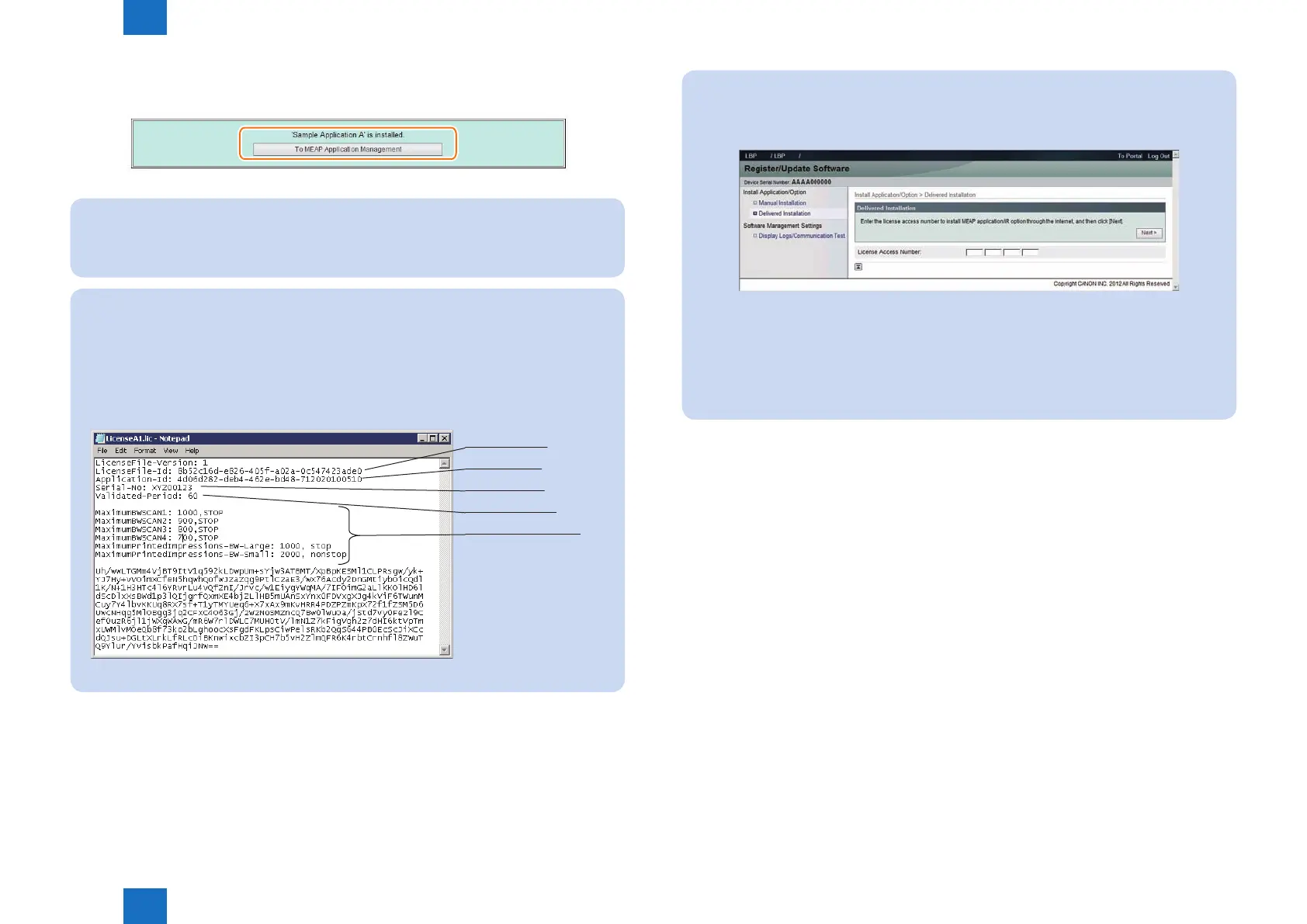
The license le is provided in text le format, enabling to view in a text editor. The
application ID and device serial number shown in the le allow users to conrm which
device to install with the license le.
Note that any changes added to the license le may disable installation. Cares should
be taken when conrming the contents of the license le.
Sample le
License File ID
Application ID
Serial Number
Validated Period
Counter informations
F-2-83
F-2-82
Note:
There are two ways to install an MEAP application. You can install using SMS, or install
using the [Register/Update Software] screen of the remote UI.
Screen example
[Register/Update Software] provides two types of installations. One is [Manual
Installation] where you specify a jar le and a license le and then install. The other is
[Delivered Installation] where you enter a license access number.
For details of the procedures, please refer to the e-Manual.
F-2-84














 To Next Page