5
5
5-18
5-18
Troubleshooting > Error Codes > Error Code Details (LBP3560/6750dn)
Troubleshooting > Error Codes > Error Code Details (LBP3560/6750dn)
Error Codes
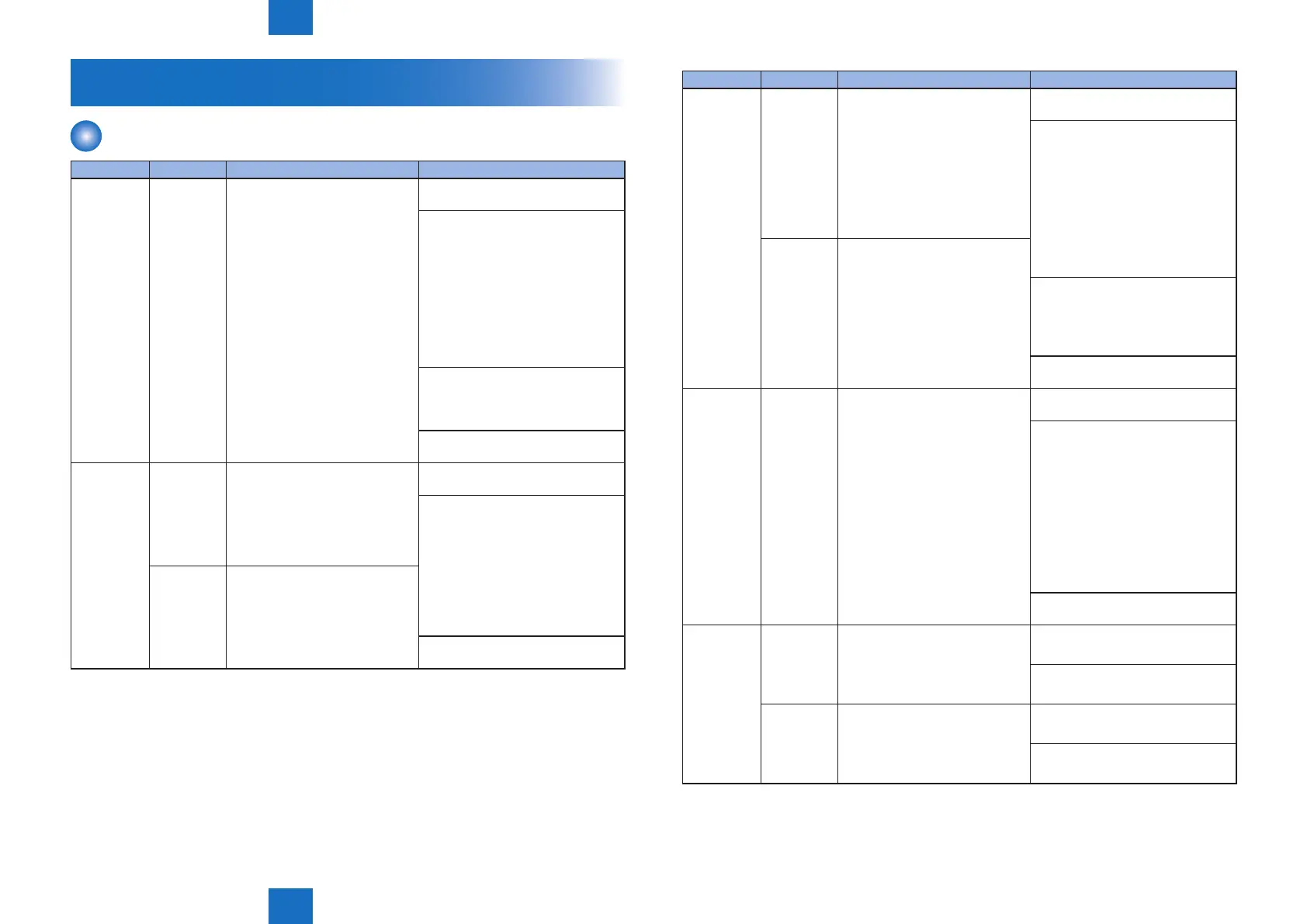
Error Code Details (LBP3560/6750dn)
Error Code Detail Code Main Cause/Detection Content Condition/Countermeasure
E000 0000 Fixing startup failure 1) Reconnect the connector on the
Engine Controller PCB.
2) Turn OFF the power supply
switch, and remove the Fixing
Assembly. Measure the resistance
value between the connector
(FSRTH) at the Fixing Assembly
side and grounding. If the
resistance value is not between
368k ohm and 512k ohm (normal
temperature), replace the Fixing
Assembly.
3) If the connector at the Fixing
Assembly side does not have
induction while the assembly is
removed, replace the assembly.
4) Replace the Engine Controller
PCB.
E001 0000 Abnormal high temperature in
xing
(The main thermistor detected a
temperature of higher than 255
degree C.
)
1) Reconnect the connector on the
Engine Controller PCB.
2) Turn OFF the power supply
switch, and remove the Fixing
Assembly. Measure the
resistance value between the
connector (FSRTH) at the Fixing
Assembly side and grounding.
If the resistance value is 1k
ohm or lower, replace the Fixing
Assembly.
0001 Abnormal high temperature in
xing
(The sub thermistor detected a
temperature of higher than 290
degree C.
3) Replace the Engine Controller
PCB.
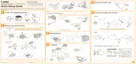
Error Code Detail Code Main Cause/Detection Content Condition/Countermeasure
E003 0000 Abnormal low temperature in
xing
(The main thermistor detected a
temperature of lower than 120
degree C for more than 1 second
when 20 seconds elapsed after
start of the power distribution to
the heater.)
1) Reconnect the connector on the
Engine Controller PCB.
2) Turn OFF the power supply
switch, and remove the Fixing
Assembly. Measure the resistance
value between the connector
(FSRTH) at the Fixing Assembly
side and grounding. If the
resistance value is not between
368k ohm and 512k ohm (normal
temperature), replace the Fixing
Assembly.
0001 Abnormal low temperature in
xing
(The sub thermistor detected a
temperature of lower than 80
degree C for more than 2 seconds
when 20 seconds elapsed after
start of the power distribution to
the heater.)
3) If there is no induction between
the connector (ACN) at the Fixing
Assembly side and the connector
(ACH) while the assembly is
removed, replace the assembly.
4) Replace the Engine Controller
PCB.
E004 0000 Fixing assembly drive circuit
failure
1) Reconnect the connector on the
Engine Controller PCB.
2) Check the source of power supply
for the printer. When using the
power supply from the power
generator and the like, improve
the source of power supply.
Note: If the frequency of power
supply is not the specied
range (40Hz to 70Hz), the
xing temperature control is not
executed normally, so this might
cause the damage.
3) Replace the Engine Controller
PCB.
E012 0000 Black drum motor error (Failure in
drum motor initial operation)
The target speed was not reached
within a specied time after
startup of the motor.
1) Reconnect the connector on the
Main Motor
2) Replace the Engine Controller
PCB.
0001 Black drum motor error (Failure in
drum motor rotation)
The motor rotated out of the target
speed during rotation after the
target speed was reached.
1) Reconnect the connector on the
Main Motor
2) Replace the Engine Controller
PCB.












 To Next Page