1
1
1-19
1-19
Product Description > Using The Machine > Setup Menu (LBP3580/6780x) > Interface Menu
Product Description > Using The Machine > Setup Menu (LBP3580/6780x) > Interface Menu
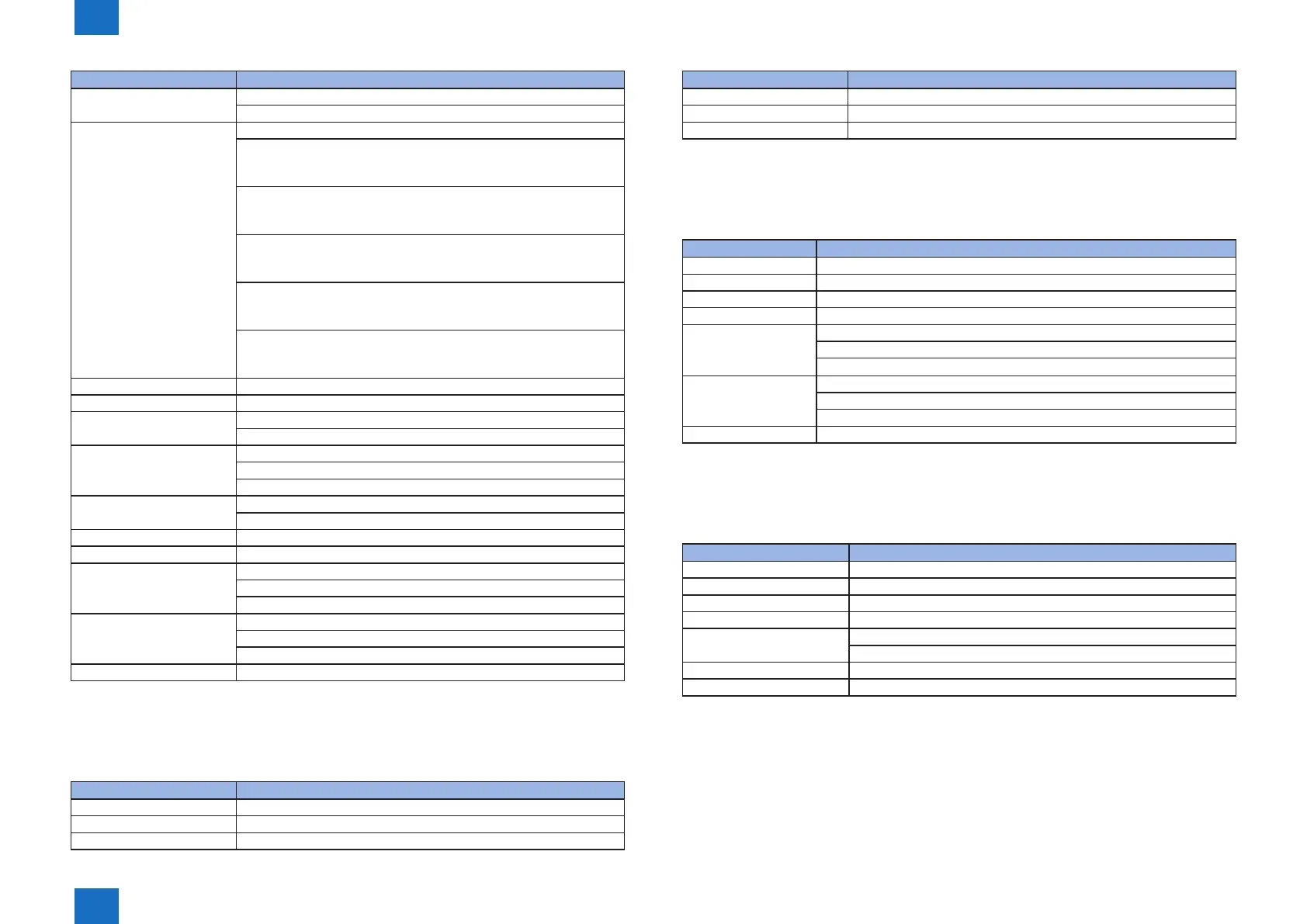
Setting Item Setting Value
SNP v. 1 Settings SNMP v. 1 : On* , Off
Dctd. Community : Off , Read / Write , Read Only*
SNMP v. 3 Settings SNMP v. 3 : On , Off*
User Settings 1
Auth. Password
Encryption Password
User Settings 2
Auth. Password
Encryption Password
User Settings 3
Auth. Password
Encryption Password
User Settings 4
Auth. Password
Encryption Password
User Settings 5
Auth. Password
Encryption Password
Spooler On , Off*
Network delay Time 0* to 300
Remote UI Settings Remote UI : On* , Off
SSL : On OFF*
Ethernet Driver Auto Detect : On* , Off
Communication Mode : Half Duplex* , Full Duplex
Ethernet Type : 10 Base-T* , 100 Base-TX , 1000 Base-T
IEEE802.1X On , Off*
Message
Address Filter On* ,Off
MAC Address -
E-Male Print Set POP3 RX Interval : 0* to 90
POP3 RX : On , Off*
SMTP RX : On , Off*
Net Eye Monitoring Service
Comm. Test
Comm. Log
Init. Network Set.
• "*" indicates factory default setting.
■
Layout Menu
Setting Item Setting Value
Copies 1* to 9999
Offset Y -50 to 0* to 50 (mm)
Offset X -50 to 0 to 50 (mm)
T-1-34
Setting Item Setting Value
Binding Location Long Edge* , Short Edge
Gutter -50 to 0* to 50 (mm)
Alternative Method On* , Off
• "*" indicates factory default setting.
■
Quality Menu
Setting Item Setting Value
Resolution 1200 dpi , 600dpi*
Image Renement On* , Off
Toner Save On , Off*
Density -8 Light to +8 Dark
Density (Fine Adj) High : -8 Light to 0* to +8 Dark
Mid : -8 Light to 0* to +8 Dark
Low : -8 Light to 0* to +8 Dark
Halftones Text : Resolutions , Color Tone* , Gradation , High Resolution
Graphics : Resolutions , Color Tone* , Gradation , High Resolution
Image : Resolutions , Color Tone* , Gradation , High Resolution
Reduce Quality Continue Printing* , Stop Printing
• "*" indicates factory default setting.
■
Interface Menu
Setting Item Setting Value
Interface Selection
USB On* , Off
Net Work On* , Off
USB Strage Device MEAP Driver : On , Off*
Timeout On* , Off
Timeout Time : 5 to 15* to 300 (seconds)
Connection Recog. On* , Off
Extended RX Buffer On , Off*
• "*" indicates factory default setting.
T-1-35
T-1-36
T-1-37














 To Next Page