5
5
5-29
5-29
Troubleshooting > Service Mode > Service Mode List (LBP3580/6780x) > F/W UPDATE GR.
Troubleshooting > Service Mode > Service Mode List (LBP3580/6780x) > F/W UPDATE GR.
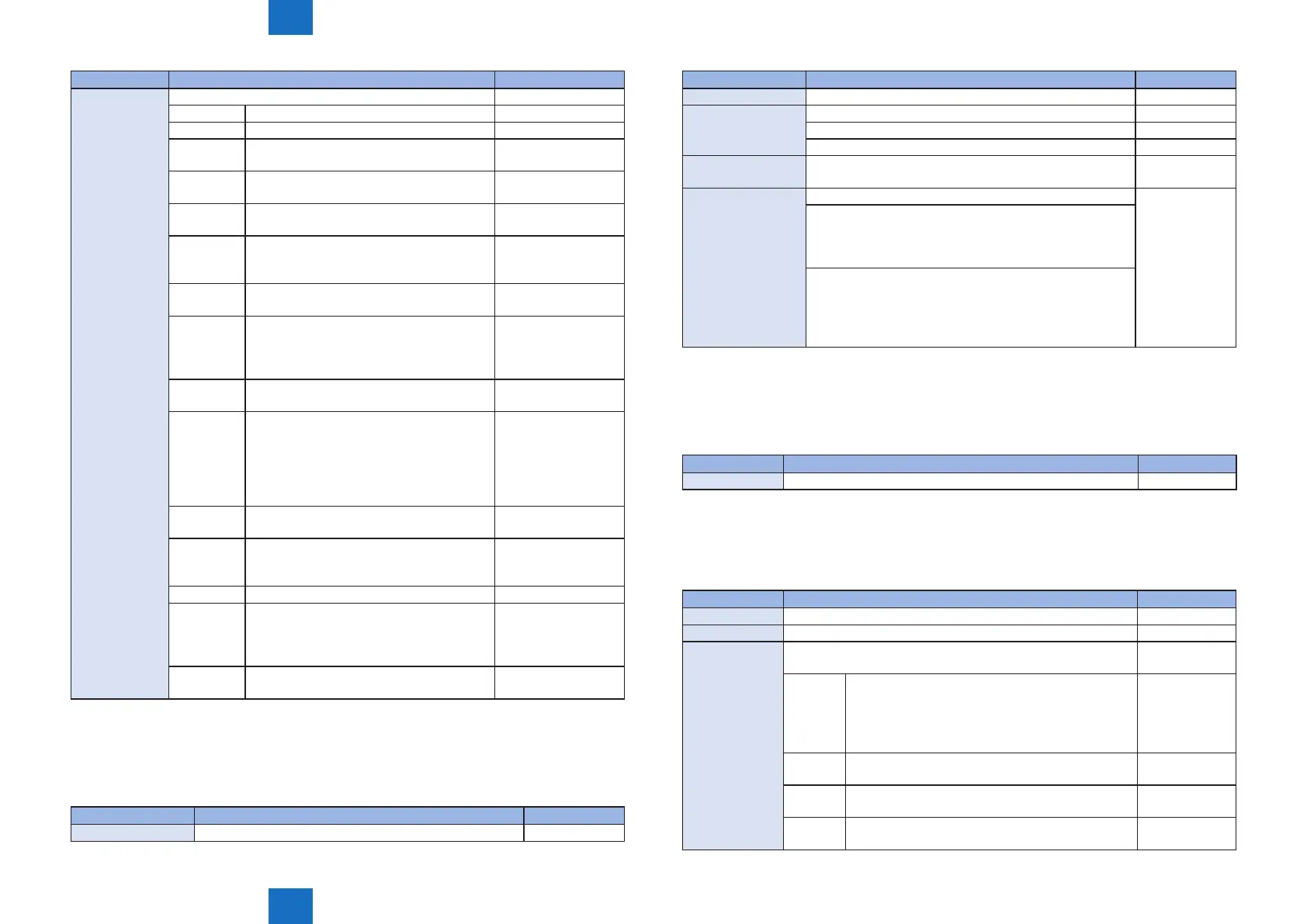
Item Description Setting Range
MEAP Setting menu related to MEAP -
MEAP-PN To specify the port number of MEAP HTTP. 0 to 8000* to 65535
MEAP-SSL To specify the port number of MEAP HTTPS 0 to 8443* to 65535
CDS-MEAP To set whether to permit the user
administrator to install MEAP application.
On* , Off
CDS-FIRM To set whether to permit the user
administrator to update rmware.
On , Off*
CDS-UGW To set whether to permit rmware update
from UGW.
On , Off*
CDS-LVUP To set whether to permit service technician
or user administrator to use the periodical
update function.
On , Off*
CDS-CTL To switch the country to obtain rmware via
CDS
-
MEAP
FUNCTION
(E602-0009) occurs when either of MEAP,
CDS or KEEP becomes ReadOnly, causing
the device to enter function limit mode. It
clears the error code and recovers MEAP.
On* , Off
LCDSFLG To switch whether to permit the user
administrator to use the local CDS.
On , Off*
CLEAR
MEAP
To delete the following data retained by
MEAP application at the next startup
• MEAP application
• Data retained by MEAP application
• Data retained by the service-purposed
area in the MEAP platform
-
CREAR
CDS
To delete all including APL_CDS at the next
startup.
-
DDNSINTV To change DDNS periodical update interval.
When 0 is set, periodical update is not
performed.
0 to 24* to 48
IPMTU To change MTU size of network packet. 1 to 10*
PDL Z Logic To switch the calculation logic processed by
Xebra.
MODE_FRUYA ,
MODE_FLAG ,
MODE_VALUE ,
MODE_ROP
FILE BOX
FUNC
To switch to enable/disable le box. On* , Off
• "*" indicates factory default setting.
■
LOG GR.
Item Description Setting Range
SYSTEM LOG Select system log setting On* , Off
T-5-41
Item Description Setting Range
SUBLOG FTP GET Get SUBLOG without using serial console ----
LOGGING UTILITY Select whether to use "Logging Utility" from Utility menu On , Off*
ON: Logging utility function enabled
OFF: Logging utility function disabled
DEBUGLOG-SW To set whether to perform sublog auto output when error
code/exception/service call occurs.
On , Off*
DEBUGLOG-MODE To change the debug log mode. Mode1* , Mode2
Mode1 : The le name of the debug log is xed. When the
number of debug logs exceeds the maximum number of
logs that can be saved at saving of debug logs, the latest
debug log le is deleted to save the new le.
Mode2 : The le name of the debug log is one with a
device serial number and time stamp. When the number of
debug logs exceeds the maximum number of logs that can
be saved at saving of debug logs, the oldest debug log le
is deleted to save the new le.
• "*" indicates factory default setting.
■
PANEL LOCK GR.
Item Description Setting Range
PANEL LOCK To perform access restriction for each key on the Control Panel. On , Off*
• "*" indicates factory default setting.
■
F/W UPDATE GR.
Item Description Setting Range
USB Update controller rmware version (only USB is supported) -
NETWORK Execute version upgrade of controller rmware -
USB STORAGE To update the rmware of the device to that stored in the USB
storage.
-
ALL To update the controller rmware, startup rmware,
Control ROM rmware and engine rmware of the
device to those stored in the USB storage. Update
is executed even if any of the rmware is lacking in
the USB storage.
-
CONT To update the controller rmware of the device to
that stored in the USB storage.
-
BOOT To update the startup rmware of the device to that
stored in the USB storage.
-
DCON To update the engine rmware of the device to that
stored in the USB storage.
-
T-5-42
T-5-43












 To Next Page