5
5
5-30
5-30
Troubleshooting > Service Mode > Service Mode List (LBP3580/6780x) > NETWORK GR.
Troubleshooting > Service Mode > Service Mode List (LBP3580/6780x) > NETWORK GR.
Item Description Setting Range
CDS Firmware auto/manual update function by MEAP application
(updater).
-
■
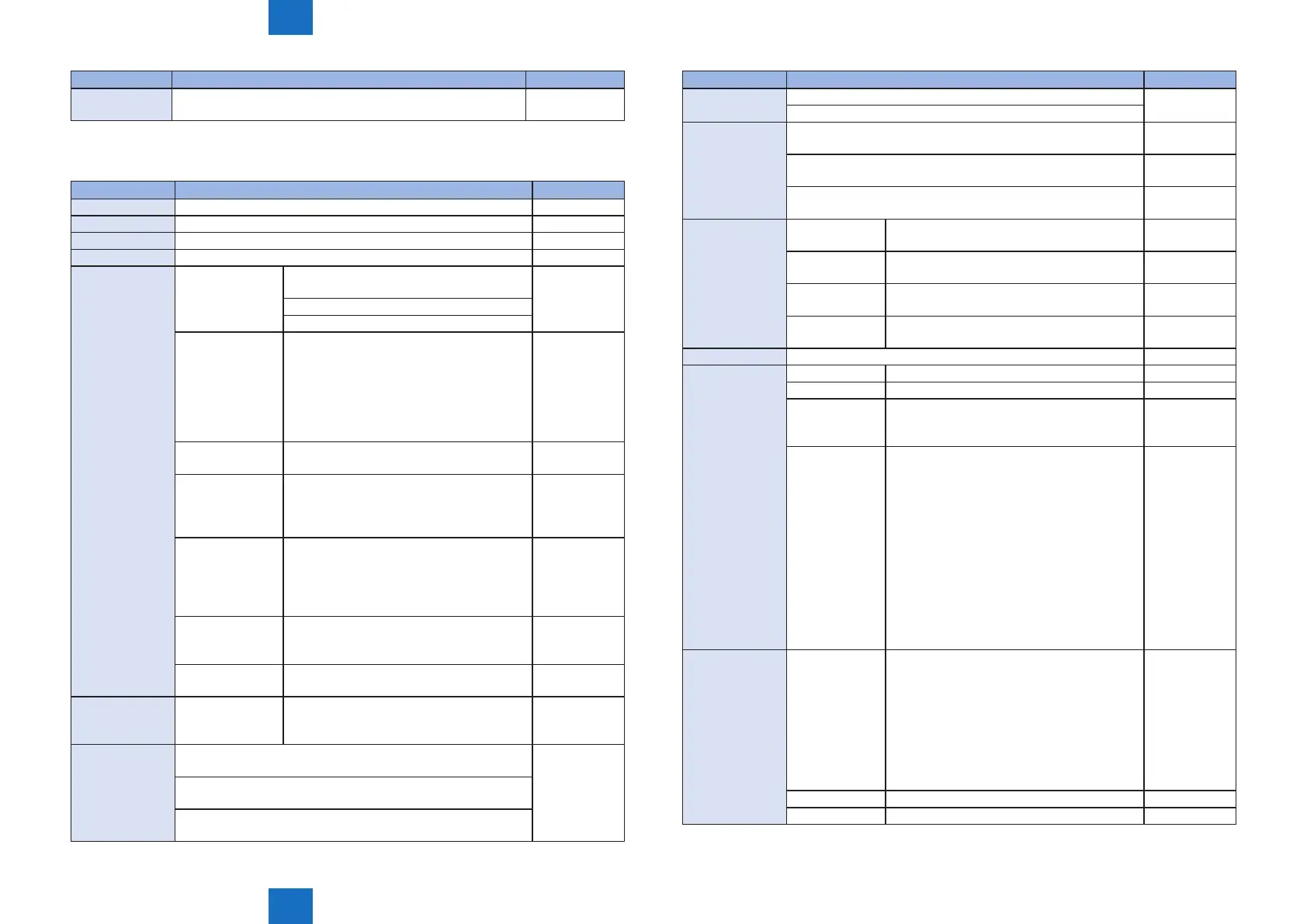
NETWORK GR.
Item Description Setting Range
DNSTRANS Priority of protocol for DNS inquiry (IPv4/IPv6) IP V. 4 , IP V. 6*
FTP SYSLOG Setting for obtaining system log les by ftp On , Off*
JOB SERIALIZE Connection serialize function setting On , Off*
BUFFER LIMIT PSS buffer limit cancel setting On , Off*
E-RDS E-RDS SWITCH Set to determine whether Embedded-RDS is
used.
On , Off*
• ON: Embedded-RDS is used
• OFF: Embedded-RDS is not used
RGW-ADDRESS URL can be checked and set here. For
the URL entry, use various keys (up/down/
left/right keys, Job Status/Cancel key and
Feeder Selection key). Then, press OK key
to set the entry. In the very end of character
strings, “down-pointing arrow” is displayed.
Up to 128 characters can be entered.
1 to 443* to
65535
RGW-PORT Set the port number of server. 1 to 443* to
65535
COM-TEST Communication test is executed. The
machine tries to connect to the server,
judges whether it was connected, and
displays the result
-
COM-LOG Details of communication test result are
displayed. When any error occurs, the
time, error code and error information are
displayed. Up to 5 logs can be stored and
the latest log is displayed
-
CLEAR Beside e-RDS setting value in the service
mode, schedule information, alarm and
ltering information are cleared.
-
REDUCE SEND
METHOD
On , Off*
CA-KEY CLEAR After executing this item, turn the power
OFF/ON t o set the CA certicate to the
default status.
-
MIB
CHARGECOUNT
• ALL ACCESS: All information in the charge counter MIB can
be collected.
ALL ACCESS ,
DISP ACCESS
NON ACCESS
• DISP ACCESS: Information displayed on LUI in the charge
counter MIB is displayed.
• NON ACCESS: All information in the charge counter MIB
cannot be collected.
T-5-44
Item Description Setting Range
TCP DELAYED
ACK
ON: TCP ACK delay function enabled On* , Off
OFF: TCP ACK delay function disabled
WOL trans 1: New protocol (WSD) WakeUp enabled; old utility WakeUp
function using CPCA Echo (broadcast) packets not supported.
1* to 3
2: New protocol (WSD) WakeUp enabled; old utility WakeUp
function using SNMP search broadcast packets not supported.
3: Old Canon utility WakeUp function supported; new protocol
(WSD) WakeUp function not supported.
SLEEP
ADVERTISE
SWITCH Determines whether sleep advertise function
is used
On* , Off
PORT Species port number for sleep advertise
function
1 to 11427* to
65535
TTL Sets number of routers exceeding sleep
advertise message number
1 to 3* to 254
INTERVAL Sets sleep advertise interval (seconds) 60 to 600* to
655
PROXYRES To set the proxy response function by Yukon. On* , Off
IPSEC SETTING IKERETRY To set the IKE retry times. 0 to 1* to 3
IKEINTVL To set the IKE retry interval. Its unit is second. 1 to 5* to 30
SPDALDEL When "1" is set for this setting value, all
registered policies are deleted at next startup
to initialize policies.
0* to1
IPSDEBLV Since IPsec operates by a different process
from the bootable, log information is not kept
in the Sublog.
Therefore, change the value of this menu
when obtaining the IPsec log.
Log level 1 to 3: FATAL level; Fatal error
information
Log level 4 to 6: WARN level; Warning
information
Log level 7: LOG level; important log
information
Log level 8: INFO level; all logs
Log level 9 and 10: Same as level 8
0* to 10
PFW SETTING ILOGKEEP The time is saved when an address is blocked
by iptables. The log is not notied to UI
(pptLog) when an access is made from the
same address within the specied period of
time.
Possible setting range is 1 to 48 hours, and
when the value in service mode is "0", it is 1
minute.
Restart is required to reect the setting.
0 to 1* to 48
ILOGMODE To switch the lter operation. 0* to 1
IPTBRODE Multicast address application switching value 0* to 10


 To Next Page
 Loading...











