3
3
3-36
3-36
Disassembly/Assembly > Controller System > Removing the Engine Controller PCB (LBP3560/6750dn) > Procedure
Disassembly/Assembly > Controller System > Removing the Engine Controller PCB (LBP3560/6750dn) > Procedure
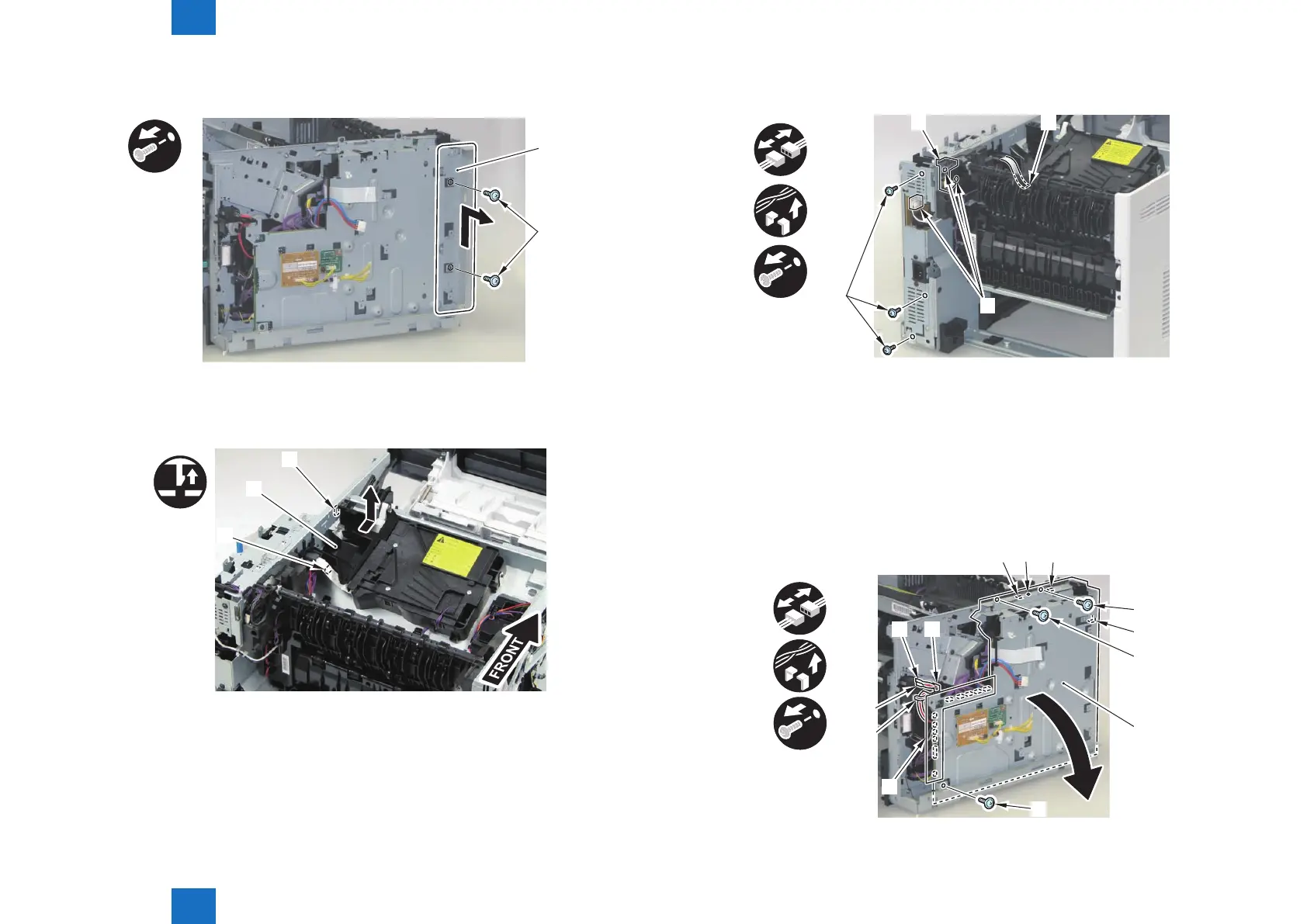
2) Remove the PCB Installation Plate [1].
• 2 Screws [2]
x2
[1]
[2]
3) Remove the Scanner Cover [1].
• 1 Claw [2]
• 1 Hook [3]
[2]
[1]
[3]
F-3-71
F-3-72
4) Disconnect the Flat Cable [1] and 3 connectors [2], release the harnesses from the Harness
Guide [3], and remove the 3 screws [4].
x3
x4
[2]
[4]
5) Open the Engine Controller PCB [1].
• 11 Connectors [2]
• 2 Faston [3]
• 1 Harness Guide [A]
• 1 Harness Guide [B]
• 3 Screws [4]
• 1 Boss [5]
• 3 Hooks [6]
x3
x13
x2
[4]
[6]
[4]
[1]
[4]
[3]
[3]
[A]
[6]
[6]
[B]
[2]
F-3-73
F-3-74














 To Next Page