2
2
2-57
2-57
Technology > MEAP > MEAP Application Management > Other License File Management Functions
Technology > MEAP > MEAP Application Management > Other License File Management Functions
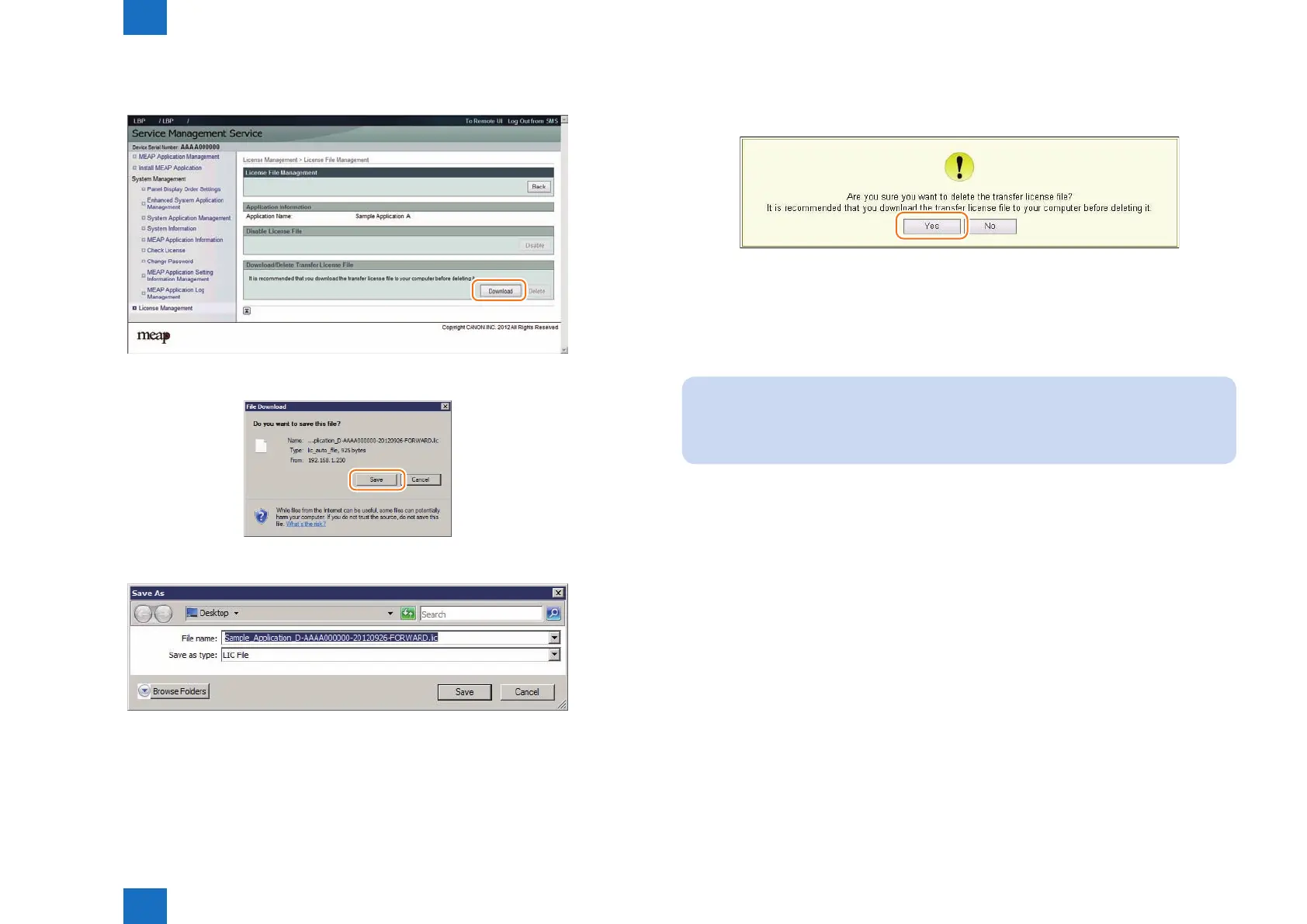
6) When [Download] button on the [ Download / Delete Transfer License File ] becomes
effective, click [Download] button.
7) The dialogue [ File Download ] is displayed. Click [ Save ].
8) Specify the download destination, click [ Save ].
F-2-113
F-2-114
F-2-115
9) After downloading the license le for forwarding, click [ Delete ] to display the conrmation
screen and click [ Yes ] to delete the le (in consideration of breakage of license for
forwarding, deleting disabled license can be executed after all steps have been completed).
10) Log out of SMS.
11) Since this downloaded transfer license is the le only to prove the license invalidation,
it cannot be used for installation to the other device as it is. Send the transfer license to
the service support contact of your nearest sales company to request issuance of the new
license for installation in the new device.
Note:
When requesting issuance of license for forwarding, inform the sales company of the
name of product name and serial No. of the device as sender, and of the name of
product name and serial No. of the forwarding destination.
12) Install application using the license for forwarding issued by the sales company.
F-2-116














 To Next Page