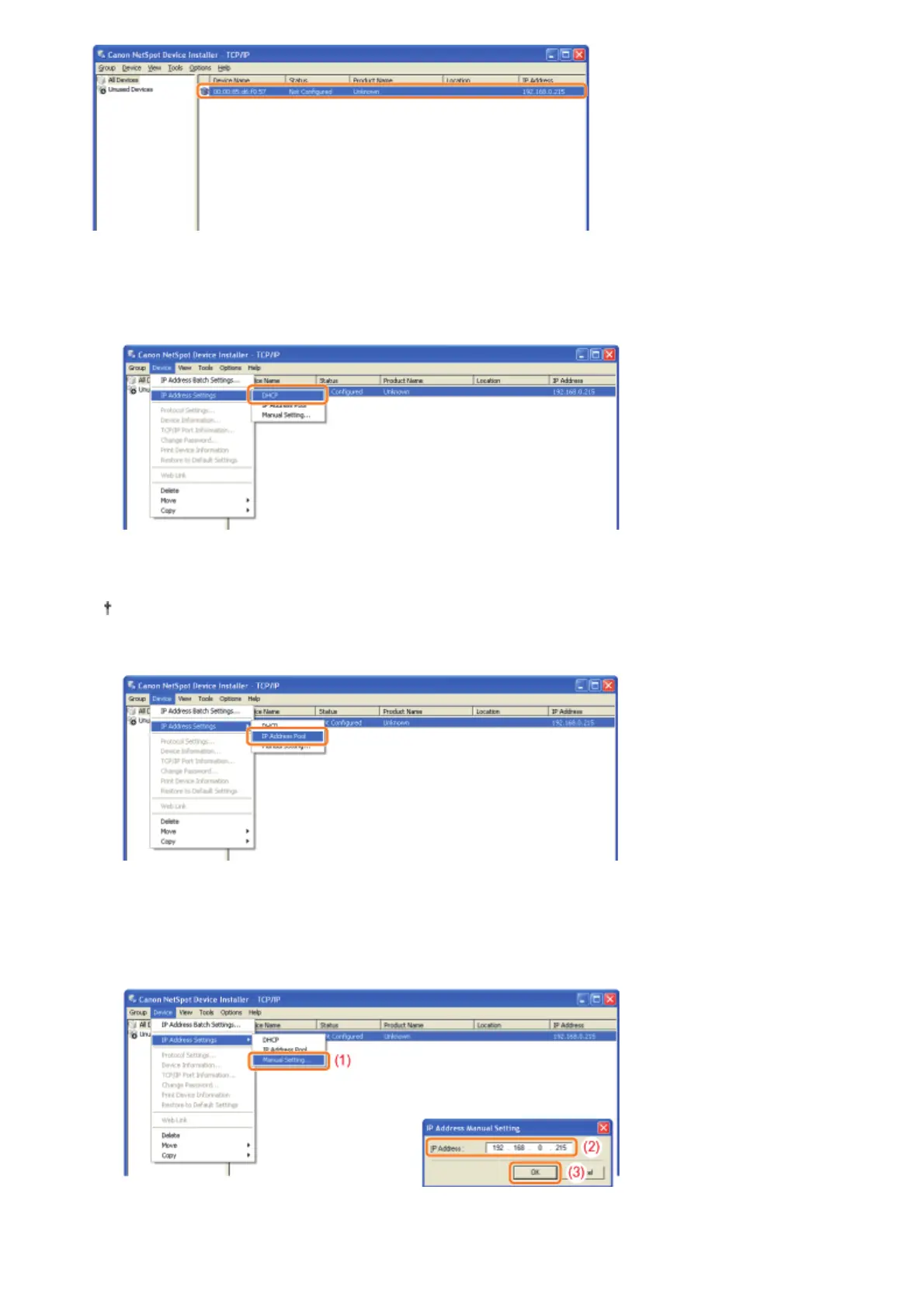
2. Set the IP address.
When obtaining an IP address using DHCP
(The DHCP server needs to be running.)
6HOHFW>,3$GGUHVV6HWWLQJV@ĺ>'+&3@IURPWKH>'HYLFH@PHQX
When assigning an IP address using IP Address Pool
(IP Address Pool needs to be specified.)
For more details on IP Address Pool, see Help of NetSpot Device Installer.
(Help is displayed by clicking [Help] in the [Help] menu.)
6HOHFW>,3$GGUHVV6HWWLQJV@ĺ>,3$GGUHVV3RRO@IURPWKH>'HYLFH@PHQX
When setting an IP address directly
(1) 6HOHFW>,3$GGUHVV6HWWLQJV@ĺ>0DQXDO6HWWLQJ@IURPWKH>'HYLFH@PHQX
(2) Enter the IP address of the printer.
(3) Click [OK].
3. When the message <The device has been reset.> appears, click [OK].
Wait for approximately 20 seconds or longer as is after clicking [OK].
㻞㻟㻣㻌㻛㻌㻠㻡㻞














 To Next Page