CDM-625A Advanced Satellite Modem MN-CDM625A
Appendix M Revision 4
M–28
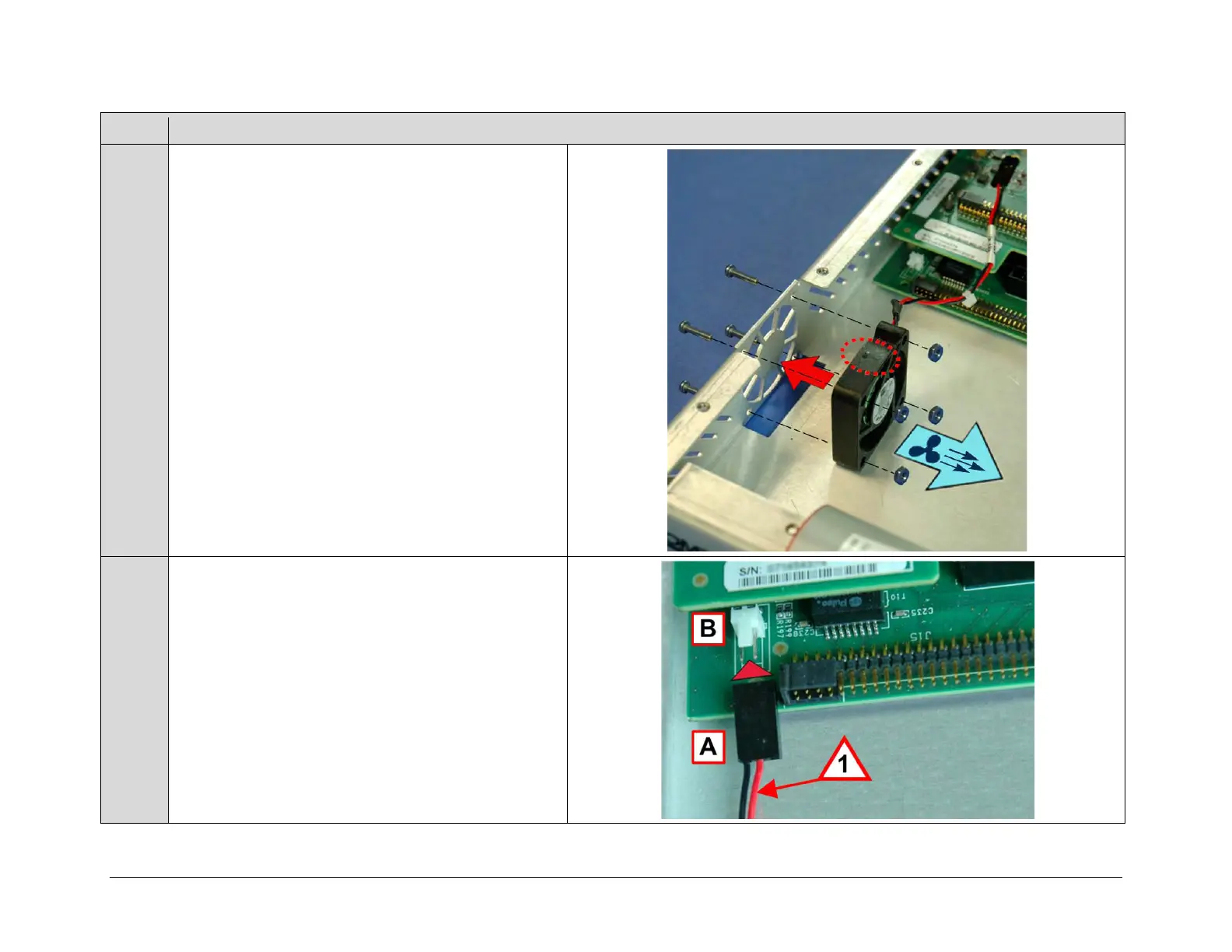
Use the screwdriver and pliers, as needed, to install the fan
(CEFD P/N PL-0000449) and fan guard (CEFD P/N
FN/FGDC12V01) securely into the chassis with the
provided mounting hardware (4X CEFD P/N HW/4-
40X3/4PH 4-40 x 3/4 pan head screws and 4X CEFD P/N
HW/440HXNUTLOC 4-40 locking hex nuts) at the
designated location.
IMPORTANT: Refer to the arrow icons imprinted on the fan
housing when installing the fan, to ensure that:
• The air flow is directed into the chassis during
operation and
• The fan power cable is routed towards the power
connector on the modem’s framing board.
Use needle-nose pliers as needed to plug the fan power
cable receptacle (A) into the mating connector on the
modem’s framing board (B).
IMPORTANT NOTE 1: Note the orientation of the fan’s
power cable receptacle and wiring to the mating connector
and its pins on the modem’s framing board.



 To Next Page