IMS.OM.002949.DRM Page 90 of 310 Version 1.4
Doremi Labs
10.2 Changing the Time Zone
To change the time zone, follow the steps bellow:
● Go to Administration → Control Panel → Time Settings and the Date and Time tab will
appear.
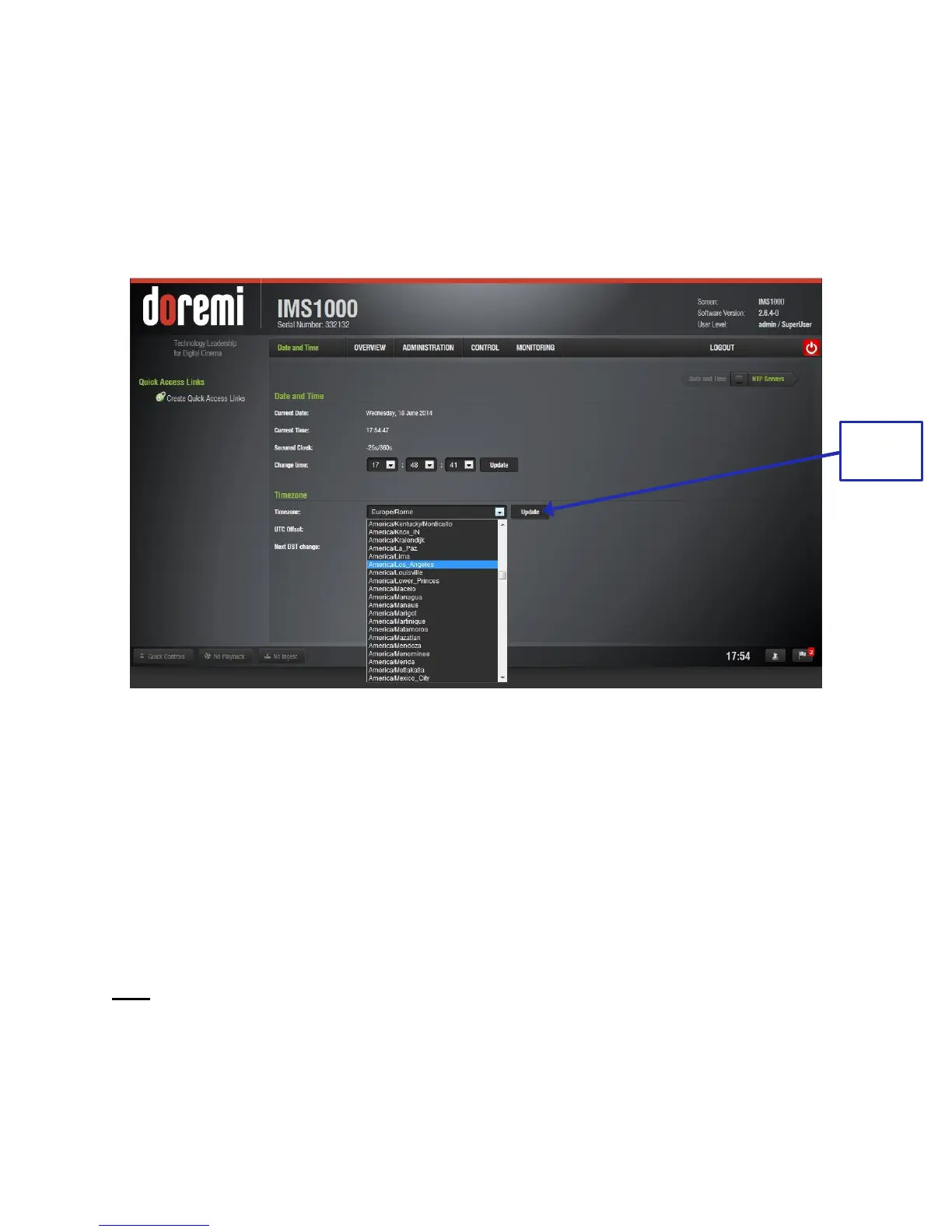
● Click on the drop-down menu labeled, Timezone.
● A list of time zones will appear (Figure 99).
Figure 99: TimeZone Drop-Down Window
● Select the time zone that best represents the geographical area in which the IMS1000 is
installed.
● Once the appropriate timezone has been selected and appears within the box labeled
Timezone, click the Update button to save this setting (Figure 99).
● SuperUser privileges are necessary to save the change.
● Reboot for the changes to take effect.
10.3 Changing the System Time
To modify the IMS1000 system clock (RTC - Real Time Clock), follow the steps below:
Note: DCI specification allows the user to only modify the time +/- up to 6 minutes per calendar
year.
● Go to Administration → Control Panel → Time Settings and the Date and Time tab will
appear.
● Click on one of the appropriate drop-downs to modify minutes or seconds.



 To Next Page