9. Raster Chart Material
9-18
9.9.2 How to load ARCS charts by active group
Use "Loading by active group" when you want to load only ARCS charts that are in a group that you have defined.
This is very useful if your license includes many charts from around the world and you are going to use only a part
of those charts for which you have a permit. Simply define a group of charts you need for voyage then load them
into the system. To load by active group, do the following:
1. Define a group, if one does not exist. See section 9.12 "How to Group ARCS Charts".
2. Set group as an active group. See "How to select an active group" on page.9-28.
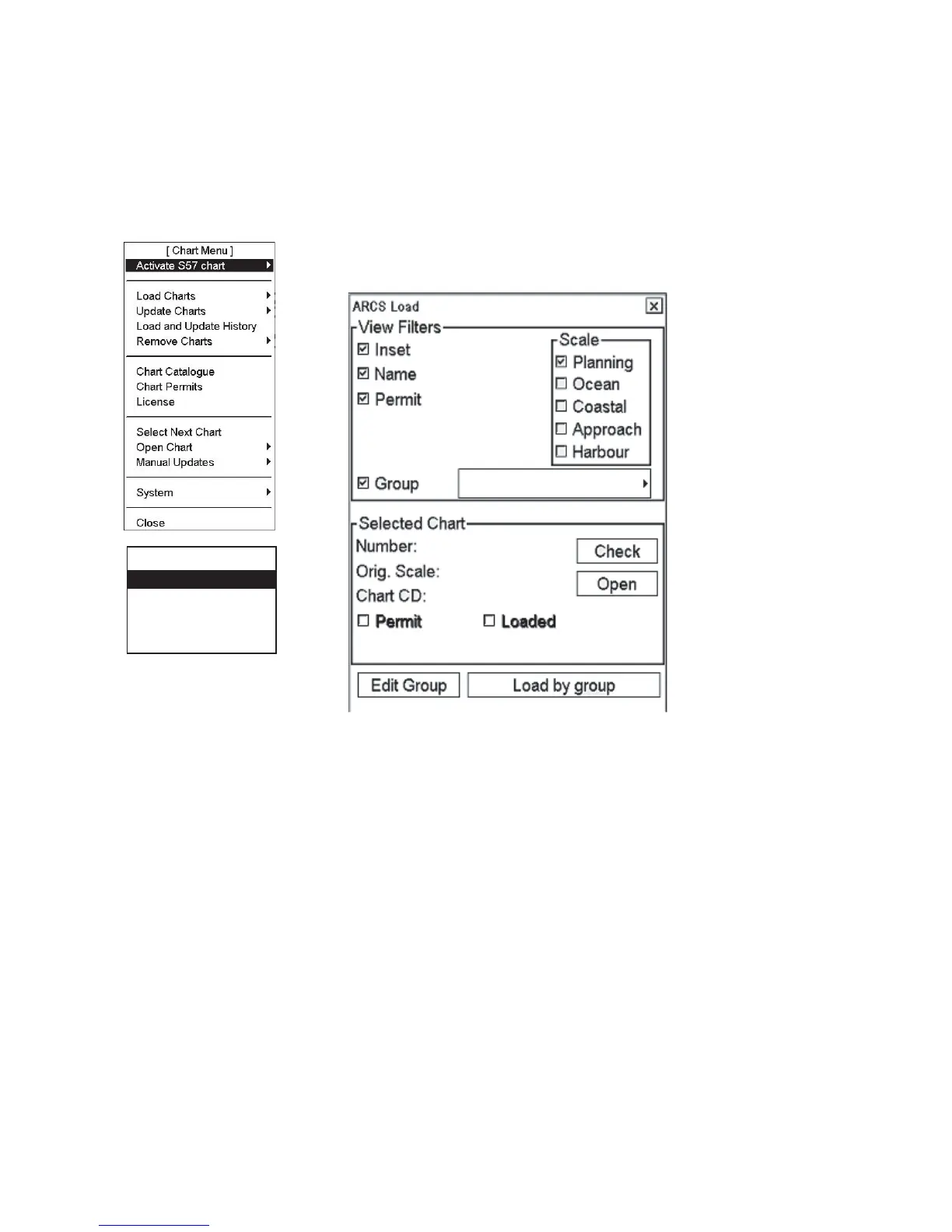
[Load Charts]
By Permits
By Group
Manual
Go Back
1. Select Load Charts from the Chart menu and By Group from the sub menu.
2. An ARCS Load window appears that shows active group and desired ARCS
CD-ROMs.
3. Insert desired CD-ROM in the CD-ROM drive then click the Load by group
button.
4. Repeat until you have loaded all the CD-ROMs pertaining to the active group.
After you have loaded all CD-ROMs, click the X on the ARCS Load window
to close the window.


 To Next Page