EasyManua.ls Logo

HP 262SA - Point-To-Point Considerations

HP 262SA
390 pages
Print Icon
To Next Page IconTo Next Page
To Previous Page IconTo Previous Page
Loading...
Data
Communications
POINT-TO-POINT CONSIDERATIONS
The
terminal
point-to-point
datacomm
capabilities
are
listed
in
table
7-1.
Table 7-1.
Terminal
Point-to
Point
Datacomm
Capabilities
TERMINAL
HP
2625A
Standard
Terminal
HP
2628A
Standard
Terminal
HP
2625A
and
HP
2628A
Option
021
HP
2625A
and
HP
2628A
Option
022
HP
2625A
Option
026
HP
2628A
Option
046
DATACOMM FEATURES
Port
1
can
be
used
for
either
an
RS-232-C or RS-422
datacomm
connection.
Port
2 is
an
IBM Bisync port.
Port
1
can
be used for
either
an
RS-232-C or RS-422
datacomm
connection.
Port
2 is a
printer
connection port,
useable
as
either
RS-232-C
or
RS-422
type.
Port
1,
on
both
the
HP
2625A
and
2628A
terminals,
connects to a
DSN
data
link
through
a cable which is included
in
this
option.
Contains
an
integral
datacomm
pod
adapter
for
connecting
to
either
a
13265A modem or a 13266A
Current
Loop Converter.
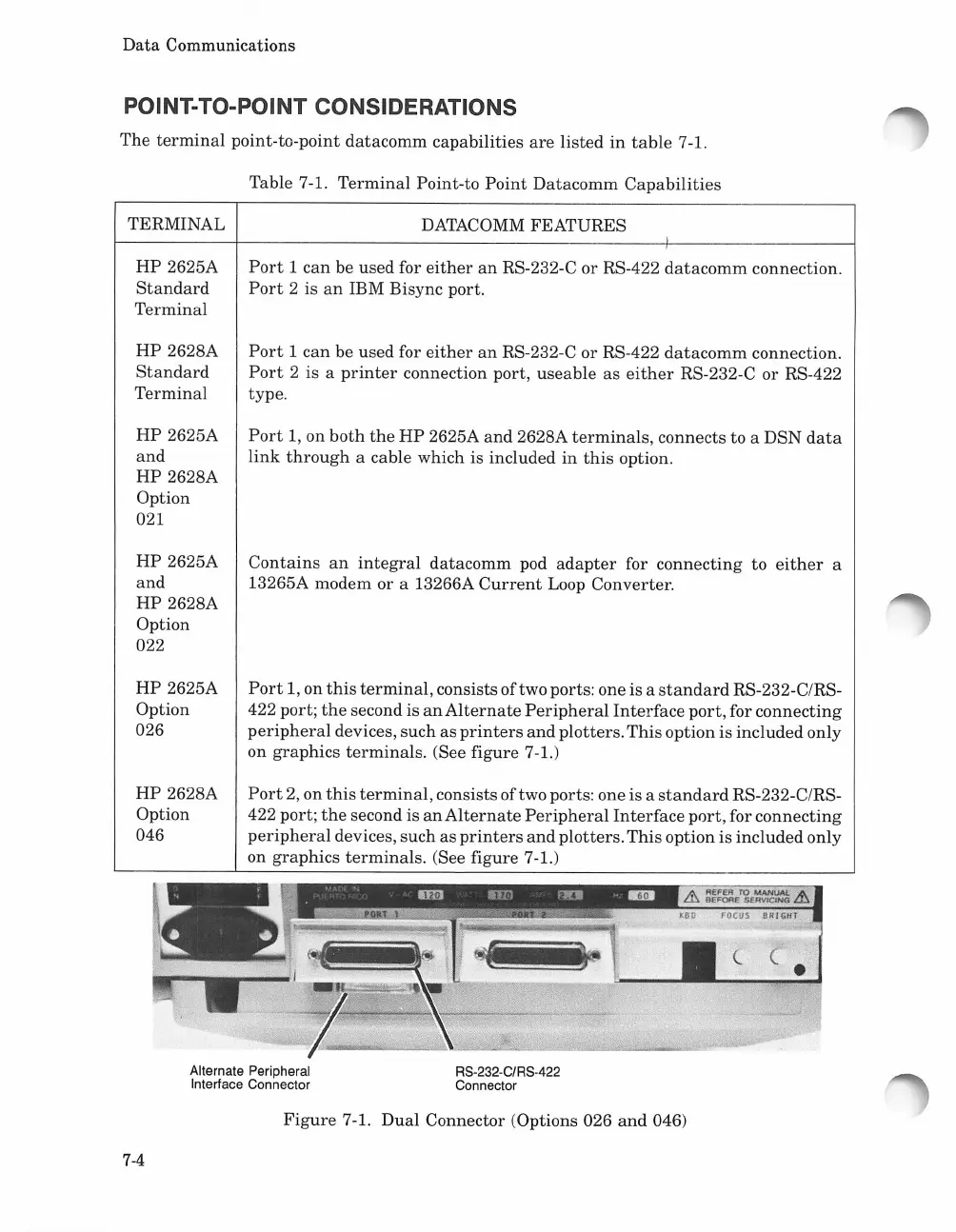
Port
1, on
this
terminal,
consists
oftwo
ports: one is a
standard
RS-232-C/RS-
422 port;
the
second is
an
Alternate
Peripheral
Interface
port,
for
connecting
peripheral
devices,
such
as
printers
and
plotters.
This
option is included only
on
graphics
terminals.
(See figure 7-1.)
Port
2,
on
this
terminal,
consists oftwo ports: one is a
standard
RS-232-C/RS-
422 port;
the
second is
an
Alternate
Peripheral
Interface
port,
for
connecting
peripheral
devices, such
as
printers
and
plotters.
This
option is
included
only
on
graphics
terminals.
(See figure 7-1.)
<-
(.
Alternate Peripheral
Interface Connector
RS-232-C/RS-422
Connector
Figure
7-1.
Dual
Connector (Options 026
and
046)
7-4

Table of Contents

Related product manuals