Graphics
abcdefghijklmnopqrstuvwxyz
~BCDEFGHIJKLMNOPQRSTUVWXYZ
i8Qi~6~~~b~i~8Q~i0~ii0~~i~
!
II
#
$.
~".'
I;,
••
!....I
1"1.
+ -
..
'
17
..
1
.:'
':1
4
c:
t-'.
"'?
I:'
l=t
•
• • •• ,
..'
to_I
.:..
._1
._1
_I.
I_I..
•
.'
'.
.'
......'
£1
-
.-
f.~·n·
i
I~I
ti
~--~
Foreign
'-
r . . Characters
•
•••.
-
•••.
1"':1
Ii
['"
]
.....
".
.1·
I
-I
•.•...
,
'"
- ••' : -
'.
-
I.
I
.1
.-..::
.'.
I I
.'
II
I_I
~
1':)1
.:&.1_1
E:
1
:1
NOTE: All of the U.S. ASCII and foreign characters are accessible
by
entering
"YES"
in the
ASCII
8 Bits
config field of the Terminal Configuration menu; then entering foreign character mode set by
typing.
t
••
You may shift back to the Roman base set by typing
••.
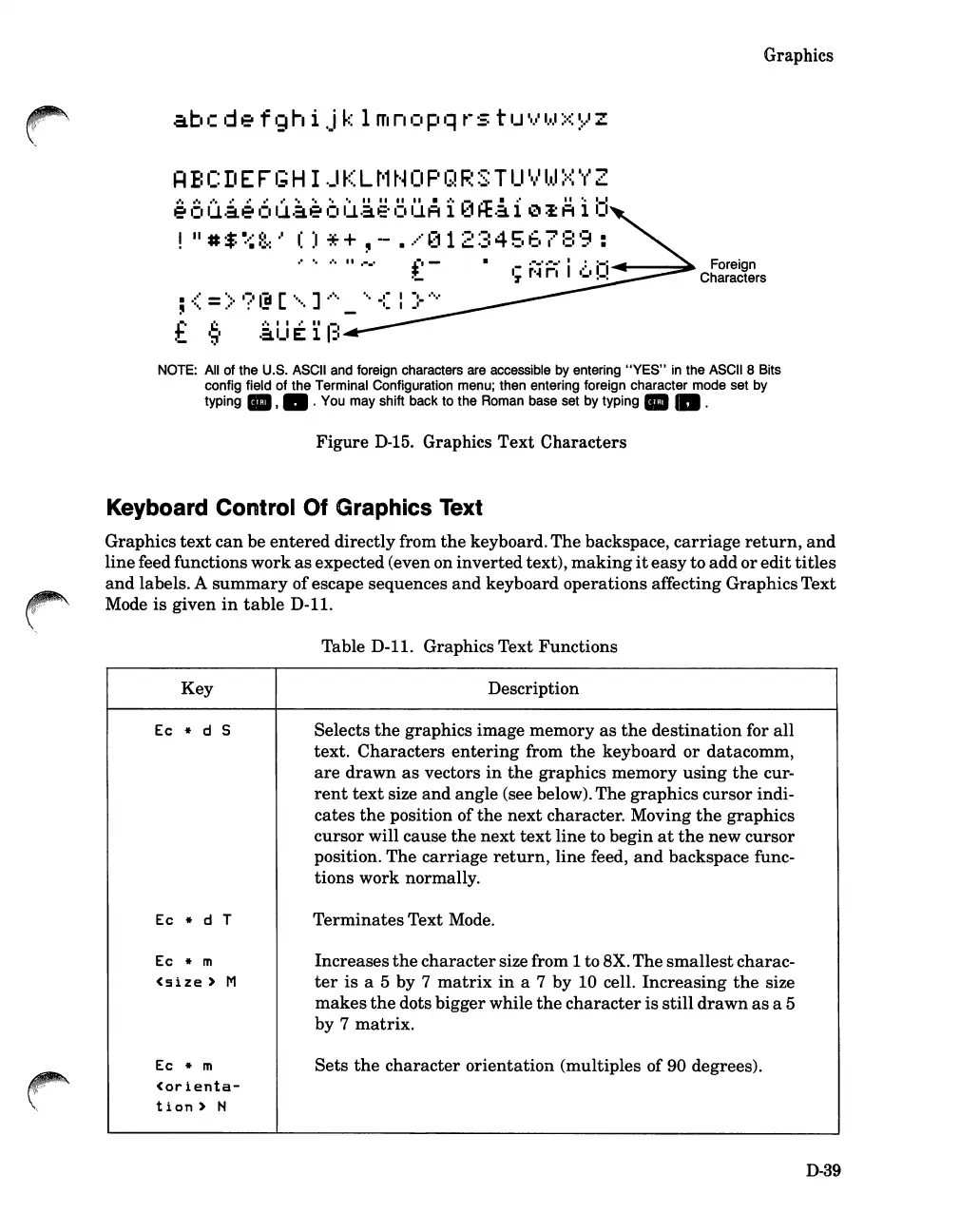
Figure
0-15. Graphics
Text
Characters
Keyboard Control Of Graphics Text
Graphics
text
can
be
entered
directly from
the
keyboard. The backspace,
carriage
return,
and
linefeed functions
work
as
expected (even on
inverted
text),
making
it
easy
to
add
or
edit
titles
and
labels. A
summary
of
escape sequences
and
keyboard operations affecting GraphicsText
Mode
is
given
in
table
D-11.
Table
0-11.
Graphics Text Functions
Key
Description
Ec
* d 5
Selects
the
graphics image memory
as
the
destination
for
all
text.
Characters
entering
from
the
keyboard
or
datacomm,
are
drawn
as
vectors
in
the
graphics
memory
using
the
cur-
rent
text
size
and
angle (see below).
The
graphics
cursor
indi-
cates
the
position of
the
next
character. Moving
the
graphics
cursor
will cause
the
next
text
line to begin
at
the
new
cursor
position. The
carriage
return,
line feed,
and
backspace func-
tions
work normally.
Ec
* d
T
Terminates
Text Mode.
Ec
* m
Increases
the
character
size from 1 to 8X.
The
smallest
charac-
<size)
M
ter
is
a 5 by 7
matrix
in
a 7 by 10 cell.
Increasing
the
size
makes
the
dots bigger while
the
character
is
still
drawn
as
a 5
by 7
matrix.
Ec
* m
Sets
the
character
orientation
(multiples of 90 degrees).
<orienta-
t
ion)
N
0-39













 To Next Page