EasyManua.ls Logo

HP 262SA - Drawing Forms Using the Function Keys; Line Drawing Set Keyboard Keys; Example Data Entry Form

HP 262SA
390 pages
Print Icon
To Next Page IconTo Next Page
To Previous Page IconTo Previous Page
Loading...
Designing
and
Using
Forms
ESC
I-!
..
'
I~%
1-5
- A
-11
& +*
..L
(
-i
6
,7
...L8
=9
U ) T _
++
~" L - r =
..
11
-lL}
I
..
I
ly
lu
11
~o
Jp
I
'-Q
'w
rR
-, T
--,
DEL
~
E
1
-1"
CAPS
CTRL
F
...JG
r-H
'-J
r1K
rTlL
-i
"
SHIFT
-tt-<
=i=?
SHIFT
ENTER
+1
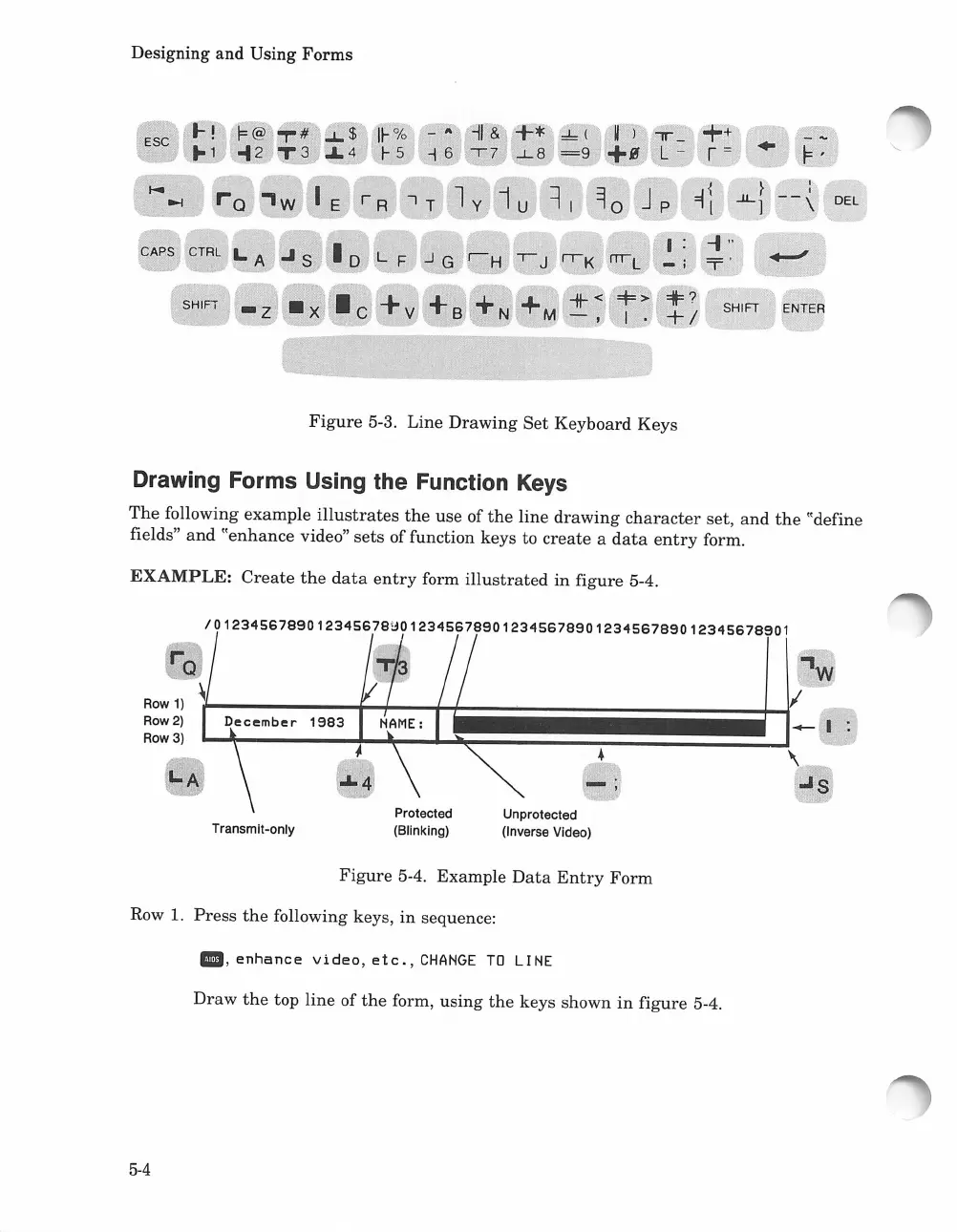
Figure
5-3, Line
Drawing
Set
Keyboard
Keys
Drawing Forms Using the Function
Keys
The
following
example
illustrates
the
use
of
the
line
drawing
character
set,
and
the
"define
fields"
and
"enhance
video"
sets
of function keys to
create
a
data
entry
form.
EXAMPLE:
Create
the
data
entry
form
illustrated
in
figure
5-4.
/0123456789012345678~012345678901234567890123456789012345678901
-;
Unprotected
(Inverse Video)
Protected
(Blinking)
Transmit-onlY
~~~~~~-
. \
"'s
I-A
Row
1)
Row 2)
Row 3)
Figure
5-4.
Example
Data
Entry
Form
Row 1.
Press
the
following keys,
in
sequence:
III,
enhance
Video,
etc.,
CHANGE
TO
LINE
Draw
the
top
line
of
the
form,
using
the
keys shown
in
figure
5-4.
5-4

Table of Contents

Related product manuals