Data Communications
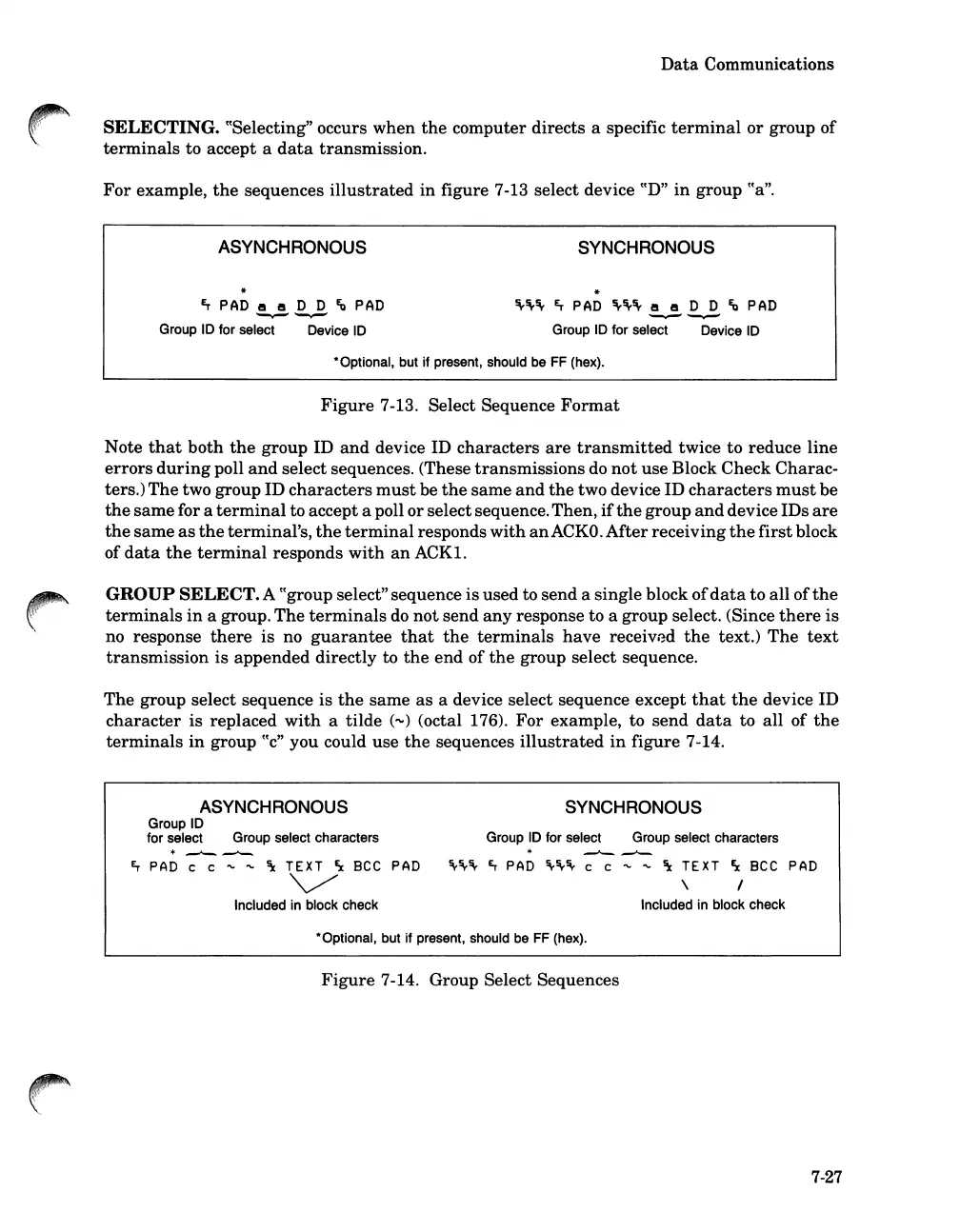
SELECTING. ttSelecting" occurs
when
the
computer directs a specific
terminal
or
group
of
terminals
to accept a
data
transmission.
For
example,
the
sequences
illustrated
in figure 7-13 select device
ttD"
in
group
tt
a
".
ASYNCHRONOUS
~
PAD
e e D D
~
PAD
~--..--
Group
ID
for select Device
ID
SYNCHRONOUS
~~~
~
PAD
~~~
e e D D
~
PAD
'-...-"
~
Group
ID
for select Device
ID
*Optional, but if present, should
be
FF
(hex).
Figure
7-13. Select Sequence
Format
Note
that
both
the
group ID
and
device ID
characters
are
transmitted
twice to reduce line
errors
during
poll
and
select sequences. (These
transmissions
do
not
use Block Check Charac-
ters.)
The
two group ID
characters
must
be
the
same
and
the
two device ID
characters
must
be
the
same
for a
terminal
to accept a poll orselect sequence.Then,
if
the
group
and
device IDs
are
the
same
as
the
terminal's,
the
terminal
responds
with
an
ACKO.
After
receiving
the
first
block
of
data
the
terminal
responds
with
an
ACK1.
GROUP
SELECT.
A ttgroup select"sequence is used to
send
a single block
of
data
to
all
of
the
terminals
in
a group.
The
terminals
do
not
send
any
response to a group select. (Since
there
is
no response
there
is
no
guarantee
that
the
terminals
have
received
the
text.)
The
text
transmission
is appended directly to
the
end
of
the
group select sequence.
The
group select sequence is
the
same
as
a device select sequence except
that
the
device ID
character
is replaced
with
a tilde
(~)
(octal 176).
For
example, to
send
data
to all of
the
terminals
in
group
tt
c
"
you could use
the
sequences
illustrated
in
figure 7-14.
ASYNCHRONOUS
Group
ID
for select Group select characters
*
-"--"-
~
PAD
c c
~ ~
\
TEXT
~
Bee
PAD
'v/
Included
in
block check
SYNCHRONOUS
Group
ID
for select Group select characters
*
~-"-
~~~
~
PAD
~~~
c c
~ ~
\
TEXT
~
Bee
PAD
\ I
Included
in
block check
*Optional, but if present, should
be
FF
(hex).
Figure
7-14. Group Select Sequences
7-27













 To Next Page