EasyManua.ls Logo

HP 262SA - Extended Character Mode for

HP 262SA
390 pages
Print Icon
To Next Page IconTo Next Page
To Previous Page IconTo Previous Page
Loading...
Keyboards and
Character
Sets
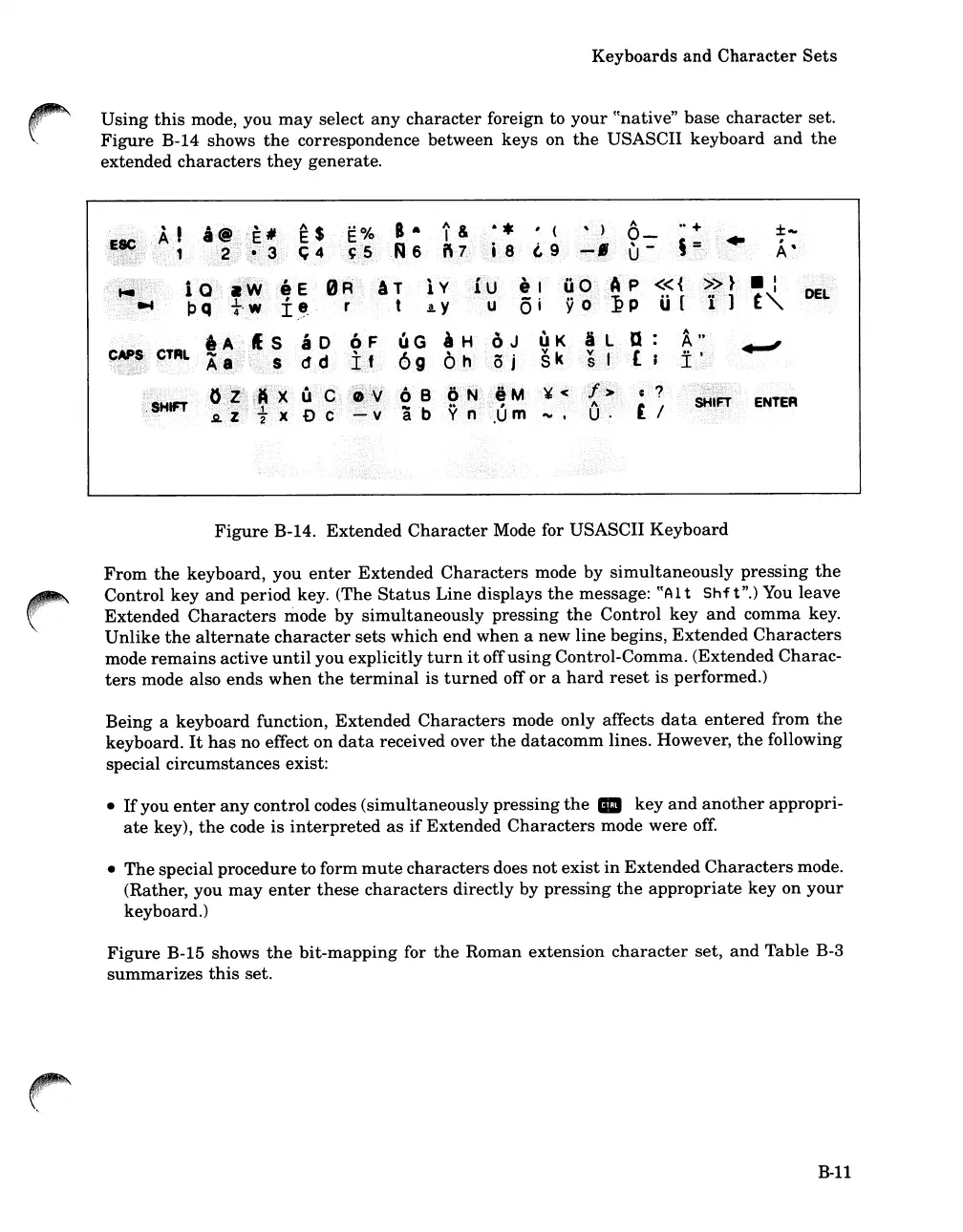
Using
this
mode, you
may
select
any
character
foreign to
your
((native"
base
character
set.
Figure
B-14 shows
the
correspondence between keys on
the
USASCII
keyboard
and
the
extended
characters
they
generate.
8
..
,A6
,
;'AT
, t
Iv
Ay
.'
".
I
:·t"
ENTER
Figure
B-14.
Extended
Character
Mode for USASCII
Keyboard
From
the
keyboard, you
enter
Extended
Characters
mode by
simultaneously
pressing
the
Control
key
and
period
key. (The
Status
Line displays
the
message:
((A
1t
Shf
t
".)
You
leave
Extended
Characters
mode
by
simultaneously
pressing
the
Control
key
and
comma key.
Unlike
the
alternate
character
sets
which
end
when
a new
line
begins,
Extended
Characters
mode
remains
active
until
you explicitly
turn
it
off
using
Control-Comma.
(Extended
Charac-
ters
mode also
ends
when
the
terminal
is
turned
off
or
a
hard
reset
is performed.)
Being
a
keyboard
function,
Extended
Characters
mode only affects
data
entered
from
the
keyboard.
It
has
no effect
on
data
received over
the
datacomm
lines. However,
the
following
special
circumstances
exist:
If
you
enter
any
control codes
(simultaneously
pressing
the
III
key
and
another
appropri-
ate
key),
the
code
is
interpreted
as
if
Extended
Characters
mode
were
off.
The
special procedure to form
mute
characters
does
not
exist
in
Extended
Characters
mode.
(Rather, you
may
enter
these
characters
directly by
pressing
the
appropriate
key
on
your
keyboard.)
Figure
B-15 shows
the
bit-mapping
for
the
Roman extension
character
set,
and
Table B-3
summarizes
this
set.
B-11

Table of Contents

Related product manuals