Graphics
The
terminal's configuration defines
the
terminating
character
sent
following
the
status
block
(CR,
CR-LF,
or
RS).
Graphics
status
requests
turn
on
an
echo suppress mode
in
the
terminal
(only
if
the
graphics option is installed). This prevents information echoed back from
the
computer from being displayed on
the
screen. Once a graphics
status
block
has
been sent,
characters received by
the
terminal
are
not
displayed
until
one of
the
following control
charactersis received:
BELL,
BS,
CR,
EC,
GS,
HT,
LF
,
RS,
US,
VT. With
the
exception
ofCR
and
LF,
the
terminating
control code itself is executed.
The
terminal
expects
the
status
information to be echoed
and
uses
the
terminating
control
character
to
turn
off
the
suppress echo mode.
If
the
computer does
not
echo
the
status,
a
suitable control
character
must
be
returned
to
the
terminal
to
turn
off echo suppression.
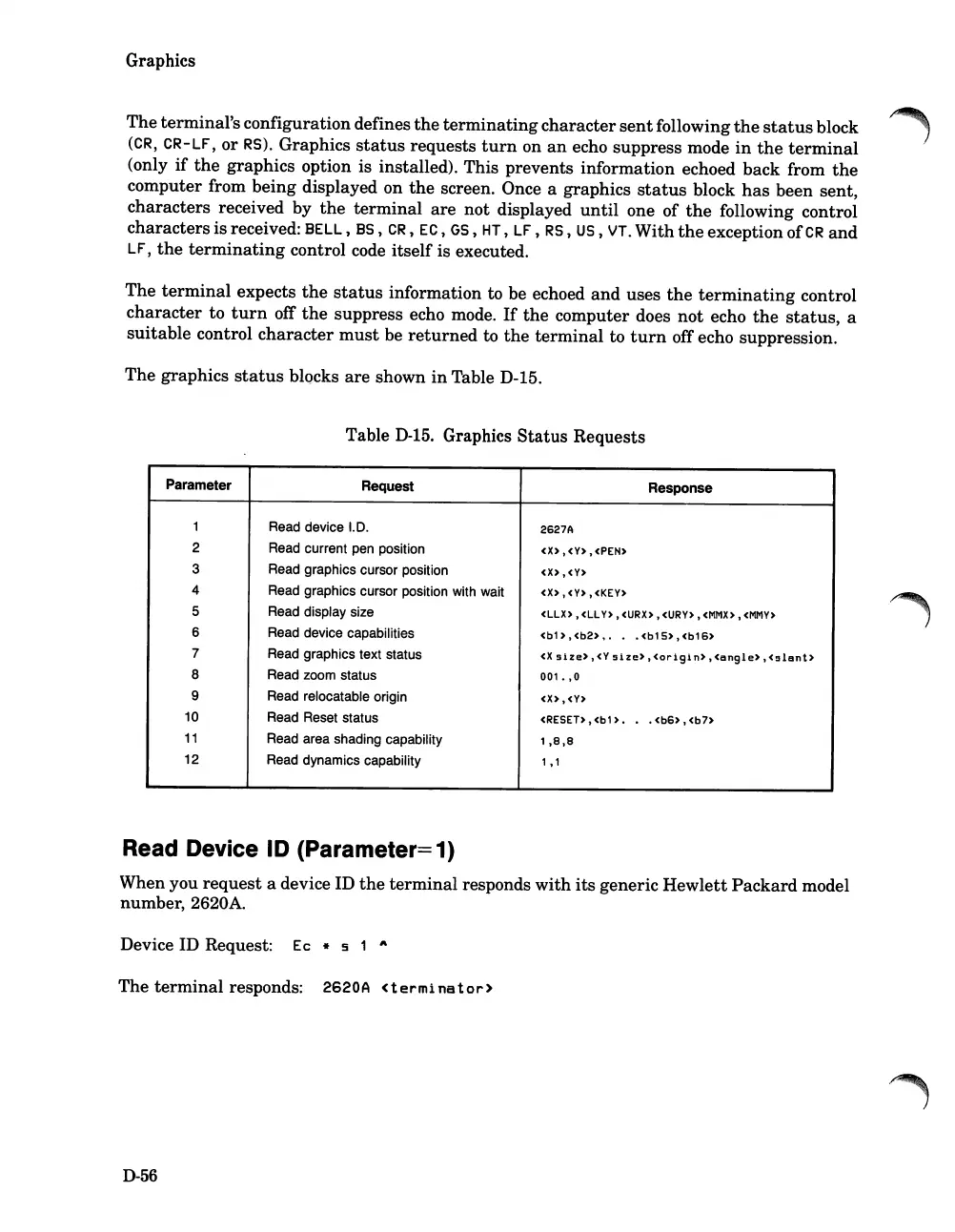
The graphics
status
blocks
are
shown
in
Table D-15.
Table
D-15.
Graphics
Status
Requests
Parameter
Request Response
1
Read device
1.0.
2627A
2 Read current pen position
<x)
,<Y)
,<PEN)
3
Read graphics cursor position
<x),
<V)
4 Read graphics cursor position with wait
<X),
<V) ,<KEY)
5
Read display size
<llX),
ell
Y),
<URX),
<URY),
<MMX)
,
<MMY)
6
Read device capabilities
<b1 )
,<b2)
, • • <b1
5)
,<b16)
7
Read graphics text status
<x
size)
,<Y
size)
,<origin)
,<angle)
,<!:51ant)
8 Read zoom status
001.
,0
9
Read relocatable origin
<X),
<v)
10 Read Reset status
<RESET)
,<b1
) •
•
<b6)
,
<b7)
11
Read area shading capability
1,8,8
12 Read dynamics capability
1,1
Read Device ID (Parameter=1)
When you
request
a device ID
the
terminal
responds
with
its
generic
Hewlett
Packard
model
number, 2620A.
Device ID Request:
Ec
* 5 1 "
The
terminal
responds:
2620
A <t e r mi
na
tor)
D-56













 To Next Page