EasyManua.ls Logo

HP 262SA - Device Status; Terminal Interface Capabilities Status Bytes

HP 262SA
390 pages
Print Icon
To Next Page IconTo Next Page
To Previous Page IconTo Previous Page
Loading...
Status
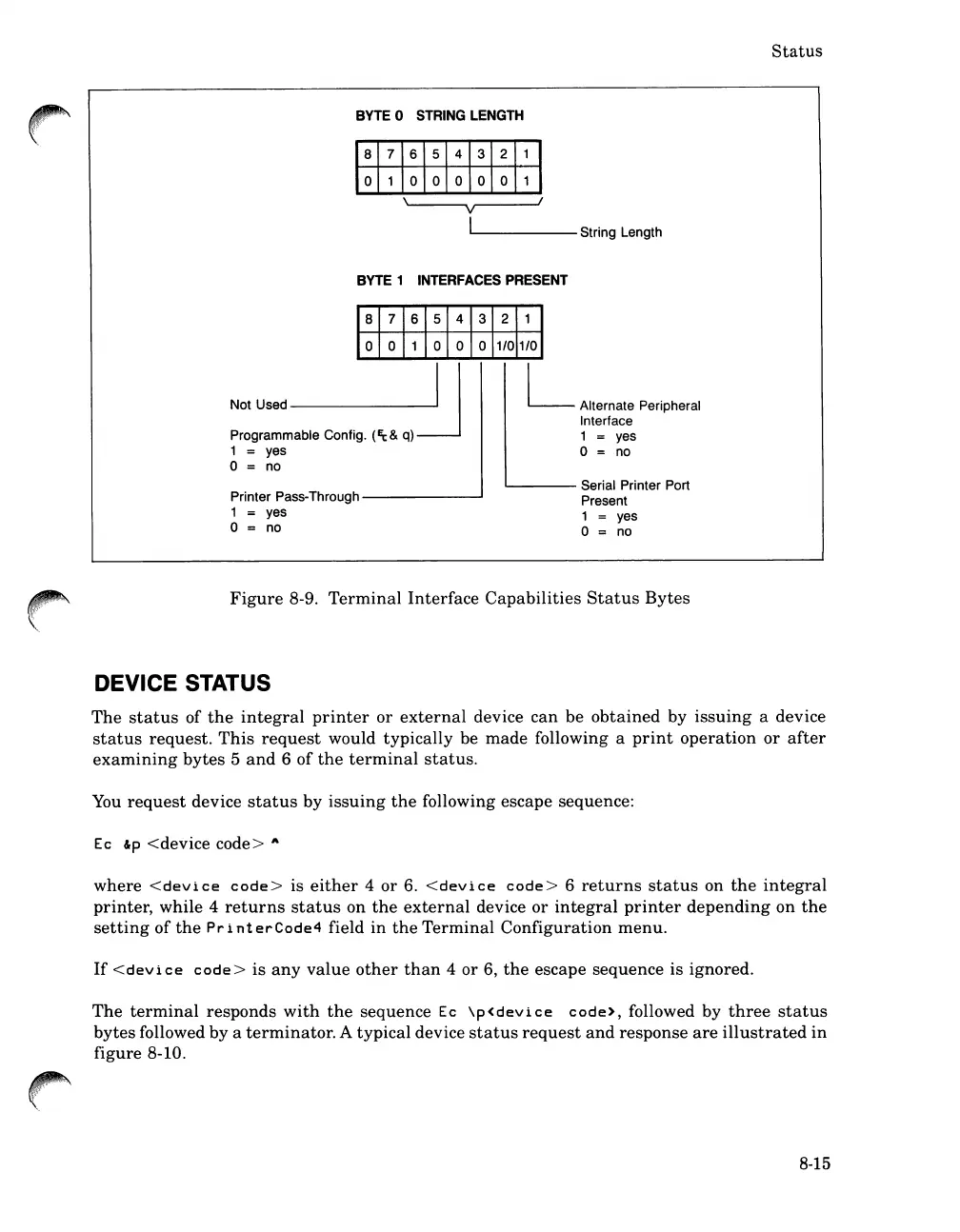
BYTE
0 STRING
LENGTH
V
II.-
-----
String Length
BYTE
1 INTERFACES PRESENT
L Alternate Peripheral
Interface
1
= yes
o = no
Printer Pass-Through
--------'
1 yes
o = no
L.-.-
Serial Printer Port
Present
1 yes
o = no
Figure
8-9.
Terminal
Interface
Capabilities
Status
Bytes
DEVICE STATUS
The
status
of
the
integral
printer
or
external
device
can
be
obtained
by
issuing
a device
status
request.
This
request
would
typically
be
made
following a
print
operation
or
after
examining
bytes
5
and
6
of
the
terminal
status.
You
request
device
status
by
issuing
the
following escape sequence:
Ec
&p
<device
code>
A
where
<device
code>
is
either
4
or
6.
<device
code>
6
returns
status
on
the
integral
printer,
while
4
returns
status
on
the
external
device
or
integral
printer
depending
on
the
setting
of
the
Pr
i
nt
erCode4
field
in
the
Terminal
Configuration
menu.
If
<device
code>
is
any
value
other
than
4
or
6,
the
escape
sequence
is
ignored.
The
terminal
responds
with
the
sequence
Ec
\p<device
code>, followed by
three
status
bytes
followed
by
a
terminator.
A
typical
device
status
request
and
response
are
illustrated
in
figure
8-10.
8-15

Table of Contents

Related product manuals