Display Control
Left
Margin
Right
Margin
Cursor
I Cursor
....... Character Movement
Cursor
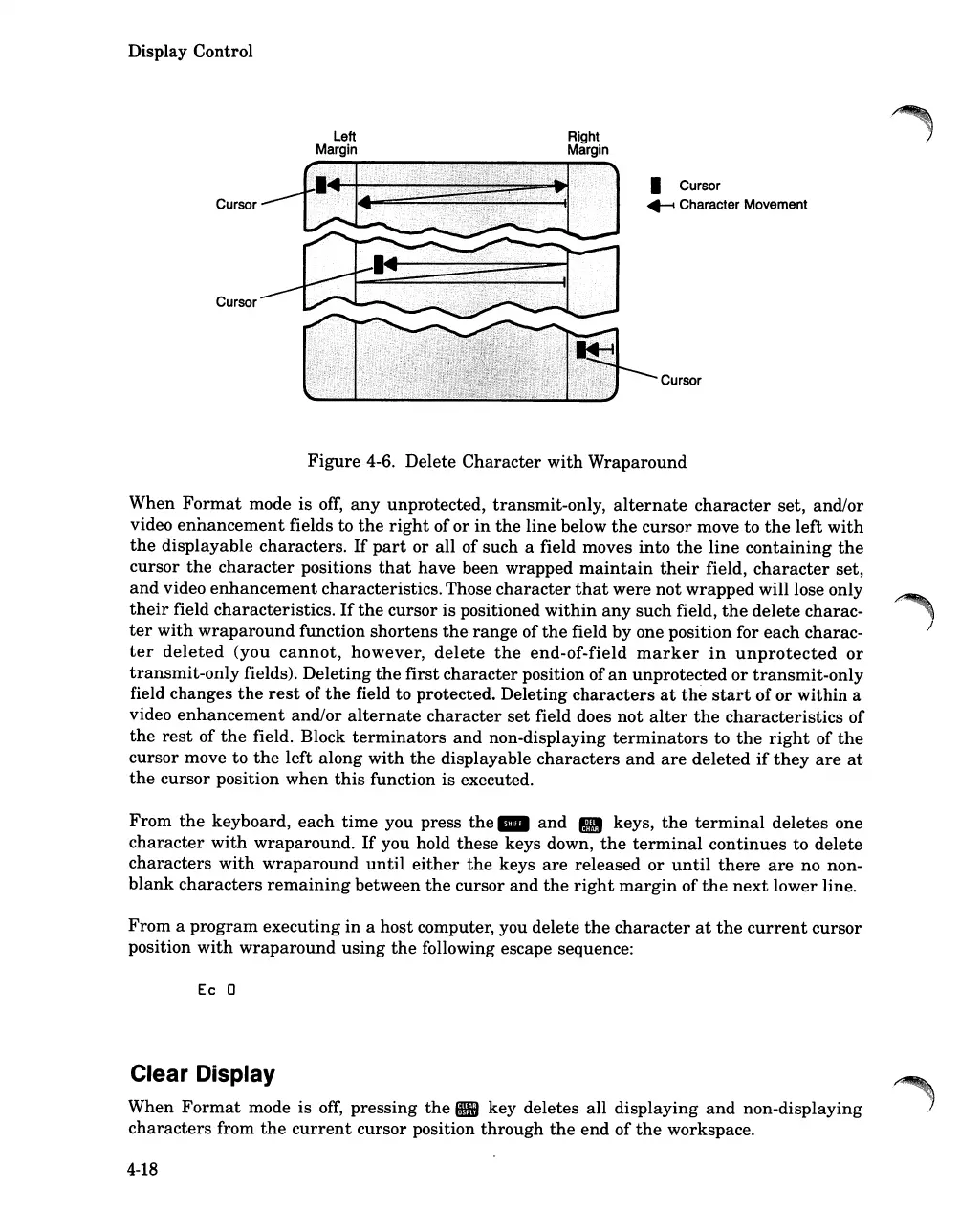
Figure
4-6. Delete
Character
with
Wraparound
When
Format
mode is
off,
any
unprotected, transmit-only,
alternate
character
set, and/or
video
ennancement
fields to
the
right
of
or
in
the
line below
the
cursor move to
the
left
with
the
displayable characters.
If
part
or all of such a field moves into
the
line
containing
the
cursor
the
character
positions
that
have
been wrapped
maintain
their
field,
character
set,
and
video
enhancement
characteristics.Those
character
that
were
not
wrapped
will lose only
their
field characteristics.
If
the
cursor is positioned
within
any
such field,
the
delete charac-
ter
with
wraparound
function
shortens
the
range
of
the
field by one position for each charac-
ter
deleted
(you
cannot,
however,
delete
the
end-of-field
marker
in
unprotected
or
transmit-only
fields). Deleting
the
first
character
position of
an
unprotected
or
transmit-only
field changes
the
rest
of
the
field to protected. Deleting
characters
at
the
start
of
or
within a
video
enhancement
and/or
alternate
character
set
field does
not
alter
the
characteristics
of
the
rest
of
the
field. Block
terminators
and
non-displaying
terminators
to
the
right
of
the
cursor move to
the
left
along
with
the
displayable
characters
and
are
deleted
if
they
are
at
the
cursor position
when
this
function is executed.
From
the
keyboard, each
time
you press
the
_
and
• keys,
the
terminal
deletes one
character
with
wraparound.
If
you hold these keys down,
the
terminal
continues to delete
characters
with
wraparound
until
either
the
keys
are
released
or
until
there
are
no non-
blank
characters
remaining
between
the
cursor and
the
right
margin
of
the
next
lower line.
From
a
program
executing
in
a host computer, you delete
the
character
at
the
current
cursor
position
with
wraparound
using
the
following escape sequence:
Ec 0
Clear Display
When
Format
mode is
off,
pressing
the.
key deletes all displaying
and
non-displaying
characters
from
the
current
cursor position
through
the
end
of
the
workspace.
4-18













 To Next Page