Graphics
60
66
129
129
129
129
66
60
•
•
•
•
64
16 4 1
128 32 8 2
••
• •
•
•
•
•
• •
•
•
• •
••
64 16 4 1
128 32 8 2
Row 7 24
Row
6
36
Row 5 66
Row 4 129
Row 3 129
Row 2 66
Row
1 36
Row 0 24
(a)
Row 7
85
Row 6
170
RowS
85
Row 4
170
Row 3
85
Row 2
170
Row 1
85
Row 0
170
(c)
(b)
204
204
51
51
204
204
51
51
(d)
240
240
240
240
15
15
15
15
(f)
85
00
85
00
85
00
85
00
(e)
•
• • •
•
• • •
• • • •
• • • •
Row 7
Row 6
RowS
Row 4
Row 3
Row 2
Row 1
Row 0
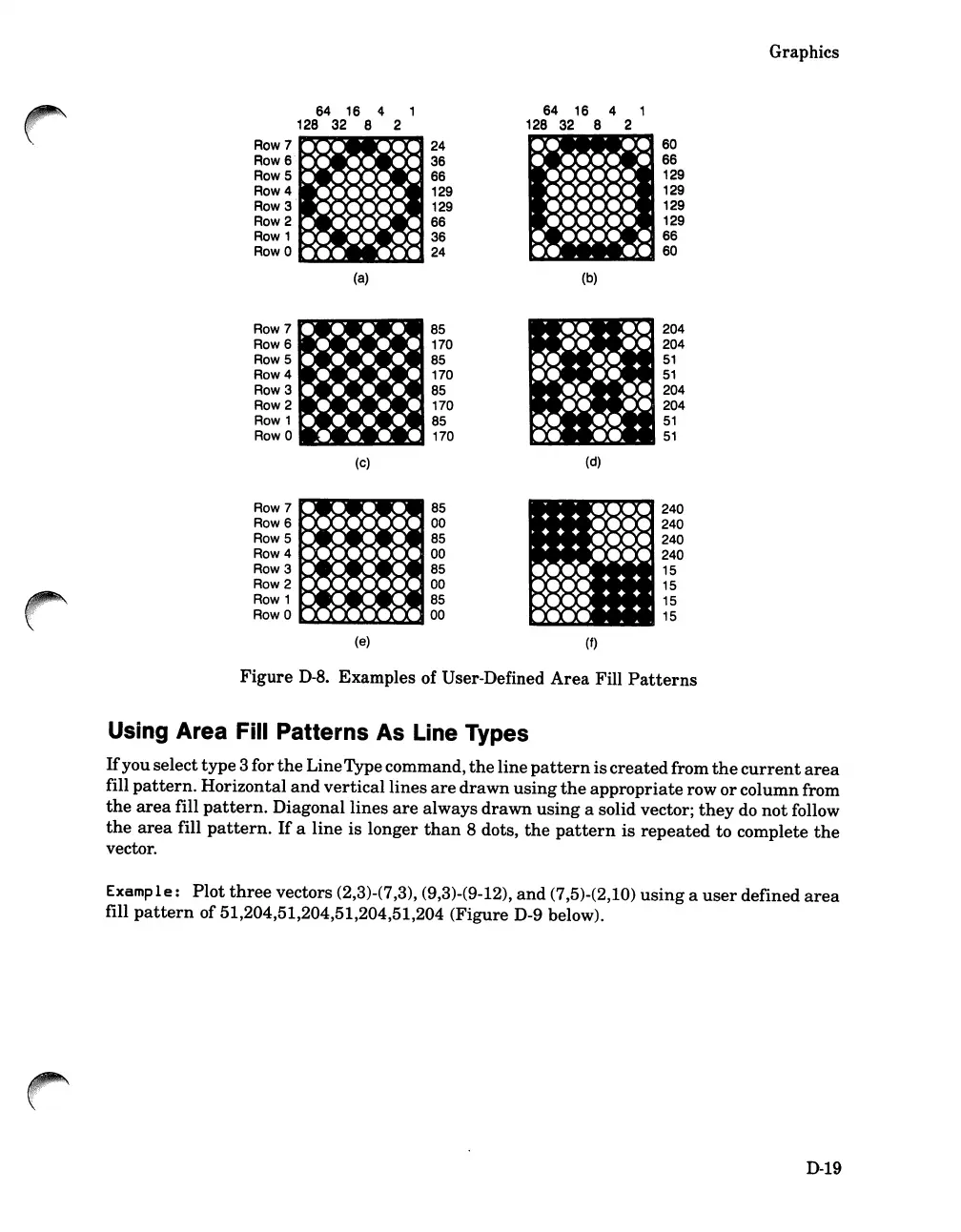
Figure
D-8.
Examples of User-Defined
Area
Fill
Patterns
Using Area Fill Patterns
As
Line Types
If
youselect
type
3 for
the
LineType command,
the
line
pattern
is
created
from
the
current
area
fill
pattern.
Horizontal
and
vertical
lines
are
drawn
using
the
appropriate
row
or
columnfrom
the
area
fill
pattern.
Diagonal
lines
are
always
drawn
using
a solid vector;
they
do
not
follow
the
area
fill
pattern.
If
a
line
is longer
than
8 dots,
the
pattern
is
repeated
to complete
the
vector.
Examp1
e:
Plot
three
vectors (2,3)-(7,3), (9,3)-(9-12),
and
(7,5)-(2,10)
using
a
user
defined
area
fill
pattern
of 51,204,51,204,51,204,51,204 (Figure D-9 below).
D-19













 To Next Page