EasyManua.ls Logo

HP 262SA - Configuring for IBM Mode; Displaying the IBM Configuration Menu; 3276;8 Configuration Menu

HP 262SA
390 pages
Print Icon
To Next Page IconTo Next Page
To Previous Page IconTo Previous Page
Loading...
3276(18
Emulation
Mode
INITIAL "IBM" DISPLAY. When
the
terminal
is
turned
off,
the
current
status
of
Port
1 is
stored
in
non-volatile memory.
If
the
terminal
is
turned
off while
Port
1
is
configured for
an
external
device
and
not
for
communicating
to
an
HP
host,
the
terminal
is
restricted
from
accessing
the
HP
function key labels. Therefore,
the
terminal
powers on
as
an
IBM
terminal,
and
the
function
key
labels
assume
the
following values:
..
ImI
..
Ell
----
..
.. ..
..
----
These
values
form
the
basic IBM "Aids" level
when
Port
1
is
configured for
an
external
device.
NOTE: Since you
can
use
Port
1 for
an
external
printer
only
when
it
is
not
communicating
to
an
HP
computer,
the
label
for selecting
the
external
printer
replaces
the
softkey
that
switches
your
terminal
between personalities.
Thus,
while you
are
using
your
terminal
with
an
IBM
system
and
an
RS-232-C
printer,
the
terminal
excludes you
from accessing
the
HP
Modes, Aids,
and
User
Keys function
key
labels.
Configuring For IBM Mode
The
3276/8
Configuration
menu
contains
parameters
that
pertain
to
the
IBM
personality.
For
example, you
must
state
in
the
configuration
menu
whether
an
external
printer
is
connected to
Port
1.
Furthermore,
certain
features
that
an
IBM
user
accomplishes
through
key
strokes,
you
must
do
through
menu
selections.
Displaying The IBM Configuration Menu
Once
the
"Aids"
set
of
IBM function key labels
appear
on
the
screen, you
may
display
the
3276/8
Configuration
menu
by
pressing"
(3276/8
conf
19).
NOTE:
Under
certain
special circumstances,
there
may
be a
momentary
delay before
the
menu
appears.
This
can
happen,
for example,
if
a
host
HP
computer
requests
softkey
definition
values
immediately
before you press
the"
function key.
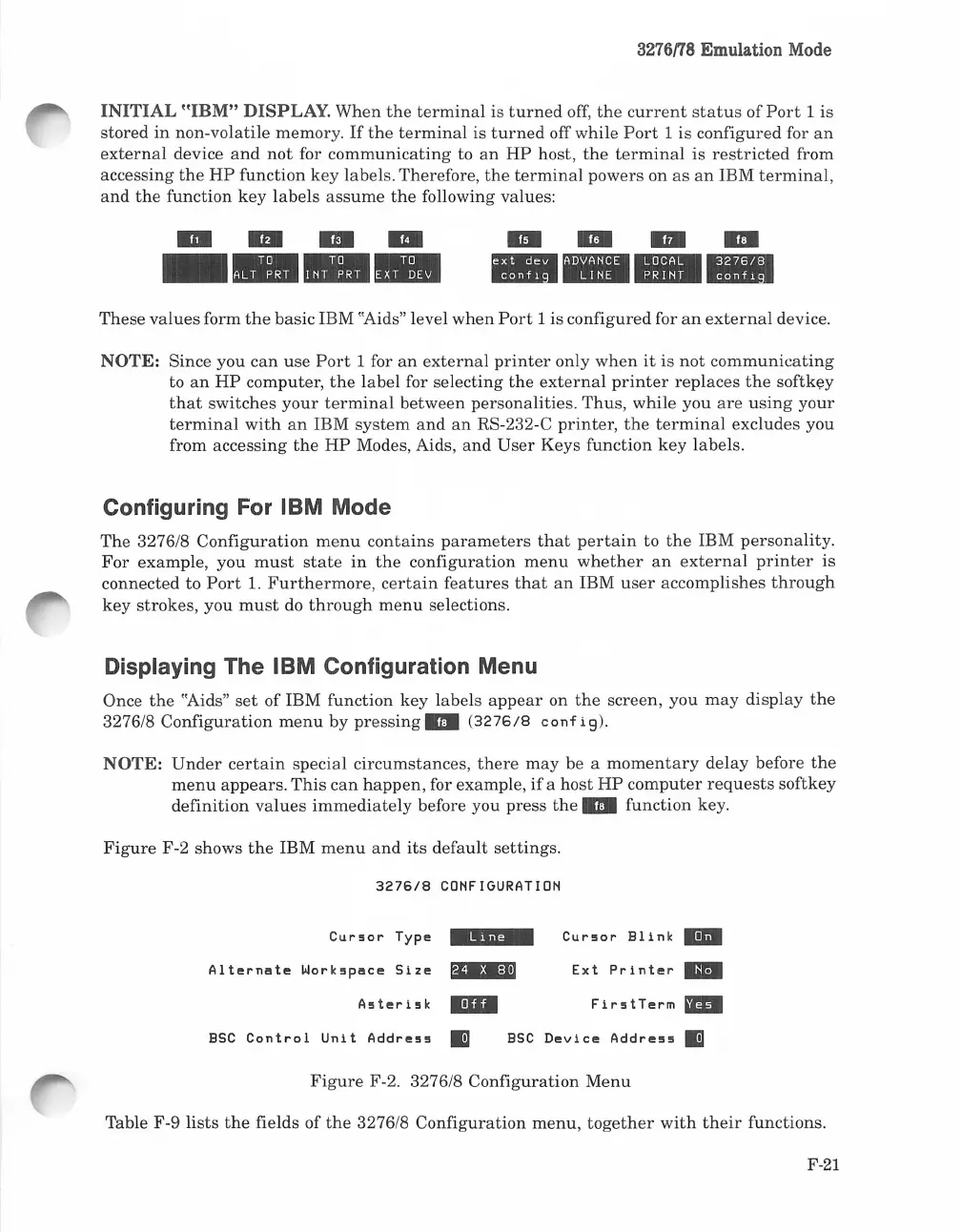
Figure
F-2 shows
the
IBM
menu
and
its
default
settings.
3276/8
CONFIGURATION
Cur~or
Typ~
-"
..
-
Cur~or
Eli
nk
BI
Al
t~rmlt~
Work~pl!lc~
Siz~
SD='"
Ext
Print~r
..
A~t~ri~k
IDI
Fir~tT~rm
-
ESC
Control
Unit
Addr~~~
Ii]
ESC
D~vic~
Addr~~~
Ii]
Figure
F-2. 3276/8
Configuration
Menu
Table F-9
lists
the
fields of
the
3276/8
Configuration
menu,
together
with
their
functions.
F-21

Table of Contents

Related product manuals