EasyManua.ls Logo

HP 262SA - 7-Bit Vs 8-Bit Operation

HP 262SA
390 pages
Print Icon
To Next Page IconTo Next Page
To Previous Page IconTo Previous Page
Loading...
Keyboards and
Character
Sets
able,
the
just
entered
character
replaces
the
mute
symbol
as
the
displayed character,
and
the
cursoradvances to
the
next
position.Thecase
may
arise, however,
when
you
want
to
enter
just
the
diacritic
mark
or
accent character. Therefore,
if
you
type
a space
after
a
mute
symbol,
the
mute
symbol
remains
displayed
and
the
cursor advances to
the
next
character
position.
7·Bit
Vs
a-Bit Operation
The
terminal
has
two modes ofoperation
that
affect how
characters
received from
datacomm
are
interpreted
by
the
terminal.
The
modes
are
named
for
the
number
of
significant
bits
they
contain.
In
8-bit mode
all
bits
are
significant;
thus
no
bit
is available for
parity
checking.
In
7-bit mode,
the
seven low-order
bits
contain
valid
data.
The
eighth
bit
may
be
used
for
parity
checking,
or
it
may
be ignored.
7-BIT
MODE.When
the
terminal
is configured for 7-bit mode,
the
least
significant
seven
bits
of
the
character
byte
determine
the
character's identity.
That
is,
the
seven
bits
are
translated
into
the
appropriate
character
according to
the
installed
character
ROM for
that
keyboard
option.
It
is
important
to
note
that
in
7-bitmode,
the
only accessible
alphanumeric
characters
are
those available
within
a keyboard's base
character
set.
For
example, while
in
7-bit mode,
if
the
terminal
supports
USASCII,
the
terminal
only recognizes
the
standard
128
US
ASCII
characters.
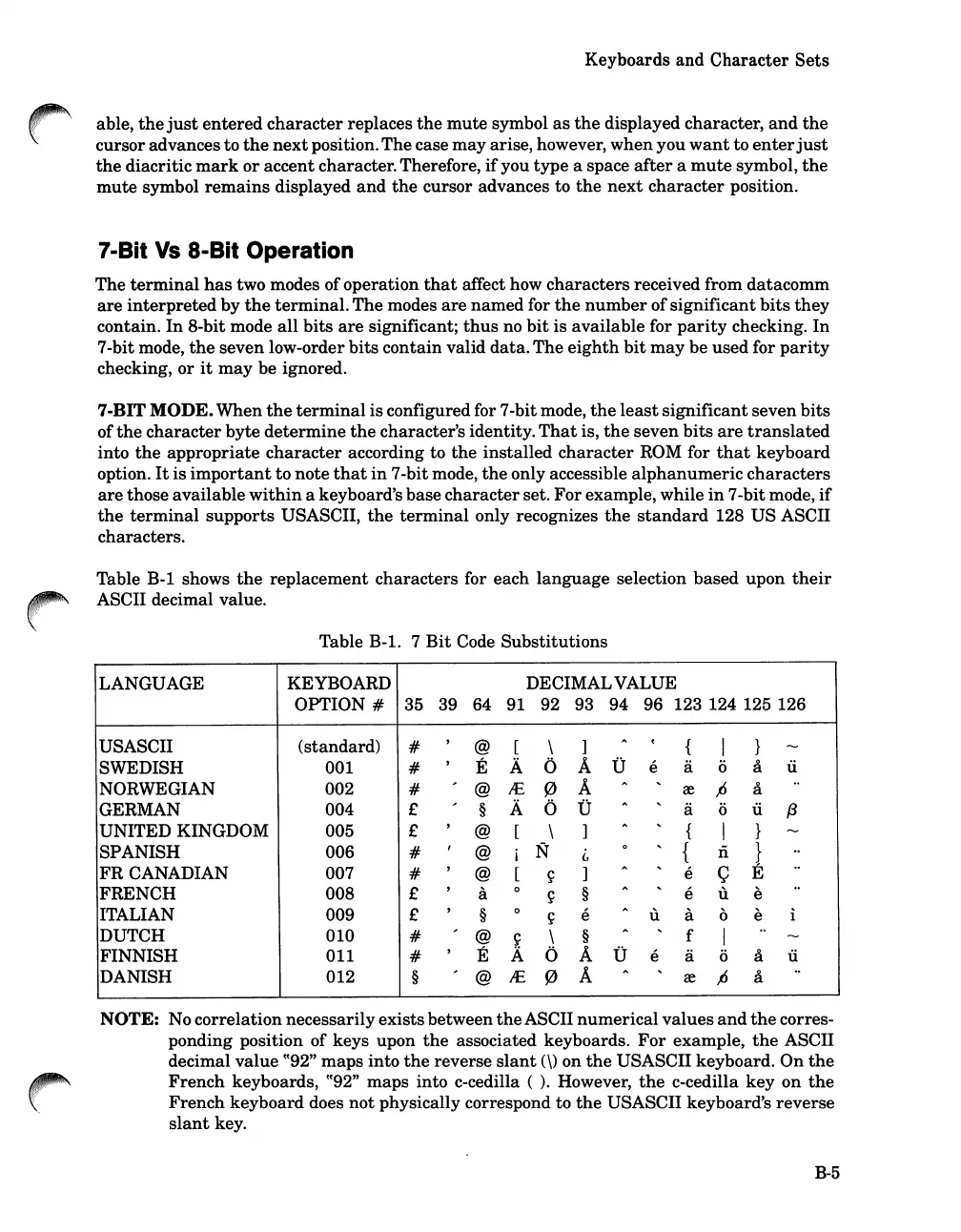
Table B-1 shows
the
replacement
characters
for each
language
selection based upon
their
ASCII decimal value.
Table B-1. 7
Bit
Code
Substitutions
LANGUAGE
KEYBOARD
DECIMALVALUE
OPTION
#
35
39 64 91
92 93 94 96 123 124 125 126
USASCII
(standard)
#
,
@
[
\
]
"
C
{
I
}
........
SWEDISH
001
#
,
E A
0
A
-0
e
a
0
a u
NORWEGIAN 002
#
,
@
IE
0
A
"
...
re
/J
a
..
GERMAN
004
£
,
§
A
0
-0
"
...
a
0
u
f3
UNITED KINGDOM 005
£
,
@
[
\
]
"
...
{
I
}
........
SPANISH 006
#
,
@
i
N
i.,
0
...
{
Ii
}
..
FRCANADIAN
007
#
,
@
[
~
]
"
...
e
Q
E
..
FRENCH
008
£
,
a
0
~
§
"
...
e u e
..
ITALIAN 009 £
,
§
0
~
e
"
u a
0
e i
DUTCH
010
#
,
@
~
\
§
"
...
f
I
..
........
FINNISH
011
#
,
E A 0 A
-0
e a
0
a u
DANISH
012
§
,
@
IE
0
A
"
...
re
/J
a
..
NOTE: No correlationnecessarilyexistsbetween
the
ASCII
numerical
values
and
the
corres-
ponding position of keys upon
the
associated keyboards.
For
example,
the
ASCII
decimal value
cC92"
maps
into
the
reverse
slant
(\) on
the
USASCII keyboard.
On
the
French
keyboards,
CC92"
maps
into c-cedilla (
).
However,
the
c-cedilla
key
on
the
French
keyboard does
not
physically correspond to
the
USASCII keyboard's
reverse
slant
key.
B-5

Table of Contents

Related product manuals