EasyManua.ls Logo

HP 262SA - Handshake Mode Selection

HP 262SA
390 pages
Print Icon
To Next Page IconTo Next Page
To Previous Page IconTo Previous Page
Loading...
Block Data Transfer
3. A DCI/DC2/DCl
handshake
(type 3),
in
which
the
host computer opens
the
transfer
with
a
DCl
trigger,
the
terminal
signals a
transfer
ready
with
a DC2
as
a
warning,
the
host
computer
enables
the
transfer
and
signals
that
it
is ready to receive a block
with
a second
DCl
trigger,
and
finally
the
data
block is transferred.
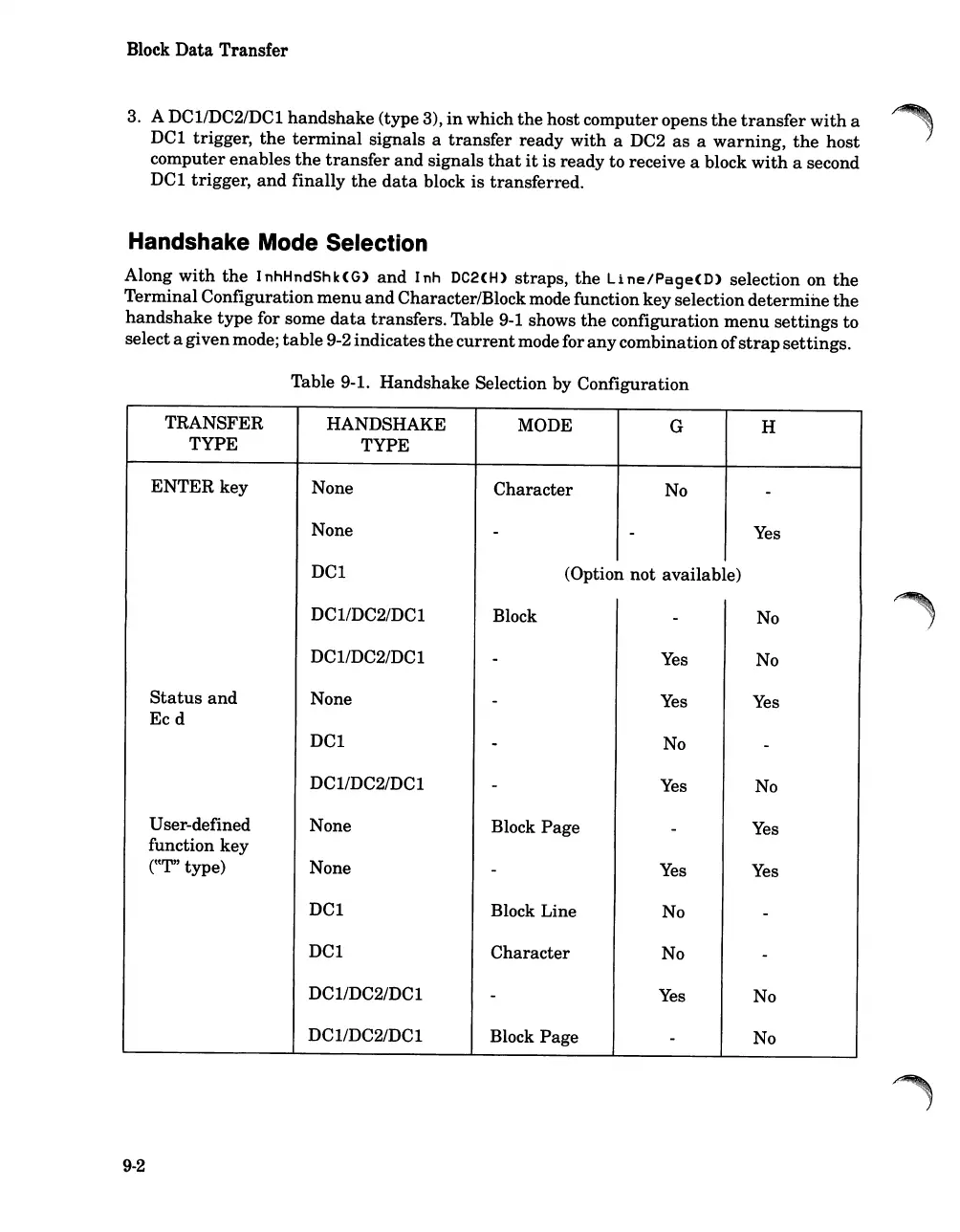
Handshake Mode Selection
Along
with
the
InhHndShk(G)
and
Inh
DC2(H)
straps,
the
Line/Page(D)
selection on
the
Terminal Configuration
menu
and
Character/Blockmode function key selection
determine
the
handshake
type
for some
data
transfers. Table
9-1
shows
the
configuration
menu
settings
to
selecta givenmode;
table
9-2 indicates
the
current
mode for
any
combinationof
strap
settings.
Table 9-1.
Handshake
Selection by Configuration
TRANSFER HANDSHAKE MODE G H
TYPE TYPE
ENTER key None
Character
No
-
None
-
-
Yes
DCl
(Option
not
available)
DCl/DC2/DCl Block
-
No
DC
l/DC2/DC1
-
Yes
No
Status
and
None
-
Yes
Yes
Ecd
DCI
-
No
-
DCl/DC2/DCI
-
Yes
No
User-defined None
Block Page
-
Yes
function key
rtT" type)
None
-
Yes
Yes
DCI
Block Line
No
-
DCl
Character
No
-
DCl/DC2/DCI
-
Yes
No
DCl/DC2/DCI
Block Page
-
No
9-2

Table of Contents

Related product manuals