EasyManua.ls Logo

HP 262SA - Terminal Configuration

HP 262SA
390 pages
Print Icon
To Next Page IconTo Next Page
To Previous Page IconTo Previous Page
Loading...
Click.
FIELD
Click
Inverse
Background
Configuring
the
Terminal
GLOBAL
CONFIGURATION
Inverse
Background
IimI
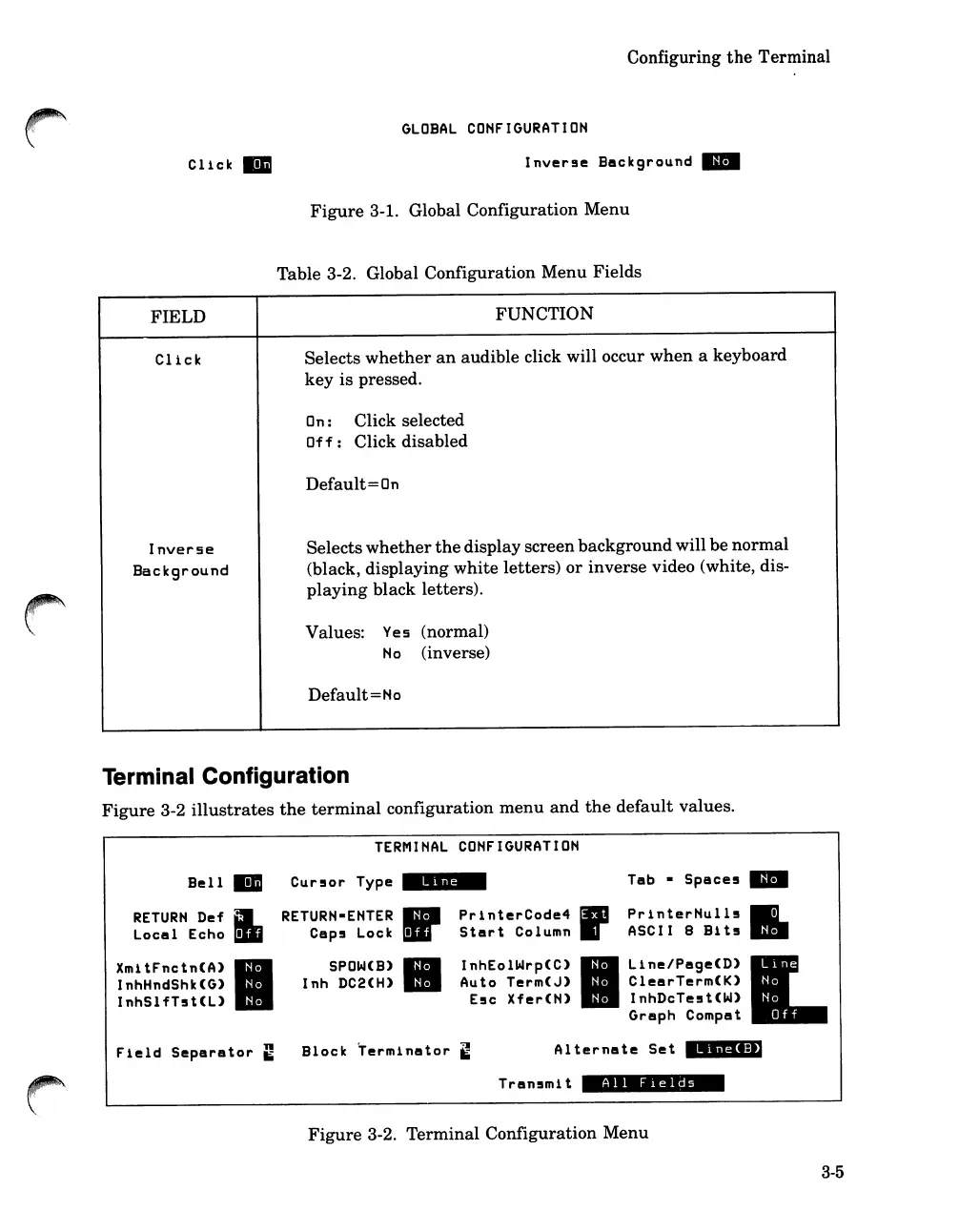
Figure
3-1. Global Configuration
Menu
Table 3-2. Global Configuration
Menu
Fields
FUNCTION
Selects
whether
an
audible click will occur
when
a
keyboard
key
is
pressed.
On:
Click selected
Of
f:
Click disabled
Default
=
On
Selects
whether
the
display screen
background
will be
normal
(black,
displaying
white
letters)
or
inverse
video (white, dis-
playing
black letters).
Values:
Yes (normal)
No (inverse)
Default
= No
Terminal Configuration
Figure
3-2
illustrates
the
terminal
configuration
menu
and
the
default
values.
TERMINAL
CONFIGURATION
Bell
Cur!or
Type
_9;';-
Tab
Space!
IimI
RETURN
Def
I.
RETURN-ENTER
II'
PrlnterCode4
--
PrinterNull!
II.
Local
Echo
Cap!
Lock
Start
Column
ASCII 8
Blt5
XmitFnctn(A)
SPOW(B)
II
InhEolWrp(C)
11II
llne/PsgeCD)
L
InhHndShk(G)
Inh
DC2(H)
Auto
Term(J)
ClearTerm(K)
InhSlfT!t(L)
E!c
Xfer(N)
InhDcTe!t(W)
Graph
Compat
Fleld
Separator
~
Block
Terminator
~
Al
ternate
Set
";"4.:,)
Tran!mlt
All
FIelds
Figure
3-2.
Terminal
Configuration
Menu
3-5

Table of Contents

Related product manuals