EasyManua.ls Logo

HP 262SA - Page 42

HP 262SA
390 pages
Print Icon
To Next Page IconTo Next Page
To Previous Page IconTo Previous Page
Loading...
Configuring
the
Terminal
Except
when
the
cursor
is positioned
in
the
fields labeled
ttRETURN
Def",
ttFldSeparator",
ttStart
Column",
ttPrinterNulls",
or
uBlkTermnator",
the
alphanumeric
keys
are
disabled
and
you select
the
desired
parameters
using
the
NEXT
CHO
I
CE
and
PREV
I
OUS
CHO
I
CE
function
keys.
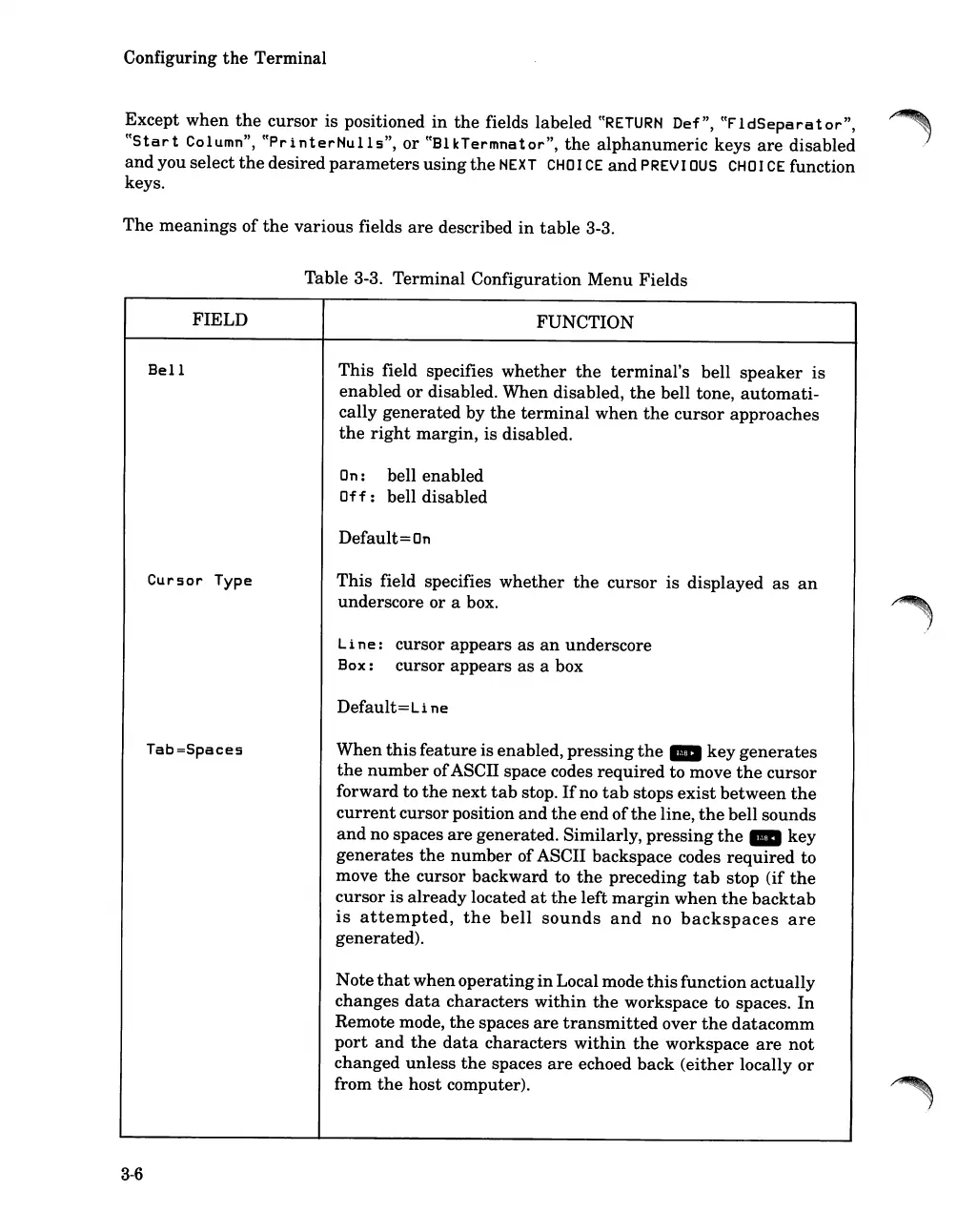
The
meanings
of
the
various
fields
are
described
in
table
3-3.
Table 3-3.
Terminal
Configuration
Menu
Fields
3-6
FIELD
Bell
Cursor
Type
Tab=Spaces
FUNCTION
This
field specifies
whether
the
terminal's
bell
speaker
is
enabled
or
disabled. When disabled,
the
bell tone,
automati-
cally
generated
by
the
terminal
when
the
cursor
approaches
the
right
margin,
is disabled.
On
: bell enabled
Off:
bell disabled
Default
=
On
This
field specifies
whether
the
cursor
is
displayed
as
an
underscore
or
a box.
Line:
cursor
appears
as
an
underscore
Box: cursor
appears
as
a box
Default=Li
ne
When
this
feature
is enabled,
pressing
the
_
key
generates
the
number
ofASCII space codes
required
to move
the
cursor
forward to
the
next
tab
stop.
If
no
tab
stops
exist
between
the
current
cursor position
and
the
end
of
the
line,
the
bell sounds
and
no spaces
are
generated. Similarly,
pressing
the
_
key
generates
the
number
ofASCII backspace codes
required
to
move
the
cursor backward to
the
preceding
tab
stop (if
the
cursor
is
already
located
at
the
left
margin
when
the
backtab
is
attempted,
the
bell
sounds
and
no
backspaces
are
generated).
Note
that
when
operating
in
Local mode
this
function
actually
changes
data
characters
within
the
workspace
to
spaces.
In
Remote mode,
the
spaces
are
transmitted
over
the
datacomm
port
and
the
data
characters
within
the
workspace
are
not
changed
unless
the
spaces
are
echoed
back
(either
locally
or
from
the
host
computer).

Table of Contents

Related product manuals