EasyManua.ls Logo

HP 262SA - Text

HP 262SA
390 pages
Print Icon
To Next Page IconTo Next Page
To Previous Page IconTo Previous Page
Loading...
Graphics
Text
Text
can
be placed in
either
alphanumeric
memory
or
graphics
memory.
If
the
terminal
is
set
for
alphanumeric
text,
the
text
is directed to
alphanumeric
memory.
Alphanumeric
text
can
be
scrolled, edited,
or
erased
without
affecting
the
graphics
image.
If
you select
graphics
text
(Ec * d
5),
text
goes into
graphics
memory. Text to be
written
to
the
graphics
memory
can
be
scaled or
rotated
if
the
terminal
is
set
to
either
UNSCALED
or
UNSC
4014 Mode. Refer to
Graphics
Text
in
this
appendix
for
additional
information.
When
text
is
written
to
the
graphics
memory,
the
graphics
cursor
is moved to
indicate
where
the
next
character
will be stored. (The
alphanumeric
cursor
is only used
when
data
is stored
in
the
alphanumeric
memory.)
This
differs from
terminals
that
have
only one mode for
text
and
display
the
graphics
cursor
only
when
waiting
for
graphic
input
from
the
user.
SCALED MODE
GRAPHICS
TEXT.
In
Scaled Mode,
text
is
initially
written
into
the
graphics
memory.
The
size is fixed to allow for 35 lines oftext.
The
text
angle
is
set
at
0
degrees
and
unslanted.
The
text
origin
is
set
to
the
left
and
bottom.These
settings
allow
the
"Page
Full"
feature
to work
properly
and
existing
software to
run
without
changes.
If
you
do
not
require
the
Page
Full
feature,
you
cannot
change
the
text
settings.
You
can
redirect
the
text
to
the
alphanumeric
memory.
UNSCALED
MODE
GRAPHICS
TEXT.
In
Unsealed Mode,
the
text
size is
unchanged
and
graphics
text
mode is
not
initially
turned
on.Text is stored
in
the
alphanumeric
memory
unless
the
graphics
text
mode is specifically
enabled.
Normal Addressing:
Short Addressing:
Note:
"SP"
means
"space"
character
y=o
x=o
Y=31
X=256
ABC
0
-"--"--"--"--
SP
,
SP
@
SP
SP
@
SP
( @
SP
, ( @
SP
,
SP
@ @ ( @ @
Turn
on
graphics
mode
y=o
x=o
A
-"-
SP ,
SP
@
,
SP@
Return to
alphanumeric mode
B
0,31
0,0
A
C
256,31
256,0
o
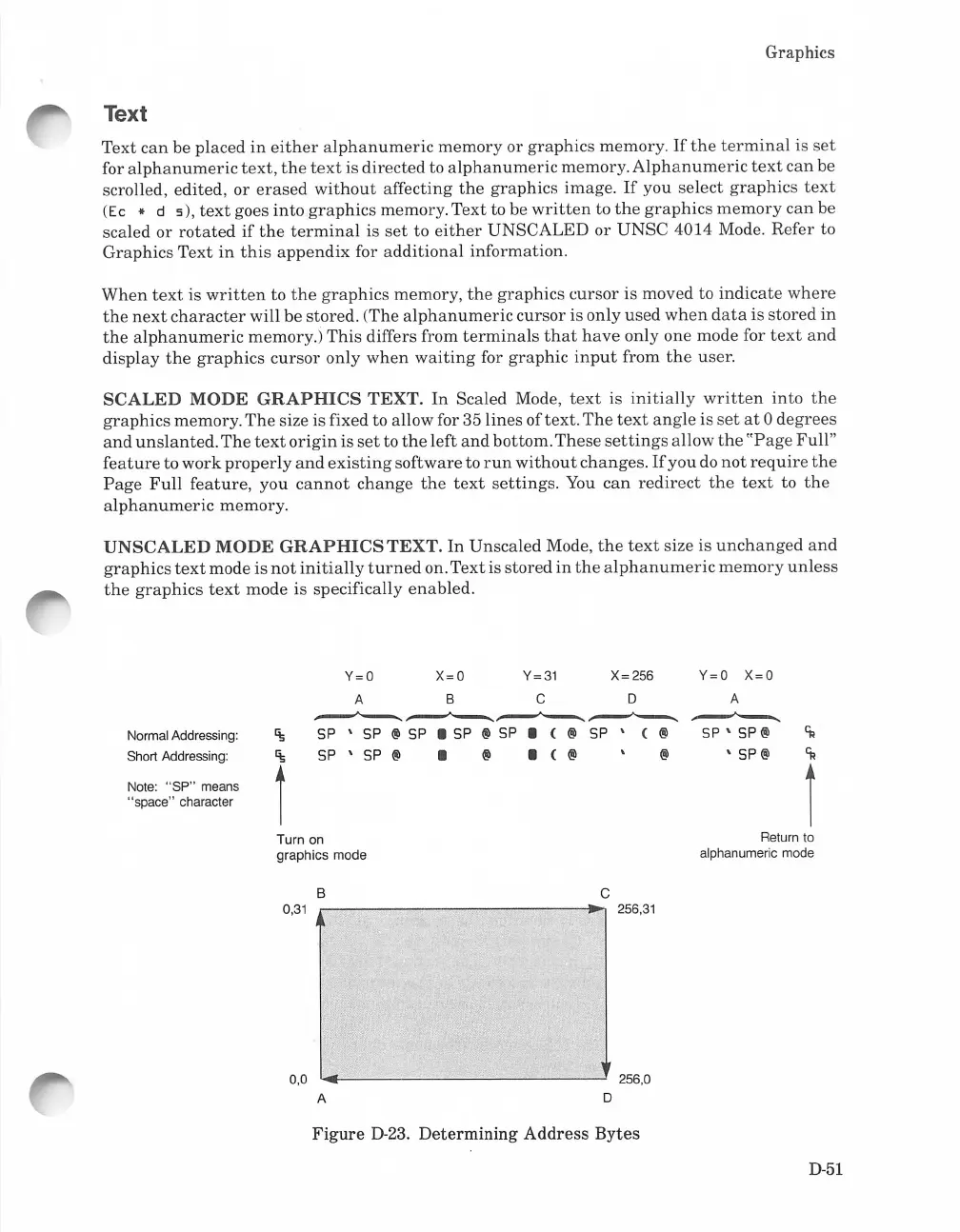
Figure
D-23.
Determining
Address
Bytes
D-51

Table of Contents

Related product manuals