EasyManua.ls Logo

HP 262SA - Graphics Control Functions; Programmable Graphics Functions

HP 262SA
390 pages
Print Icon
To Next Page IconTo Next Page
To Previous Page IconTo Previous Page
Loading...
Graphics
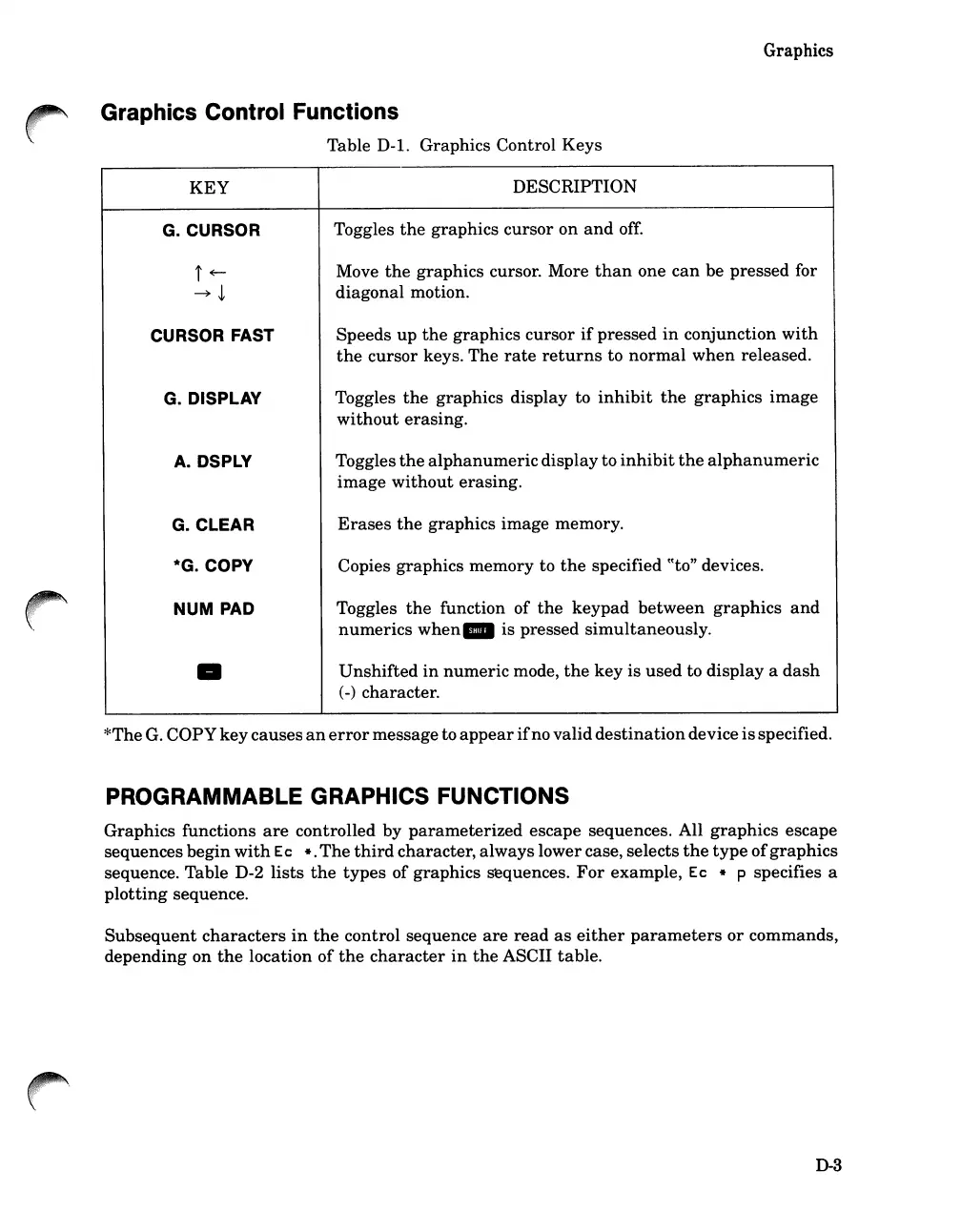
Graphics Control Functions
Table
D-l.
Graphics Control Keys
KEY
DESCRIPTION
G.CURSOR
Toggles
the
graphics cursor
on
and
off.
i~
Move
the
graphics cursor. More
than
one
can
be pressed for
~~
diagonal motion.
CURSOR FAST
Speeds
up
the
graphics cursor
if
pressed
in
conjunction
with
the
cursor
keys. The
rate
returns
to
normal
when
released.
G.
DISPLAY
Toggles
the
graphics display to
inhibit
the
graphics
image
without
erasing.
A.
DSPLY
Toggles
the
alphanumeric
display to
inhibit
the
alphanumeric
image
without
erasing.
G.CLEAR
Erases
the
graphics image memory.
*G.
COpy
Copies graphics memory to
the
specified
CCto"
devices.
HUM
PAD
Toggles
the
function of
the
keypad
between
graphics
and
numerics
when.
is pressed
simultaneously
.
Unshifted
in
numeric
mode,
the
key
is
used
to
display
a
dash
(
-)
character.
*The
G.
COpy
key
causes
an
error
messageto
appear
ifno
valid
destination
device
is
specified.
PROGRAMMABLE GRAPHICS FUNCTIONS
Graphics functions
are
controlled
by
parameterized
escape sequences. All
graphics
escape
sequences
begin
with
Ec
it.
The
third
character,
always
lowercase, selects
the
type
of
graphics
sequence. Table D-2
lists
the
types
of
graphics sequences.
For
example, Ec
it
p specifies a
plotting
sequence.
Subsequent
characters
in
the
control sequence
are
read
as
either
parameters
or
commands,
depending on
the
location
of
the
character
in
the
ASCII table.
D-3

Table of Contents

Related product manuals