EasyManua.ls Logo

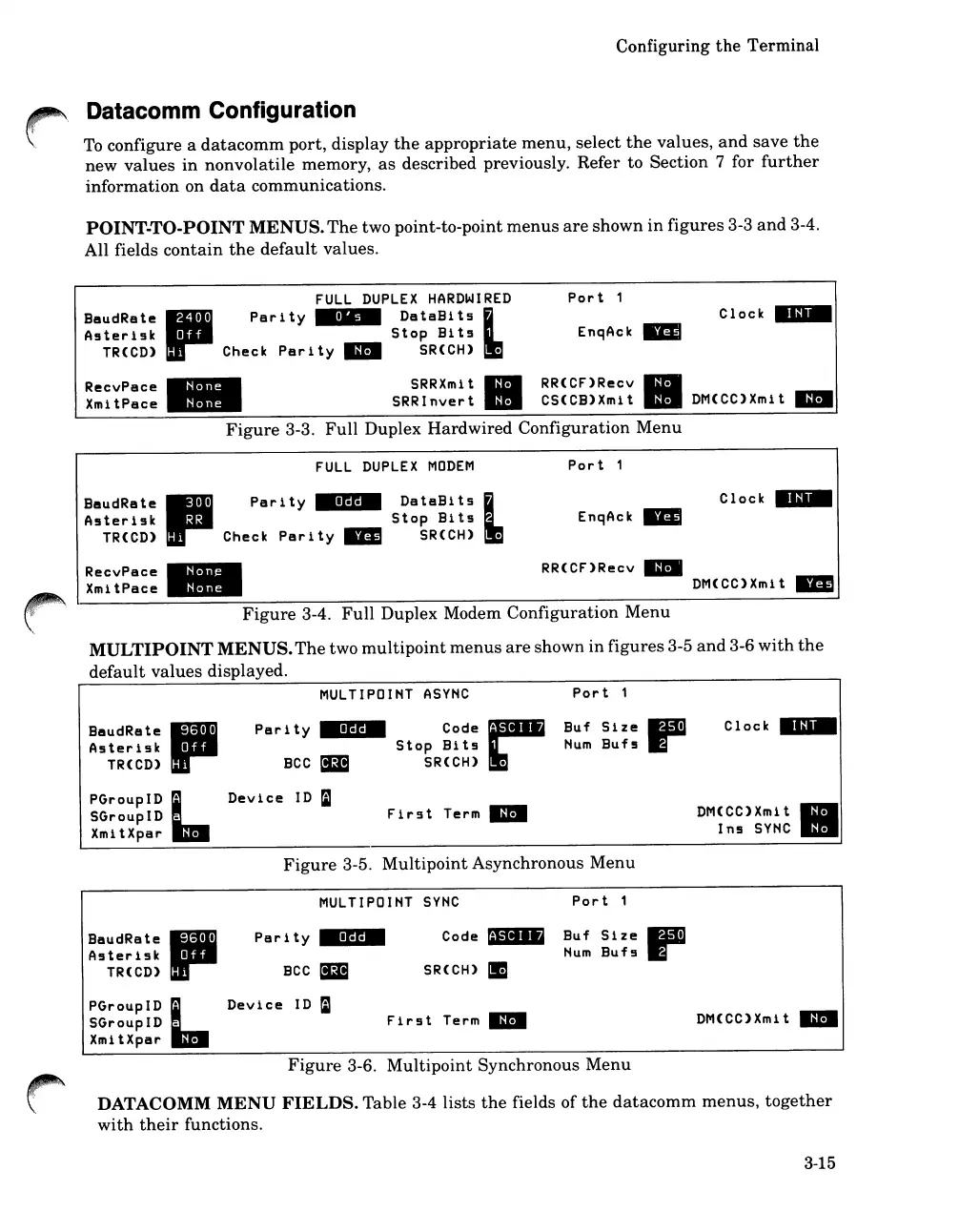
HP 262SA - Datacomm Configuration; Full Duplex Hardwired Configuration Menu; Full Duplex Modem Configuration Menu; Multipoint Asynchronous Menu

HP 262SA
390 pages
Print Icon
To Next Page IconTo Next Page
To Previous Page IconTo Previous Page
Loading...
Configuring
the
Terminal
Datacomm Configuration
To
configure a
datacomm
port,
display
the
appropriate
menu,
select
the
values,
and
save
the
new
values
in
nonvolatile
memory,
as
described previously. Refer to Section 7 for
further
information
on
data
communications.
POINT-TO-POINT
MENUS.
The
two point-to-point
menus
are
shown
in
figures
3-3
and
3-4.
All fields
contain
the
default
values.
FULL
DUPLEX
HARDWIRED
Port
1
BeudRete II
Parity
M
•••
DBtaBlh
L
Clock
__
A5ter19k
I
Stop
Bit5
EnqAck
--
TR(CD) Check
Parity
III
SR(CH)
RecvPace
-
SRRXmit
II
RR(CF)Recv
II
XmitPace
. -
SRRInvert
CS(CB)Xmit
DM(CC)Xmit
III
Figure
3-3.
Full
Duplex
Hardwired
Configuration
Menu
FULL
DUPLEX
MODEM
BaudRate
III
Parity
IIIGPII
DataBits
L
Asterlsk
••
Stop
Blts
TR(CD) Check
Parlty
__
SR(CH).
Port
1
EnqAck
__
Clock
__
RecvPace
XmitPace
-
-
. -
RR(CF)Recv
__
DM(CC)Xmit
__
Figure
3-4.
Full
Duplex Modem
Configuration
Menu
MULTIPOINT
MENUS.
The
two
multipoint
menus
are
shown
in
figures
3-5
and
3-6
with
the
default
values
displayed.
MULTIPOIHT
ASYHC
BaudRate
II-
I I
Asterlsk
I
TR(CD)
Parl
ty
IIIGP-
BCC
Code
••
Stop
Blts
SR(CH)
Port
1
Buf
Size
Hum
Bufs
p
Clock
__
PGroupID L
SGroupID .
XmitXpar
Device
ID
raJ
First
Term
III
DM(CC)Xmlt
Ins
SYHC
II
Figure
3-5.
Multipoint
Asynchronous
Menu
MULTIPOINT
SYNC
Port
1
BaudRate
11-
I I
A5terlsk
I
TR(CD)
PGroupID
L
SGroupID .
XmltXpar
Par
i
ty
IIIPP-
BCC
Device
ID
=
Code"
SR(CH) _
First
Term
III
Buf
Slze
Hum
Bufs
DM(CC)Xmlt
III
Figure
3-6.
Multipoint
Synchronous
Menu
DATACOMM
MENU
FIELDS.
Table 3-4 lists
the
fields of
the
datacomm
menus,
together
with
their
functions.
3-15

Table of Contents

Related product manuals