EasyManua.ls Logo

HP 262SA - Extended Characters Mode B-IO

HP 262SA
390 pages
Print Icon
To Next Page IconTo Next Page
To Previous Page IconTo Previous Page
Loading...
Keyboards and Character Sets
When
using
8-bitmode, you
must
set
the
Par
i t Yfield
in
the
Datacomm
Configuration
menu
to
cCHone",
and
you
must
set
the
Da
taBi
t 5 field to
cC8".
Failure
todo so will
cause
data
communica-
tion
problems
with
the
host
computer.
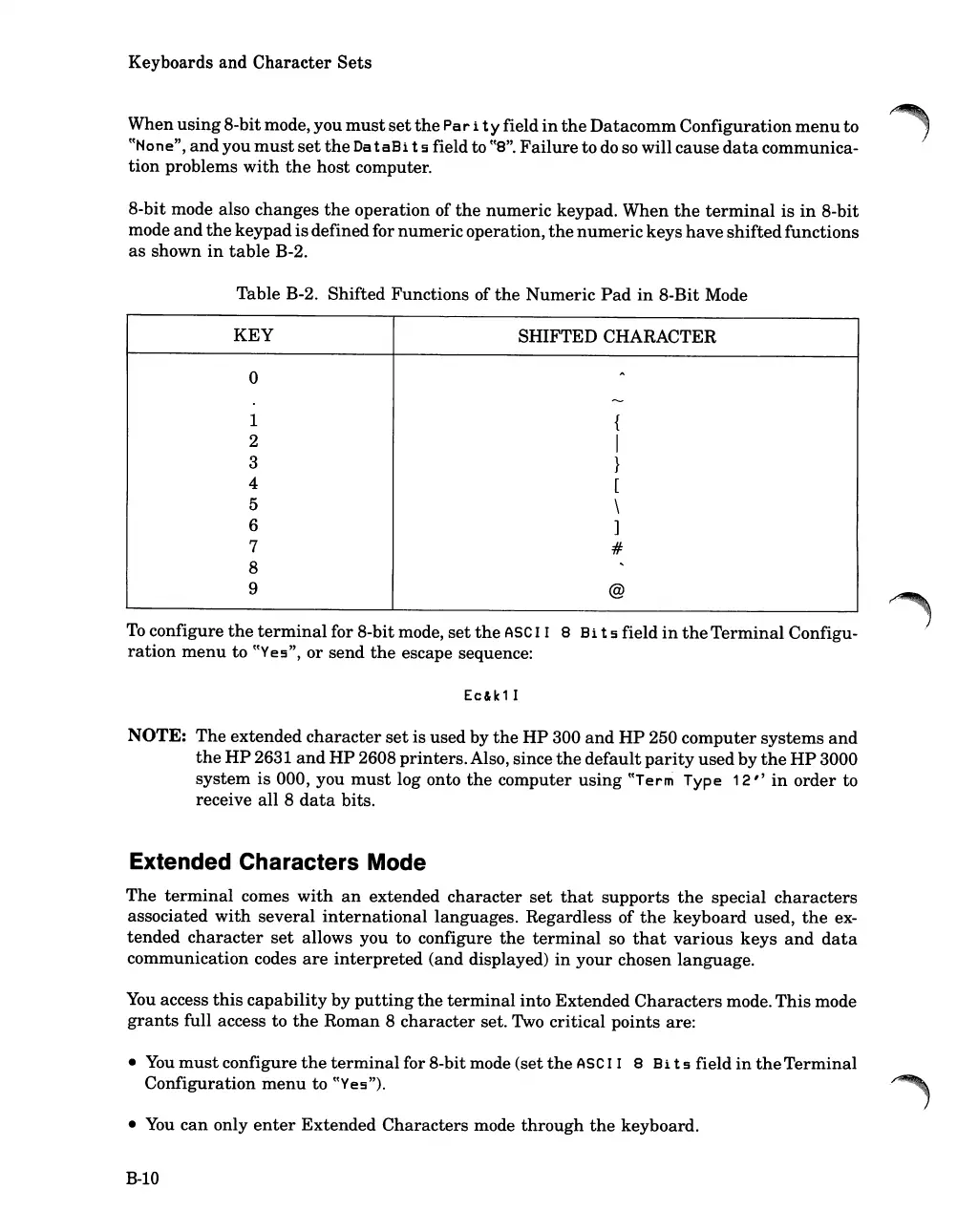
8-bit mode also
changes
the
operation of
the
numeric
keypad.
When
the
terminal
is
in
8-bit
mode
and
the
keypad
is
definedfor
numeric
operation,
the
numeric
keys
have
shifted
functions
as
shown
in
table
B-2.
Table B-2. Shifted Functions of
the
Numeric
Pad
in
8-Bit Mode
KEY
SHIFTED CHARACTER
0
,..
---
1
{
2
I
3
}
4
[
5
\
6
]
7
#
8
,
9
@
To
configure
the
terminal
for 8-bit mode,
set
the
ASC
I I 8
Hi
t 5 field
in
the
Terminal
Configu-
ration
menu
to
cCYes",
or
send
the
escape sequence:
Ec&k1I
NOTE:
The
extended
character
set
is used by
the
HP
300
and
HP
250
computer
systems
and
the
HP
2631
and
HP
2608
printers.
Also, since
the
default
parity
used
by
the
HP
3000
system
is 000, you
must
log onto
the
computer
using
cCTerm
Type
12
"
in
order
to
receive all 8
data
bits.
Extended Characters Mode
The
terminal
comes
with
an
extended
character
set
that
supports
the
special
characters
associated
with
several
international
languages. Regardless of
the
keyboard
used,
the
ex-
tended
character
set
allows you to configure
the
terminal
so
that
various
keys
and
data
communication codes
are
interpreted
(and displayed)
in
your
chosen language.
You
access
this
capability
by
putting
the
terminal
into
Extended
Characters
mode.
This
mode
grants
full access to
the
Roman 8
character
set. Two critical points are:
You
must
configure
the
terminal
for 8-bit mode (set
the
ASC I I 8
Hi
t 5 field
in
the
Terminal
Configuration
menu
to
cCYes")
.
You
can
only
enter
Extended
Characters
mode
through
the
keyboard.
B-10

Table of Contents

Related product manuals