EasyManua.ls Logo

HP 262SA - Area Fills; Selecting an Area Fill Pattern

HP 262SA
390 pages
Print Icon
To Next Page IconTo Next Page
To Previous Page IconTo Previous Page
Loading...
Graphics
AREA FILLS
The
terminal
has
two
types
of
area
fill specifications--rectangular
and
polygonal.
An
area
can
befilled
with
oneofa
variety
of
predefined
patterns
or
with
a user-defined
pattern.
The
pattern
can
also be
used
to provide
line
patterns
for horizontal
or
vertical
lines
when
the
area
pattern
is
selected
as
the
line
type. (Refer to (tUsing
Area
Fills
As Line Types".)
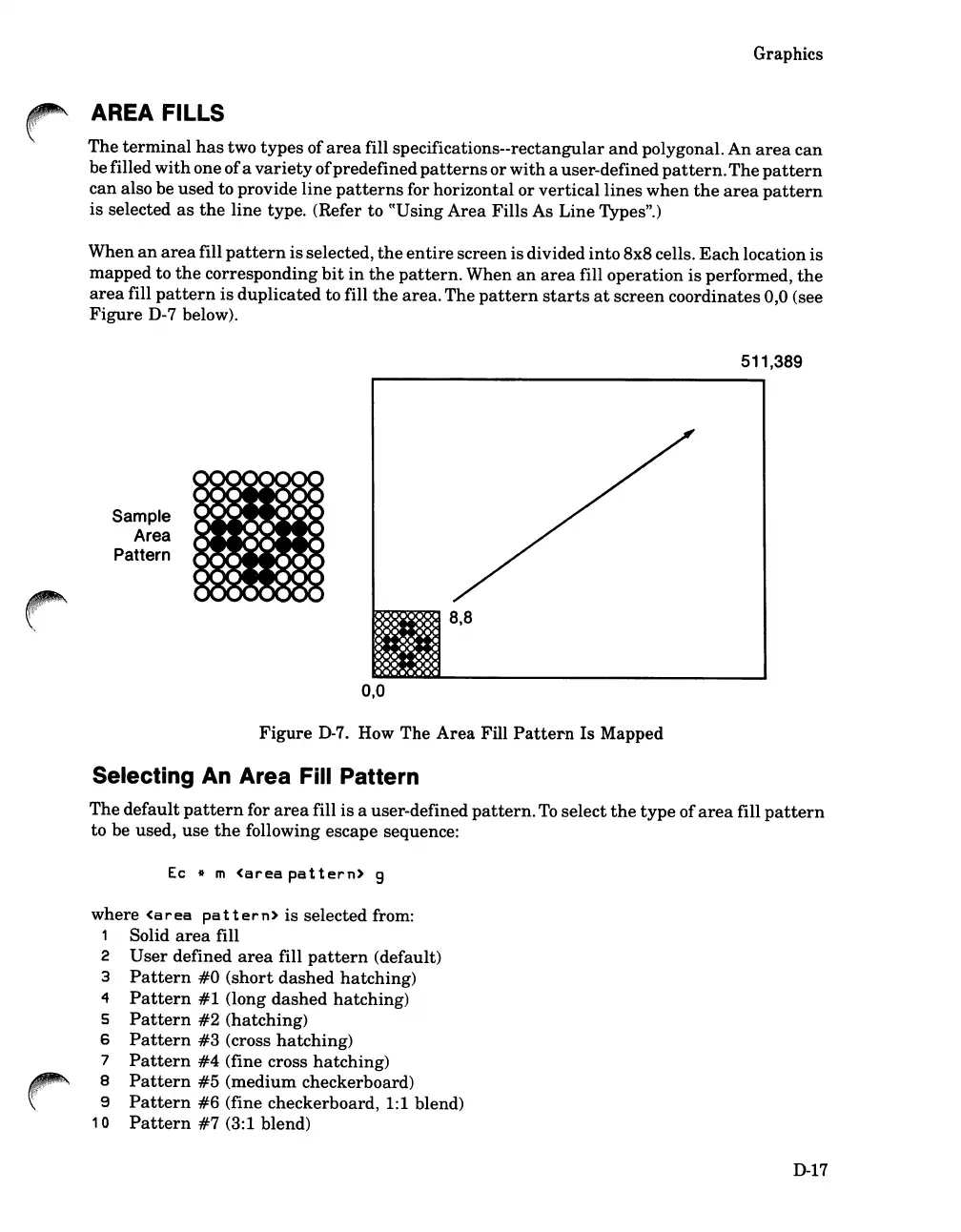
When
an
area
fill
pattern
is
selected,
the
entire
screen is divided
into
8x8 cells.
Each
location is
mapped
to
the
corresponding
bit
in
the
pattern.
When
an
area
fill
operation
is
performed,
the
area
fill
pattern
is
duplicated
to fill
the
area.
The
pattern
starts
at
screen
coordinates 0,0 (see
Figure
D-7 below).
511,389
Sample
Area
Pattern
-N-N-N-III-N-N-II-
I
=-:.:K:.:K:
•••
iilll
z
NZII-
I
::K:.::KN::K.ii.iilll-N
z
.-
I
I
'::K
:z
~
::K ::K
-
--
I
••
••
_II
til
.N
-=-.
Iii.
t
II
••
.111
I
-.
z.
t
III
.11
••
II II
I
t
:.:.
_II
!II!II
til
-.::.:
I
:z.
:z.::.:
I
II II II
-
--
8,8
0,0
Figure
D-7.
How
The
Area
Fill
Pattern
Is
Mapped
Selecting An Area Fill Pattern
The
default
pattern
for
area
fill
is
a user-defined
pattern.
To
select
the
type
of
area
fill
pattern
to be used,
use
the
following escape sequence:
Ec
..
m
<area
pat
tern>
9
where
<area
pat
tern>
is
selected from:
1 Solid
area
fill
2
User
defined
area
fill
pattern
(default)
3
Pattern
#0
(short
dashed
hatching)
4
Pattern
#1
(long
dashed
hatching)
5
Pattern
#2
(hatching)
6
Pattern
#3
(cross
hatching)
7
Pattern
#4
(fine cross
hatching)
8
Pattern
#5
(medium
checkerboard)
9
Pattern
#6
(fine checkerboard, 1:1 blend)
10
Pa
ttern
#7
(3:1 blend)
D-17

Table of Contents

Related product manuals