EasyManua.ls Logo

HP 262SA - The Ibm Keyboard

HP 262SA
390 pages
Print Icon
To Next Page IconTo Next Page
To Previous Page IconTo Previous Page
Loading...
[])mmm
G8~[§][§]G
3276/78 Emulation Mode
Table F-9. 3276/8 Configuration Menu Fields (Continued)
FIELD
FUNCTION
Values
0-31
You
must
enter
the
appropriate address
that
agrees
with
the
host expected value for
this
terminal.
As
the
NEXT
and
PREVIOUS CHOICE keys
are
inoperable, you
must
key
in
the
required value.
Default = 0
NOTE:You
must
make
all necessary changes to
the
configuration
menu
BEFORE you
physically connect
the
terminal
to a multipoint line.
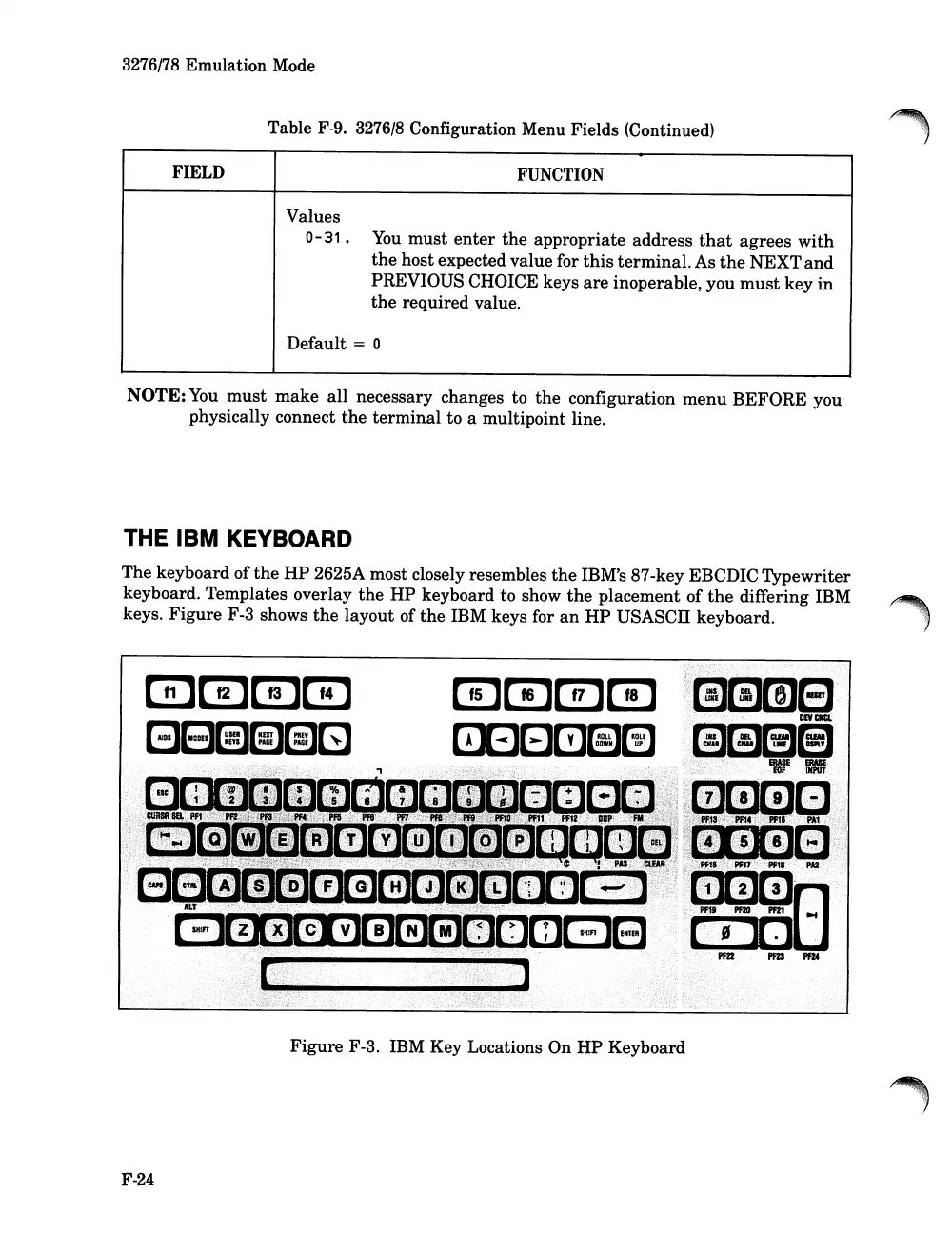
THE IBM KEYBOARD
The keyboard of
the
HP
2625A most closely resembles
the
IBM's 87-key EBCDIC Typewriter
keyboard. Templates overlay
the
HP
keyboard to show
the
placement of
the
differing IBM
~,!.;.:.,
keys.
Figure
F-3 shows
the
layout of
the
IBM keys for
an
HP
USASeII
keyboard.,
»:>~t:_:;:_~.:
:":::
.
".:.
..
:.-,
u)\:
::
.;
~:
;::
-.:
".:.
-,
mmmm
i~1_EJ
mGElm(3~
,,;lM[i]f@i
~
ERASE
...
ERASE
[...,~
__
~mc:::JEJ;;tl~]D
•...
';;f,jjil~~if
.
'.
"'i~J
.
pm
pm-
Figure F-3. IBM Key Locations On
HP
Keyboard
F-24

Table of Contents

Related product manuals