EasyManua.ls Logo

HP 262SA - Defining Keys Locally (Definition Mode)

HP 262SA
390 pages
Print Icon
To Next Page IconTo Next Page
To Previous Page IconTo Previous Page
Loading...
Terminal Control
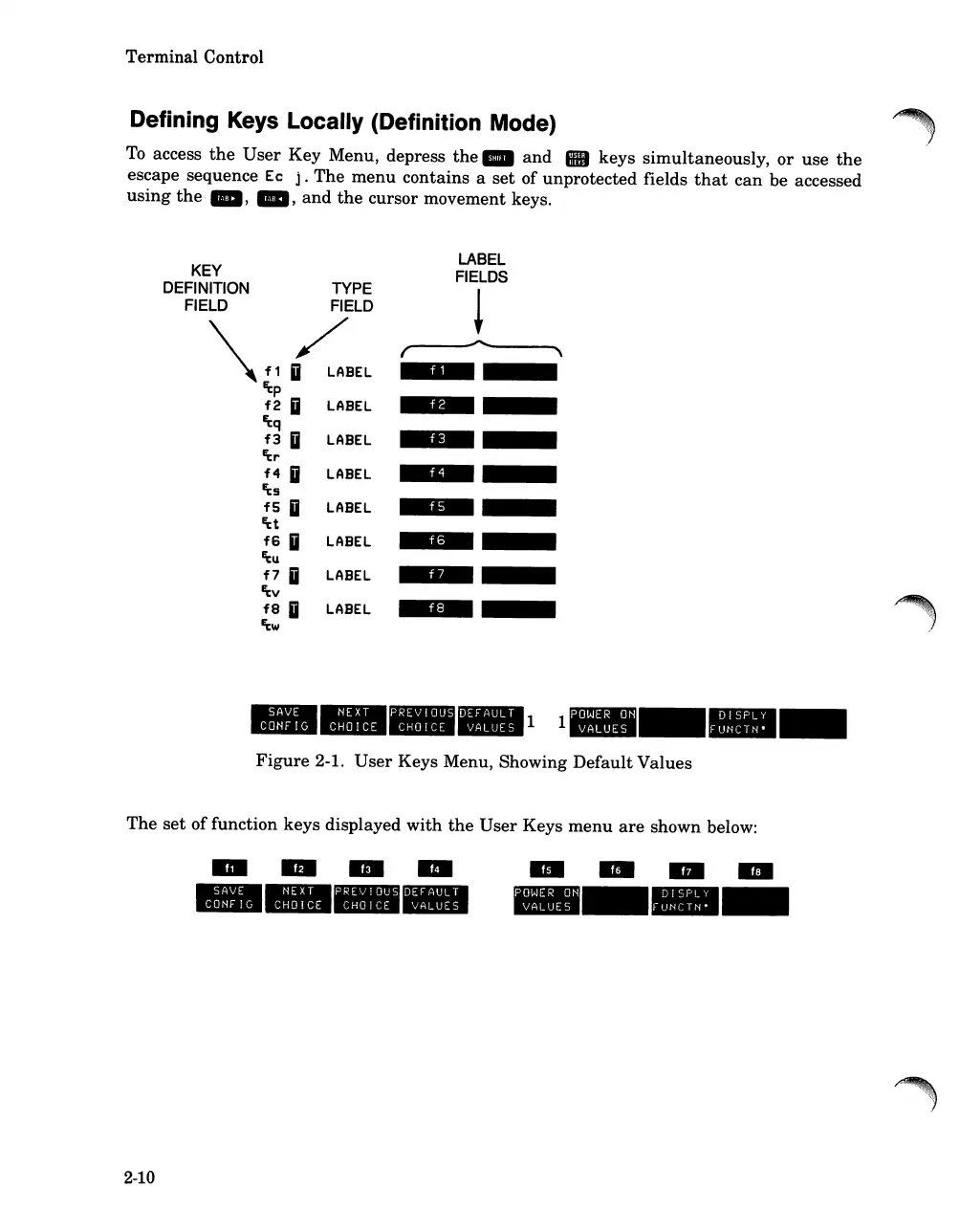
Defining Keys Locally (Definition Mode)
To
access
the
User
Key Menu, depress
the
_
and
keys
simultaneously,
or
use
the
escape sequence Ec
j.
The
menu
contains a
set
of unprotected fields
that
can
be accessed
using
the·
_,
_,
and
the
cursor movement keys.
KEY
DEFINITION TYPE
FIELD
FIELD
\fl~BEL
~p
f2
Ii
LABEL
~q
f3
Ii
LABEL
'i:
...
f4 Ii
LABEL
'i:s
fS Ii
LABEL
~t
f6
Ii
LABEL
~u
f7 Ii
LABEL
~v
f8
Ii
LABEL
'i:w
LABEL
FIELDS
!
r----~-------.".\
I
,
,.
t
1=
••••
____
11
_
Figure
2-1.
User
Keys Menu, Showing
Default
Values
The
set
of
function keys displayed
with
the
User
Keys
menu
are
shown below:
2-10
--
--
----
----
----

Table of Contents

Related product manuals