Block
Data
Transfer
In
Character
and
Block .Line modes (but
not
Block
Page
mode), a field is
sent
to
the
host
computereven
though
it
has
not
been modified,
that
is,
the
MDT is
not
checked.
In
Block
Page
mode, only modified fields
are
sent.
When a field which
has
been
modified is
transmitted,
the
field
separator
character, selected on
the
Terminal
Configuration
menu,
is
sent
for each unmodified field preceeding
the
modified
one.
If
a field
has
been
filled
with
blanks
(for example, by ((clear display" from
the
keyboard),
then
one
blank
is
sent
for
each
field; only
trailing
blanks
are
eliminated.A ((clear display" from
the
host
computer leaves
the
cleared fields unmodified.
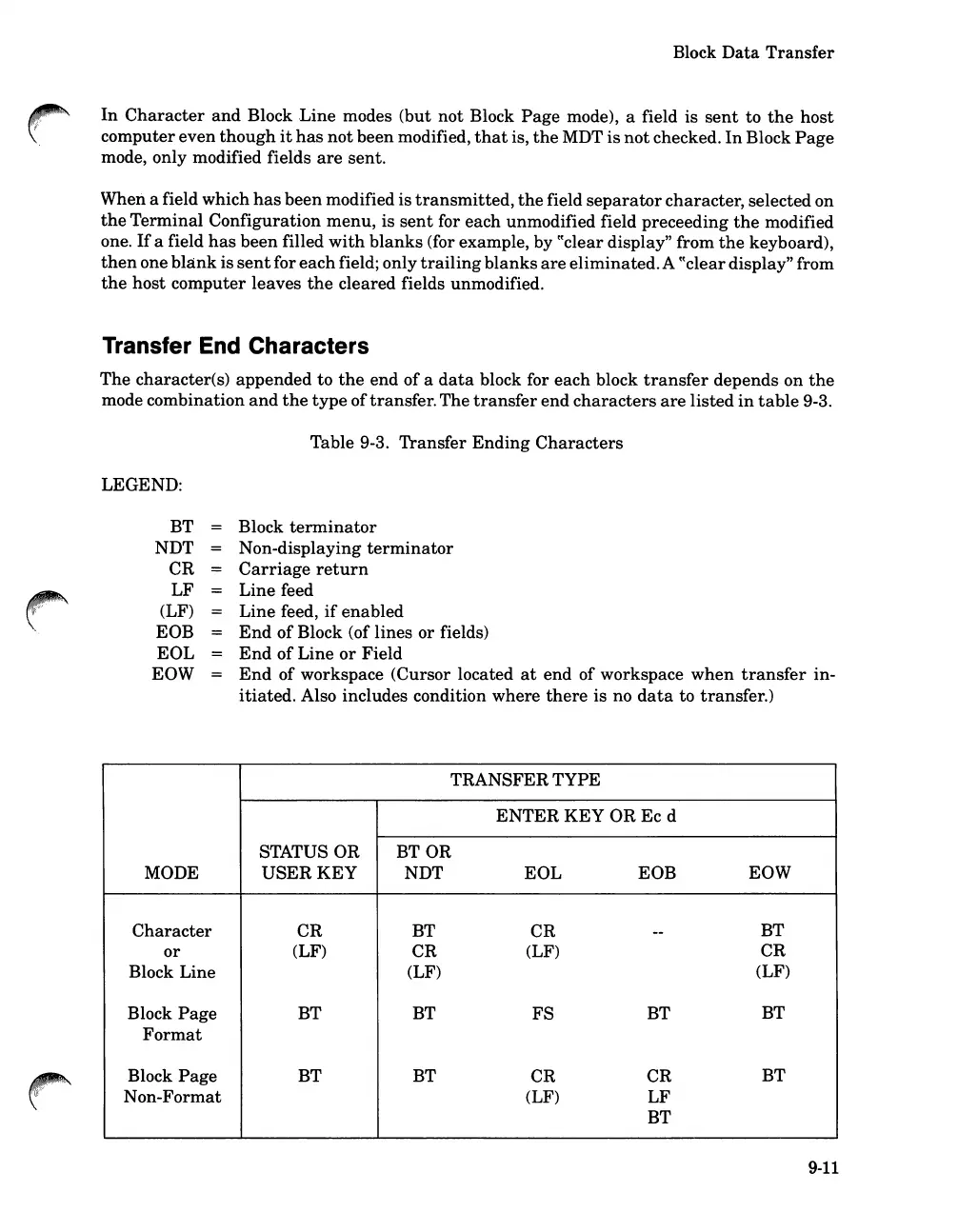
Transfer End Characters
The
character(s) appended to
the
end
of
a
data
block for each block
transfer
depends on
the
mode combination
and
the
type
oftransfer.The
transfer
end
characters
are
listed
in
table
9-3.
Table 9-3. Transfer
Ending
Characters
LEGEND:
BT
NDT
CR
LF
(LF)
EOB
EOL
EOW
Block
terminator
Non-displaying
terminator
Carriage
return
Line feed
Line feed,
if
enabled
End
of
Block (of lines or fields)
End
of
Line
or
Field
End
of workspace (Cursor located
at
end of workspace
when
transfer
in-
itiated.
Also includes condition where
there
is no
data
to transfer.)
TRANSFER TYPE
ENTER
KEY
OR Ec d
STATUS OR
BTOR
MODE
USER
KEY
NDT EOL EOB
EOW
Character
CR
BT
CR
--
BT
or
(LF)
CR
(LF)
CR
Block Line
(LF)
(LF)
Block
Page
BT BT
FS
BT
BT
Format
Block
Page
BT BT
CR CR
BT
Non-Format
(LF)
LF
BT
9-11













 To Next Page