EasyManua.ls Logo

HP 262SA - Multipoint Installation

HP 262SA
390 pages
Print Icon
To Next Page IconTo Next Page
To Previous Page IconTo Previous Page
Loading...
Data
Communications
MULTIPOINT INSTALLATION
Only
terminals
designed for
multipoint
operations
can
be used
in
multipoint
networks.
The
multipoint
options
are
021,
027,028,038,047,
and
048).
Multipoint
terminals
are
broken
down
into
first
multipoint,
daisy
chain
asynchronous, daisy
chain
synchronous,
and
DSN
data
link
terminals.
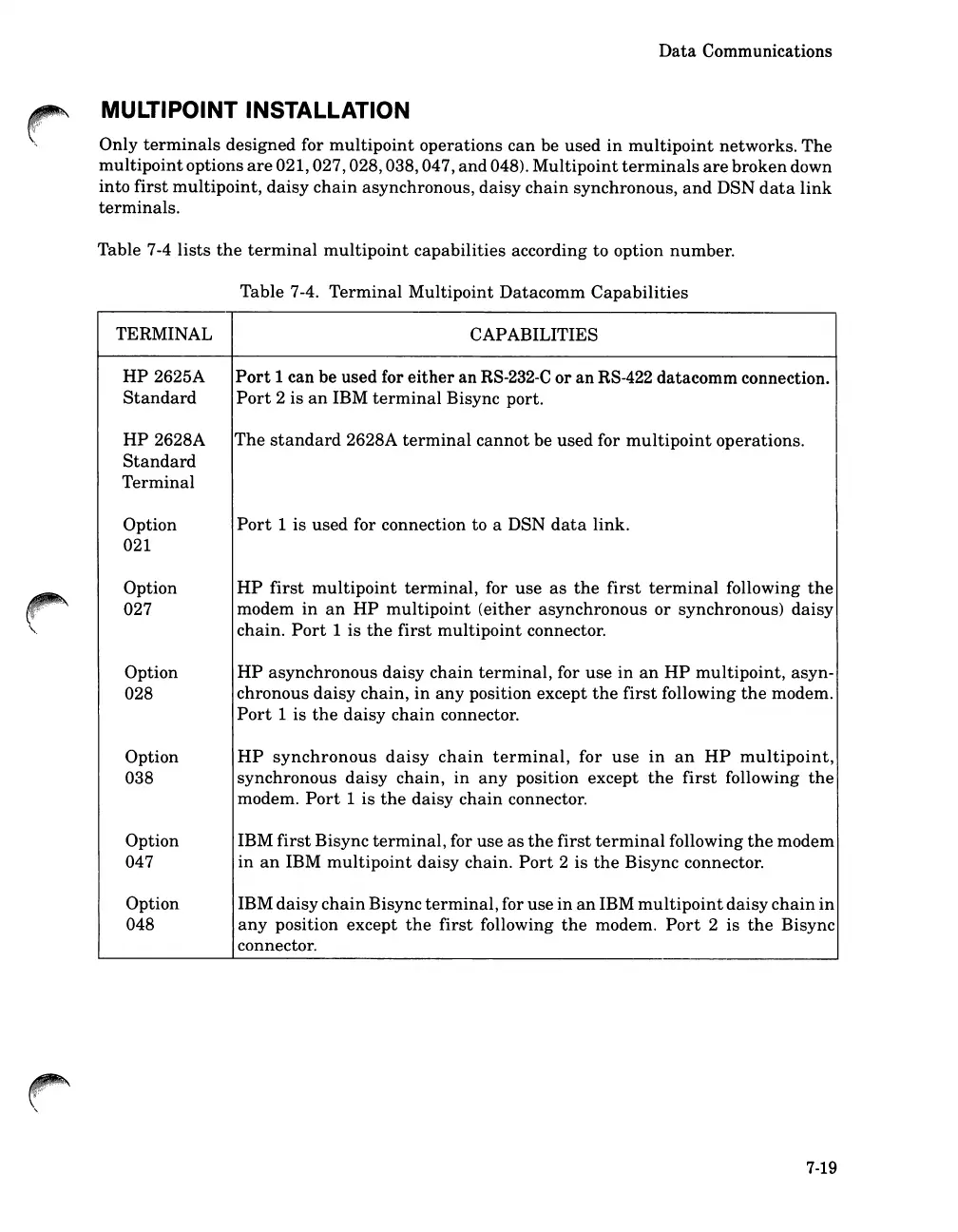
Table 7-4
lists
the
terminal
multipoint
capabilities according to option number.
Table 7-4.
Terminal
Multipoint
Datacomm
Capabilities
TERMINAL CAPABILITIES
HP
2625A
Port
1 can be used for
either
an
RS-232-C
or
an
RS-422 datacomm connection.
Standard
Port
2
is
an
IBM
terminal
Bisync port.
HP
2628A
The
standard
2628A
terminal
cannot
be used for
multipoint
operations.
Standard
Terminal
Option
Port
1 is used for connection to a DSN
data
link.
021
Option
HP
first
multipoint
terminal,
for use
as
the
first
terminal
following
the
027
modem
in
an
HP
multipoint
(either
asynchronous or synchronous)
daisy
chain.
Port
1
is
the
first
multipoint
connector.
Option
HP
asynchronous
daisy
chain
terminal,
for
use
in
an
HP
multipoint,
asyn-
028
chronous
daisy
chain,
in
any
position except
the
first
following
the
modem.
Port
1 is
the
daisy
chain
connector.
Option
HP
synchronous
daisy
chain
terminal,
for
use
in
an
HP
multipoint,
038
synchronous
daisy
chain,
in
any
position except
the
first
following
the
modem.
Port
1
is
the
daisy
chain
connector.
Option
IBM
first
Bisync
terminal,
for use
as
the
first
terminal
following
the
modem
047
in
an
IBM
multipoint
daisy chain.
Port
2
is
the
Bisync connector.
Option
IBM
daisy
chain
Bisync
terminal,
for use
in
an
IBM
multipoint
daisy
chain
in
048
any
position except
the
first
following
the
modem.
Port
2 is
the
Bisync
connector.
7-19

Table of Contents

Related product manuals