Graphics
Table
D-ll.
Graphics Text Functions (Continued)
Key
Description
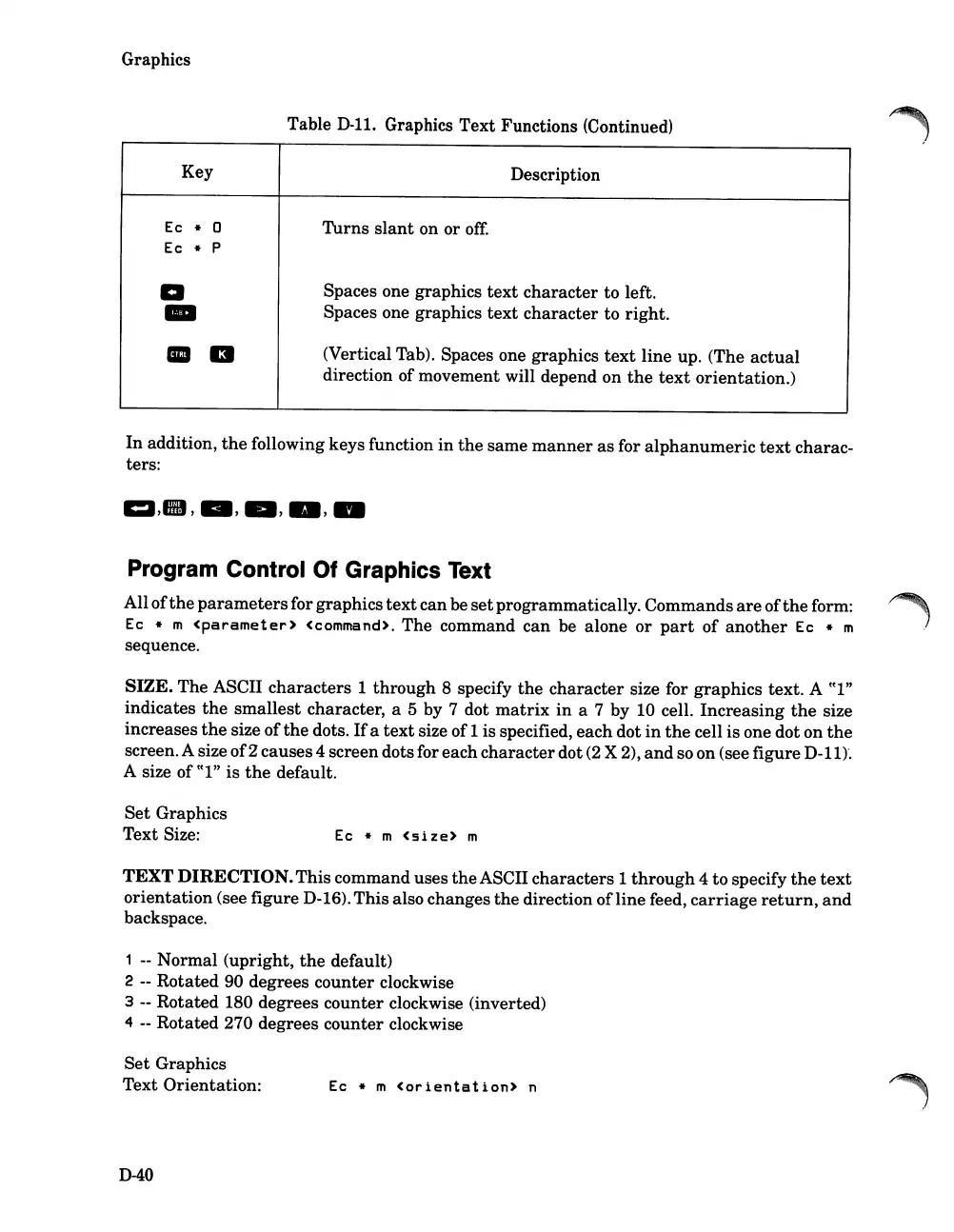
Ec
* 0
Turns
slant
on or
off:
Ec
* P
a
Spaces one graphics
text
character
to left.
-
Spaces one graphics
text
character
to right.
III
a
(Vertical Tab). Spaces one graphics
text
line up. (The
actual
direction of movement will depend on
the
text
orientation.)
In
addition,
the
following keys function
in
the
same
manner
as
for
alphanumeric
text
charac-
ters:
Program Control Of Graphics Text
Allof
the
parameters
for graphics
text
canbe
set
programmatically. Commands
are
of
the
form:
Ec
* m
<parameter>
<command>. The command can be alone or
part
of
another
Ec * m
sequence.
SIZE. The ASCII characters 1
through
8 specify
the
character
size for graphics text. A (tl"
indicates
the
smallest
character, a 5 by 7 dot
matrix
in
a 7 by 10 cell.
Increasing
the
size
increases
the
size of
the
dots.
If
a
text
size of1is specified, each dot
in
the
cell
is
one dot on
the
screen.A size
of2
causes4 screendots for eachcharacterdot
(2
X 2),
and
so on (see figure
D-ll).
A size of ttl"
is
the
default.
Set
Graphics
Text Size:
Ec
* m
<size>
m
TEXT DIRECTION.This command uses
the
ASCII characters 1
through
4 to specify
the
text
orientation
(see figure D-16). This also changes
the
direction ofline feed,
carriage
return,
and
backspace.
1 -- Normal (upright,
the
default)
2 -- Rotated 90 degrees counter clockwise
3 -- Rotated 180 degrees counter clockwise (inverted)
4 -- Rotated 270 degrees counter clockwise
Set
Graphics
Text Orientation:
D-40
Ec
* m
<orientation>
n













 To Next Page