EasyManua.ls Logo

HP 262SA - Page 356

HP 262SA
390 pages
Print Icon
To Next Page IconTo Next Page
To Previous Page IconTo Previous Page
Loading...
3276na Emulation Mode
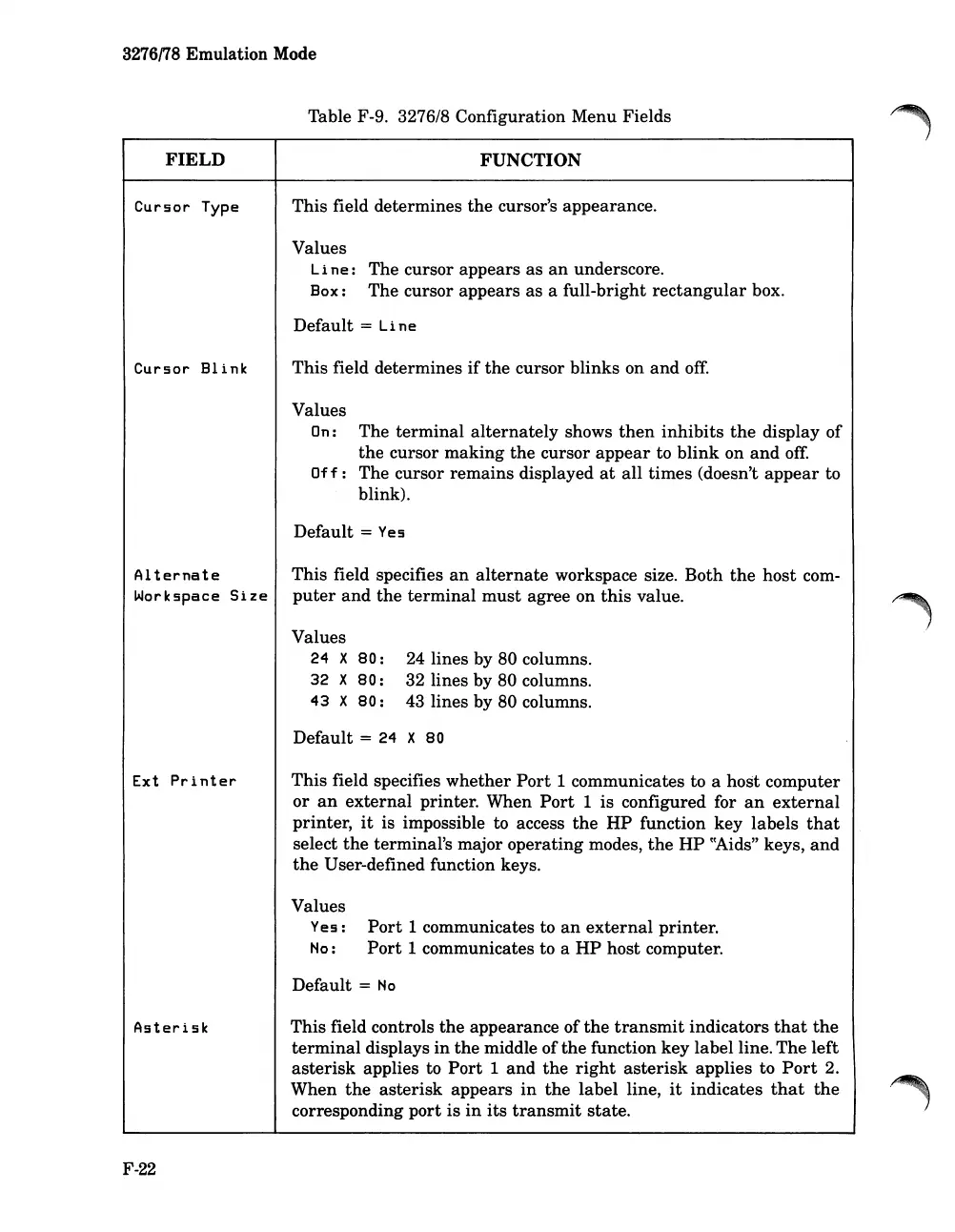
Table F-9. 3276/8 Configuration Menu Fields
FIELD
Cursor
Type
Cursor
Blink
Alternate
Workspace
Size
FUNCTION
This field determines
the
cursor's appearance.
Values
Line:
The cursor appears
as
an
underscore.
Box:
The
cursor appears
as
a full-bright
rectangular
box.
Default
= Li ne
This
field determines
if
the
cursor blinks on
and
off.
Values
On: The
terminal
alternately
shows
then
inhibits
the
display
of
the
cursor
making
the
cursor
appear
to
blink
on
and
off.
Off:
The cursor
remains
displayed
at
all
times
(doesn't
appear
to
blink).
Default
= Yes
This field specifies
an
alternate
workspace size.
Both
the
host
com-
puter
and
the
terminal
must
agree on
this
value.
Values
24
X
80:
32
X
80:
43
X
80:
24 lines by 80 columns.
32 lines by 80 columns.
43 lines by 80 columns.
Ext
Printer
Default =
24
X
80
This
field specifies
whether
Port
1 communicates to a
host
computer
or
an
external
printer. When
Port
1 is configured for
an
external
printer,
it
is impossible to access
the
HP
function key
labels
that
select
the
terminal's major
operating
modes,
the
HP
~~ids"
keys,
and
the
User-defined function keys.
Values
Yes:
No:
Port
1 communicates to
an
external
printer.
Port
1 communicates to a
HP
host computer.
Asterisk
F-22
Default =
No
This
field controls
the
appearance
of
the
transmit
indicators
that
the
terminal
displays
in
the
middle of
the
function key
label
line.
The
left
asterisk
applies to
Port
1
and
the
right
asterisk
applies to
Port
2.
When
the
asterisk
appears
in
the
label line,
it
indicates
that
the
corresponding
port
is
in
its
transmit
state.

Table of Contents

Related product manuals