EasyManua.ls Logo

HP 262SA - Page 217

HP 262SA
390 pages
Print Icon
To Next Page IconTo Next Page
To Previous Page IconTo Previous Page
Loading...
~
\.
Escape Codes
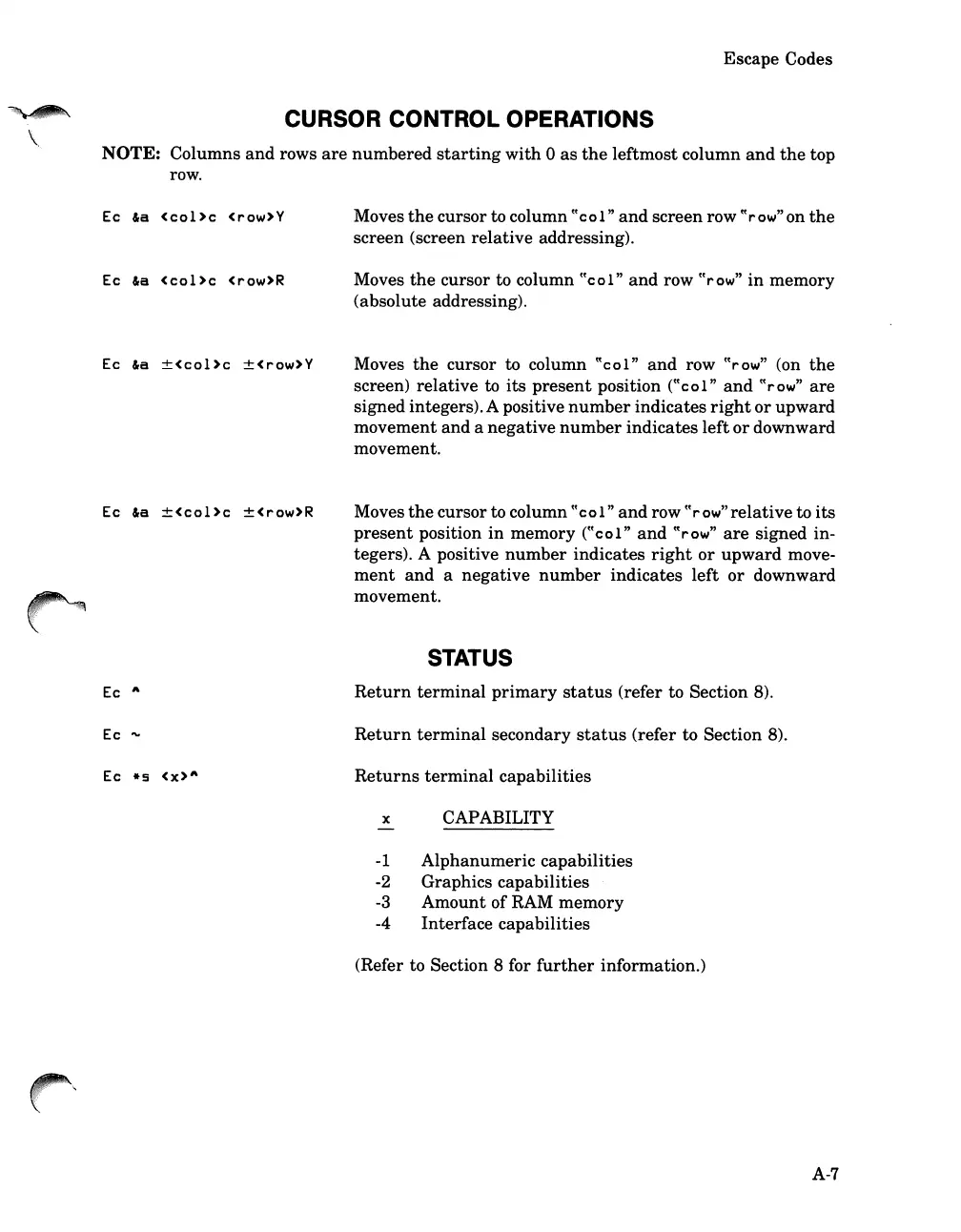
CURSOR CONTROL OPERATIONS
NOTE: Columns
and
rows
are
numbered
starting
with
0
as
the
leftmost
column
and
the
top
row.
Ec
la
<col>c
<rew>Y
Ec
la
<cel>c
<rew>R
Ec
la
±<col
>c
±<rew>Y
Ec
la
±<col
>c
±<rew>R
Ec
A
Ec
"'"
Ec
*5
<X>A
Moves
the
cursor to column
cCcel"
and
screen row
CC
row
"on
the
screen (screen
relative
addressing).
Moves
the
cursor to column
CCcel"
and
row
CC
row
"
in
memory
(absolute addressing).
Moves
the
cursor to column
CCcel"
and
row
CC
rew
" (on
the
screen)
relative
to
its
present
position
CCcol"
and
CC
row
"
are
signed integers).A positive
number
indicates
right
or
upward
movement
and
a
negative
number
indicates
left
or
downward
movement.
Moves
the
cursor to column
cCcol"
and
row ccrow"relative to
its
present
position
in
memory
CCcel"
and
CC
row
"
are
signed in-
tegers). A positive
number
indicates
right
or
upward
move-
ment
and
a
negative
number
indicates
left
or
downward
movement.
STATUS
Return
terminal
primary
status
(refer to Section 8).
Return
terminal
secondary
status
(refer to Section 8).
Returns
terminal
capabilities
x CAPABILITY
-1
Alphanumeric
capabilities
-2 Graphics capabilities
-3
Amount
of
RAM
memory
-4 Interface capabilities
(Refer to Section 8 for
further
information.)
A-7

Table of Contents

Related product manuals