EasyManua.ls Logo

HP 262SA - Page 88

HP 262SA
390 pages
Print Icon
To Next Page IconTo Next Page
To Previous Page IconTo Previous Page
Loading...
Display Control
code
blinking
inverse
video
underline
half
bright
@
A X
B
X
C X
X
D
X
E
X
X
F X
X
G X X X
H
X
I X X
J X X
K X X
X
L
X X
M
X X X
N X X
X
0 X X X
X
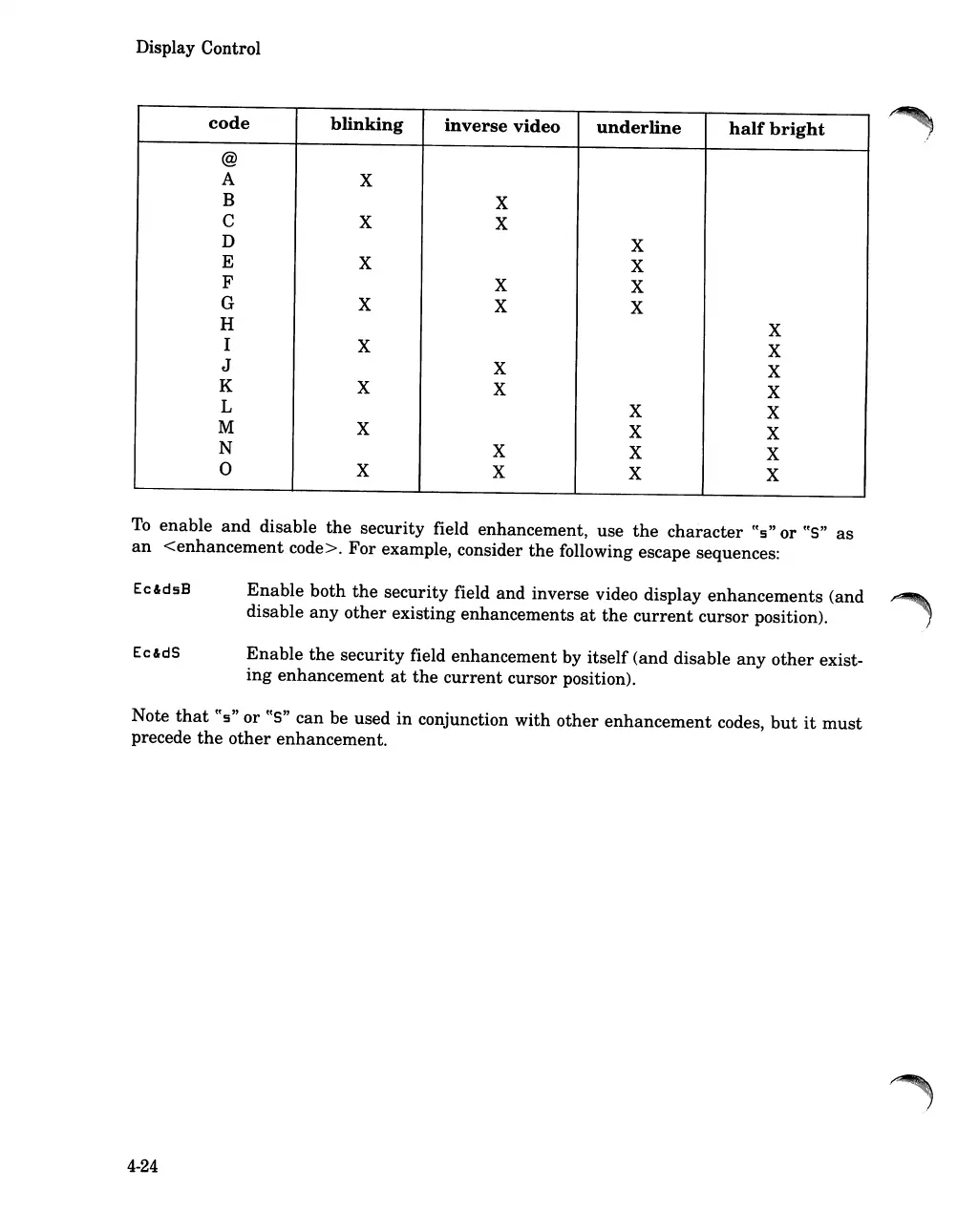
To
enable
and
disable
the
security field enhancement, use
the
character
tt
s
" or
tts"
as
an
<enhancement
code>. For example, consider
the
following escape sequences:
Ec&dsB
Ec&dS
Enable
both
the
security field and inverse video display
enhancements
(and
disable
any
other
existing enhancements
at
the
current
cursor position).
Enable
the
security field enhancement by itself (and disable
any
other
exist-
ing
enhancement
at
the
current
cursor position).
Note
that
~ts"
or
~~S"
can be used
in
conjunction with
other
enhancement
codes,
but
it
must
precede
the
other
enhancement.
4-24

Table of Contents

Related product manuals