990400 Rev C 2010 May 1
Tools
10-9
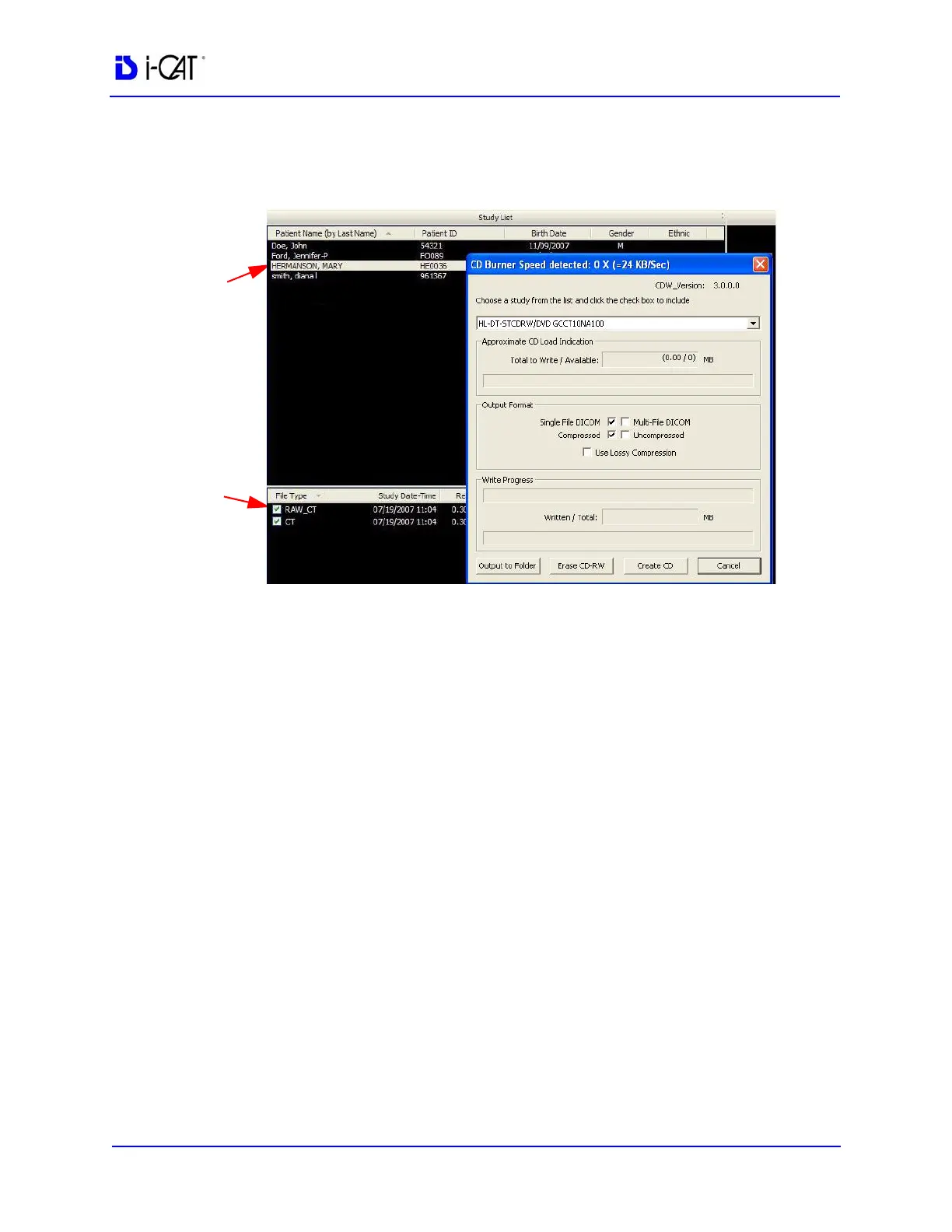
To create a DICOM CD:
1. From the top Main menu, select Tools > Create Export CD.
2. Select desired Output Selections.
• Single File DICOM - one large image file (recommended)
• Multi-File DICOM - a separate file for each image slice,
resulting in many small files. Some earlier model viewers
require this format.
• Compressed - files are compressed to save space (smaller
file size)
• Uncompressed - files are converted to DICOM and stored
(original file size)
• Use Lossy Compression - files are compressed using lossy
wavelet compression. Lossy compressed images are not
intended for Hounsfield measurements.
3. Select (highlight) Patient from Study List.
4. Select Patient Studies by enabling check-boxes.
5. Click Create CD.
6. A confirmation window is displayed and CD ejects when CD is
complete.
7. Click OK. Insert CD and check content on CD to ensure data
was captured.
Patient
Patient
Checkbox
Studies



 To Next Page