17-19 Operators’ Manual
990400 Rev C 2010 May 1
A-6
iCATTransfer Setup
The program must be configured to “watch” for exported DICOM
data from iCAT
®
in order to authenticate and transfer it to the image
root directory. The program needs to be running in the background
in order to detect the exportation of the DICOM Data. The
iCATTransfer program can be placed into the StartUp Menu of the
iCAT
®
Acquisition Computer (or server).
Putting iCATTransfer into the StartUp Menu
1. Right click the START button and select OPEN.
2. Double click Programs folder to open and then double click the
StartUp folder to open.
3. Copy the iCATTransfer.exe file into this StartUp folder.
Configure iCATTransfer
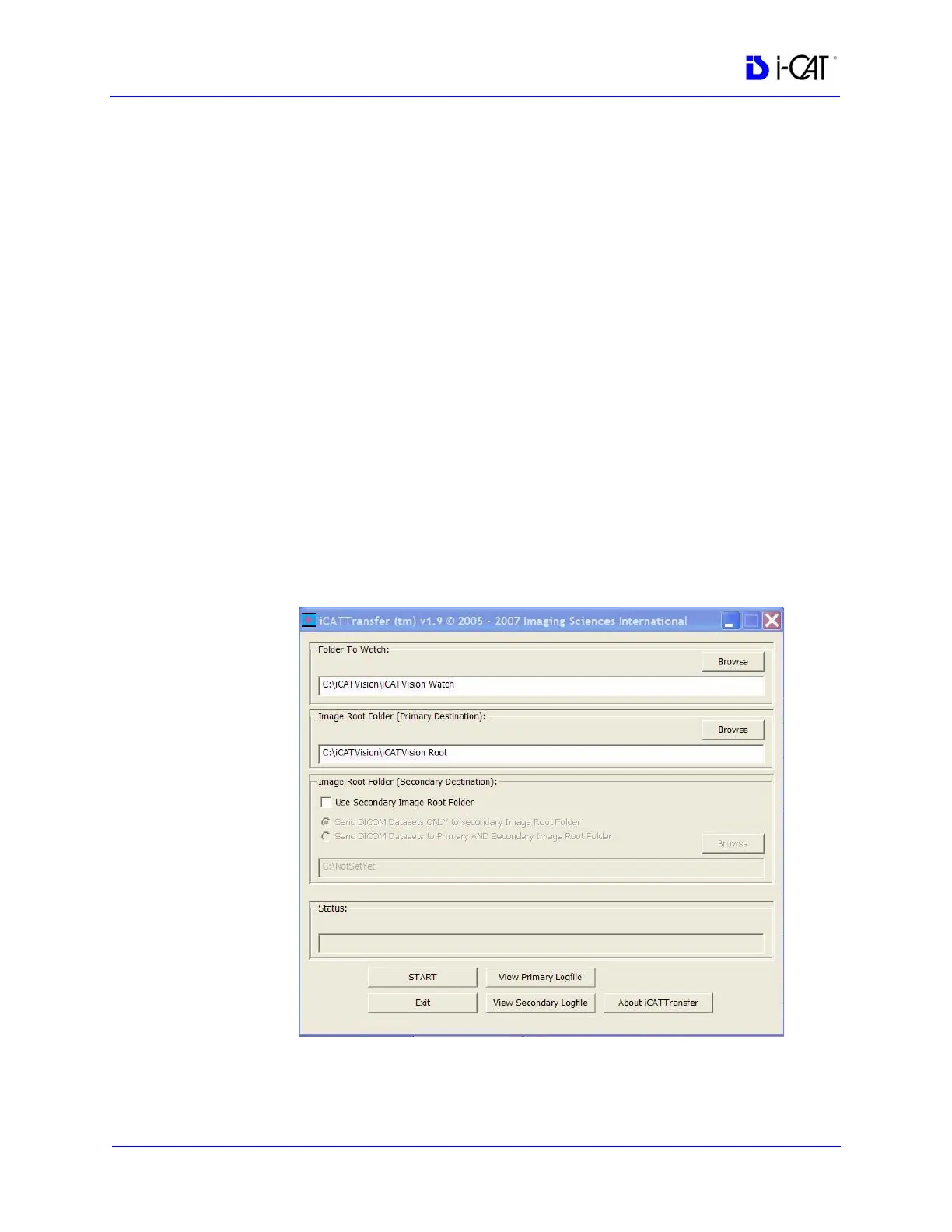
1. Launch iCATTransfer, the following window is displayed.
2. Under Folder to Watch, Browse to iCATVision\ iCATVision
Watch folder and select. (This is most likely on the C: drive of
the iCAT
®
Acquisition Computer).



 To Next Page