EasyManua.ls Logo

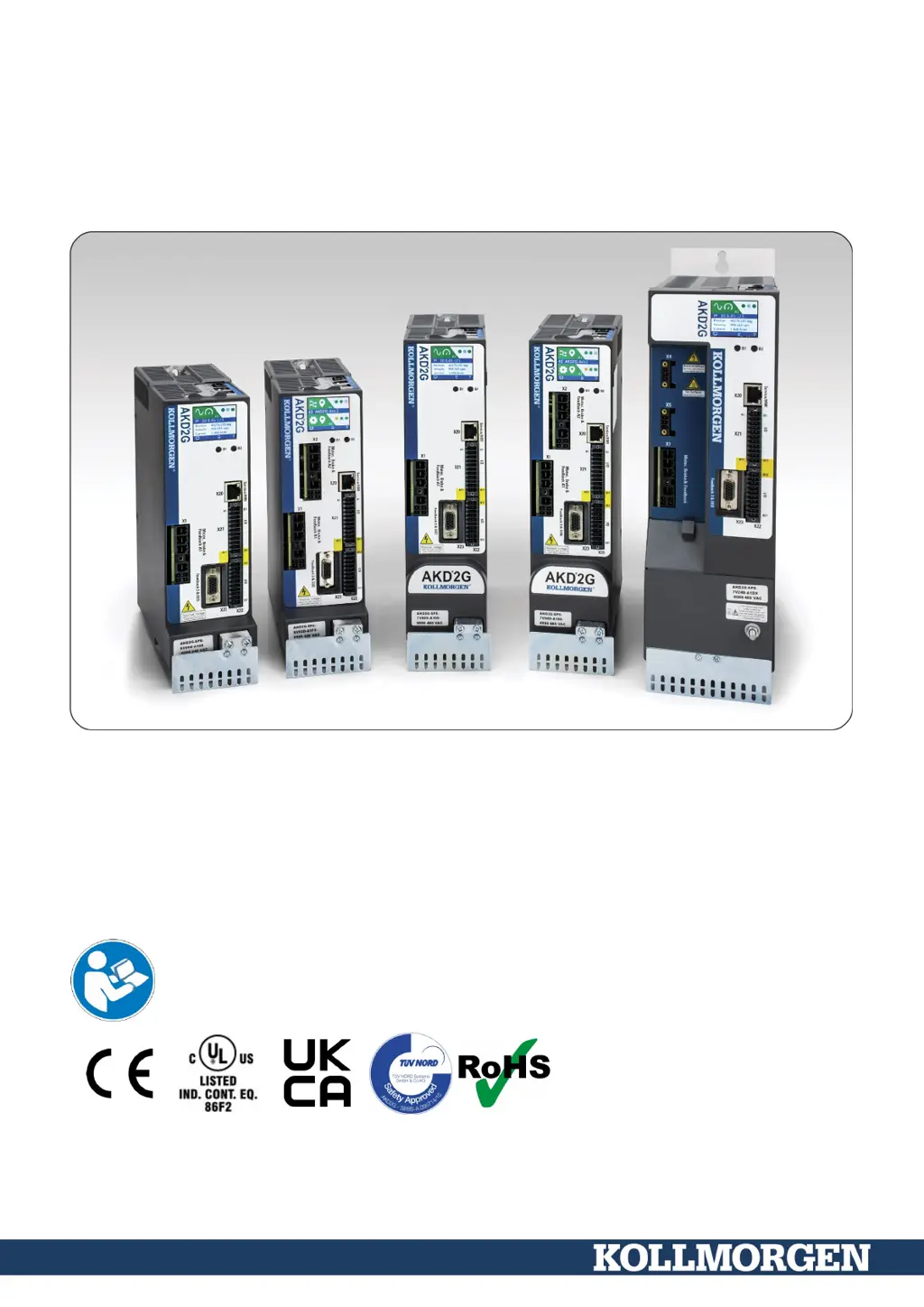
Kollmorgen AKD 2G-S Series - User Manual

Kollmorgen AKD 2G-S Series
210 pages
Print Icon
To Next Page IconTo Next Page
Loading...
AKD
®
2G-Sxx with Functional Safety Option 1
STO - SIL2
Installation Manual, English
Manual Edition: F, June, 2023
Safety Edition: S103, March 2023
Valid for AKD
®
2G-S Hardware Revision A
Part Number 907-200003-00
Original Document
For safe and proper use, follow these
instructions. Keep for future use.

Table of Contents

Questions and Answers

  • J
    Jose LeeSep 9, 2025
    What causes STO to not be deactivated (no torque) in Kollmorgen AKD 2G-S?
    • T
      turnerheatherSep 9, 2025
      STO might not be deactivated (resulting in no torque) due to several reasons: a defective external safety device, defective STO wiring, low auxiliary voltage, defective STO inputs, F9004 or F9005 being visible, OSSD pulses being too long (>1ms), or STO channels being unequal for more than 100ms. To resolve this, check the external safety device, check STO wiring for short-circuit or similar issues, check the voltage level, check the safety hardware system, check the safety controller, and switch off OSSD.
  • R
    Richard NavarroAug 23, 2025
    Why are safety faults and warnings not visible/reported on my Kollmorgen AKD 2G-S Servo Drives?
    • B
      Brittany PetersonAug 23, 2025
      Safety faults and warnings might not be visible or reported because AXIS#.SAFE.STO. REPORTFAULT is set to 0. To fix this, set AXIS#.SAFE.STO. REPORTFAULT to 1.
  • G
    Glenn DiazAug 25, 2025
    Why does my Kollmorgen AKD 2G-S Servo Drives report following error?
    • R
      Robert DavisAug 25, 2025
      If your Kollmorgen Servo Drive reports a following error, it could be due to a few reasons. The Irms or Ipeak settings might be too low, or the current or velocity limits could be applying. Another possibility is that the accel/decel ramp is too long. To address this, verify the motor/drive sizing, make sure that AXIS#.IL.LIMITN/P and AXIS#.VL.LIMITN/P are not limiting the drive, and reduce AXIS#.ACC/AXIS#.DEC.
  • J
    joe81Aug 27, 2025
    How to fix Kollmorgen Servo Drives communication fault?
    • C
      Crystal DavidsonAug 27, 2025
      If you're getting a 'Communication fault' message on your Kollmorgen Servo Drives HMI, it could be due to using the wrong cable or plugging it into the wrong port on either the drive or PC. It could also be that the wrong PC interface is selected. To resolve this, plug the cable into the correct sockets on both the drive and PC and select the correct interface.
  • E
    ericrodgersAug 28, 2025
    Why does my Kollmorgen AKD 2G-S Servo Drives motor not rotate?
    • T
      Taylor BergAug 28, 2025
      The motor might not be rotating due to several reasons: the drive may not be enabled, the software enable is not set, there could be a break in the setpoint cable, the motor phases might be swapped, the brake may not be released, the drive could be mechanically blocked, the motor pole number might be set incorrectly, or the feedback is set up incorrectly. To resolve this, apply the ENABLE signal, set the software enable, check the setpoint cable, correct the motor phase sequence, check the brake control, check the mechanics, set the motor pole number, and correctly set up the feedback.
  • K
    karadavisAug 29, 2025
    How to fix a Kollmorgen Servo Drives motor that oscillates?
    • W
      wthompsonAug 29, 2025
      If your motor is oscillating, it could be because the gain is too high (speed controller), the feedback cable shielding is broken, or AGND is not wired up. To fix this, reduce AXIS#.VL.KP (speed controller), replace the feedback cable, and join AGND to CNC-GND.
  • M
    Melissa Cole MDSep 18, 2025
    Why does my Kollmorgen AKD 2G-S Servo Drives run roughly?
    • K
      kbrownSep 18, 2025
      If the Kollmorgen Servo Drive runs roughly, it could be because AXIS#.VL.Kp (velocity) is too high, AXIS#.VL.Ki (velocity) is too high, or the filters are set too low. To resolve this, reduce AXIS#.VL.KP (velocity), reduce AXIS#.VL.KI (velocity), and refer to documentation regarding increasing filtering (AXIS#.VL.AR*).
  • B
    Brandon FigueroaSep 18, 2025
    Why is my Kollmorgen AKD 2G-S Servo Drives too soft?
    • B
      Brian SmithSep 22, 2025
      If the Kollmorgen Servo Drive feels too soft, it could be because AXIS#.VL.Kp (velocity) is too low, AXIS#.VL.Ki (velocity) is too low, or the filters are set too high. To resolve this, increase AXIS#.VL.KP (velocity), increase AXIS#.VL.KI (velocity), and refer to documentation regarding reducing filtering (AXIS#.VL.AR*).
  • L
    Lori FosterSep 7, 2025
    What to do if my Kollmorgen AKD 2G-S drive runs roughly?
    • C
      Christina SimmonsSep 8, 2025
      If the drive runs roughly, it might be because AXIS#.VL.Kp (velocity) or AXIS#.VL.Ki (velocity) are too high, or the filters are set too low. To address this, reduce AXIS#.VL.KP (velocity) and AXIS#.VL.KI (velocity). For increasing filtering (AXIS#.VL.AR*), refer to the documentation.
  • H
    hbarrSep 4, 2025
    What to do if my Kollmorgen AKD 2G-S drive is too soft?
    • G
      George RamirezSep 5, 2025
      If the drive feels too soft, it could be because AXIS#.VL.Kp (velocity) or AXIS#.VL.Ki (velocity) are too low, or the filters are set too high. You can increase AXIS#.VL.KP (velocity) and AXIS#.VL.KI (velocity). For reducing filtering (AXIS#.VL.AR*), refer to the documentation.

Summary

General Information and Document Navigation

About this Installation Manual

Details the scope and purpose of the AKD2G Installation Manual.

Symbols and Abbreviations Used

Explains warning symbols, drawing symbols, and document abbreviations.

Product Safety Guidelines

Specialist Staff and Documentation Requirements

Highlights the need for qualified personnel and reading all documentation.

Handling and Operational Precautions

Covers electrostatic discharge, hot surfaces, earthing, leakage current, and noise.

Permitted Use and Prohibited Environments

Defines the intended application and environments where the drive must not be used.

Shock-Hazard Protection Measures

Details leakage current, RCDs, and isolating transformers for shock protection.

Stop, Emergency Stop, and Emergency Off Functions

Explains different stop categories and their functional safety aspects.

Product Life Cycle Management

Transport, Packaging, and Storage Guidelines

Provides instructions for handling, packaging, and storing the AKD2G drives.

Installation, Setup, and Normal Operation

Covers installation steps, normal operation, and maintenance procedures.

Decommissioning, Disassembly, and Repair

Outlines procedures for safe decommissioning, disassembly, and system repair.

Disposal Procedures

Instructions for proper disposal of the unit and contact information.

Package Contents and Identification

Items Included in the Drive Package

Lists the standard components included with the AKD2G drive.

Drive Nameplate Information

Describes the information found on the drive's nameplate.

AKD2 G Part Number Scheme

Explains the structure and meaning of the AKD2G part numbers.

Technical Description and Data

AKD2 G Family Overview

Introduces the AKD2G digital drive family and its versions.

Ambient Conditions and Mounting Requirements

Specifies environmental conditions, ventilation, and mounting position.

Mechanical and Performance Specifications

Details mechanical dimensions and performance data of the drives.

Electrical Data and Specifications

Provides electrical data for single and dual axis variants.

Electrical Motor Braking Functions

Explains drive dynamic and regeneration braking methods.

LCD Display and Push-button Interface

Describes the drive's LCD display and push-button operations.

SD Card Slot Functionality

Details the use of the SD card slot for recovery and backup.

Mechanical Installation Procedures

Important Notes for Mechanical Installation

Covers EMC grounding, handling, and installation precautions.

Mechanical Installation Guide and Dimensions

Provides step-by-step guidance and dimensional drawings for mounting.

Electrical Installation and Wiring

General Electrical Installation Notes

Key safety and wiring precautions before starting electrical installation.

Wiring and Cable Requirements

Details connector types, cable specifications, and wire requirements.

EMI Noise Reduction and Shielding

Instructions for reducing electrical interference and proper shielding.

Connection Overview and Diagrams

Visual guides to drive connector positions and wiring layouts.

Power Supply and Voltage Connections

Covers mains and auxiliary voltage supply connections.

Motor and Brake Connections

Details how to connect motors and brakes.

Feedback Connections Overview

Explains the different feedback channels and their connector assignments.

Communication Interface Connections

Wiring for Ethernet Fieldbus, CAN-Bus, Service, Modbus, and I/O connectors.

Drive Setup and Configuration Procedures

Initial Drive Setup and Test Procedure

Step-by-step guide for initial drive testing and configuration.

WorkBench Software Installation and Usage

Instructions for installing and using the WorkBench configuration software.

Drive Switch-On and Switch-Off Behavior

Describes the sequence for power-up, power-down, and fault behaviors.

Fault and Warning Message Interpretation

Explains how to read and interpret drive fault and warning codes.

Troubleshooting Common Drive Issues

Provides guidance on diagnosing and resolving common drive problems.

Functional Safety Manual (FS1)

General Safety Notes and Requirements

Covers general safety principles, personnel qualifications, and system compliance.

Verification of Safety Functions

Details diagnostic tests and verification procedures for safety functions.

Safety Function STO (Safe Torque Off)

Explains the STO function, its technical data, and activation.

Safety Faults, Warnings, and Troubleshooting

Covers drive safety faults, warnings, and troubleshooting steps.

Functional Safety Parameter Reference

Lists and describes parameters related to functional safety functions.

Approvals and Conformance Standards

UL and cUL Conformance

Details UL and cUL listings and requirements for 3-12 A drives.

European Union (EU) Conformance

Outlines compliance with EU directives and EMC requirements.

United Kingdom (UK) Conformance

Specifies UK regulations and authorized representative information.

User Documentation Requirements

SDRS;SSRS Requirements for Documentation

Specifies requirements for safety-related systems documentation.

IEC 61508-2 Annex D Documentation Requirements

Details user documentation requirements based on IEC 61508-2 Annex D.

ISO 13849-1 Clause 11 Documentation Requirements

Outlines user documentation requirements from ISO 13849-1 Clause 11.

Revisions History

Lists the revision history of the manual and associated documents.

Kollmorgen AKD 2G-S Series Specifications

General IconGeneral
BrandKollmorgen
ModelAKD 2G-S Series
CategoryServo Drives
LanguageEnglish

Related product manuals