5-36 View Spectrum Normalized Model 831 Manual
6, 8 and 2 keys to input a numerical value and press
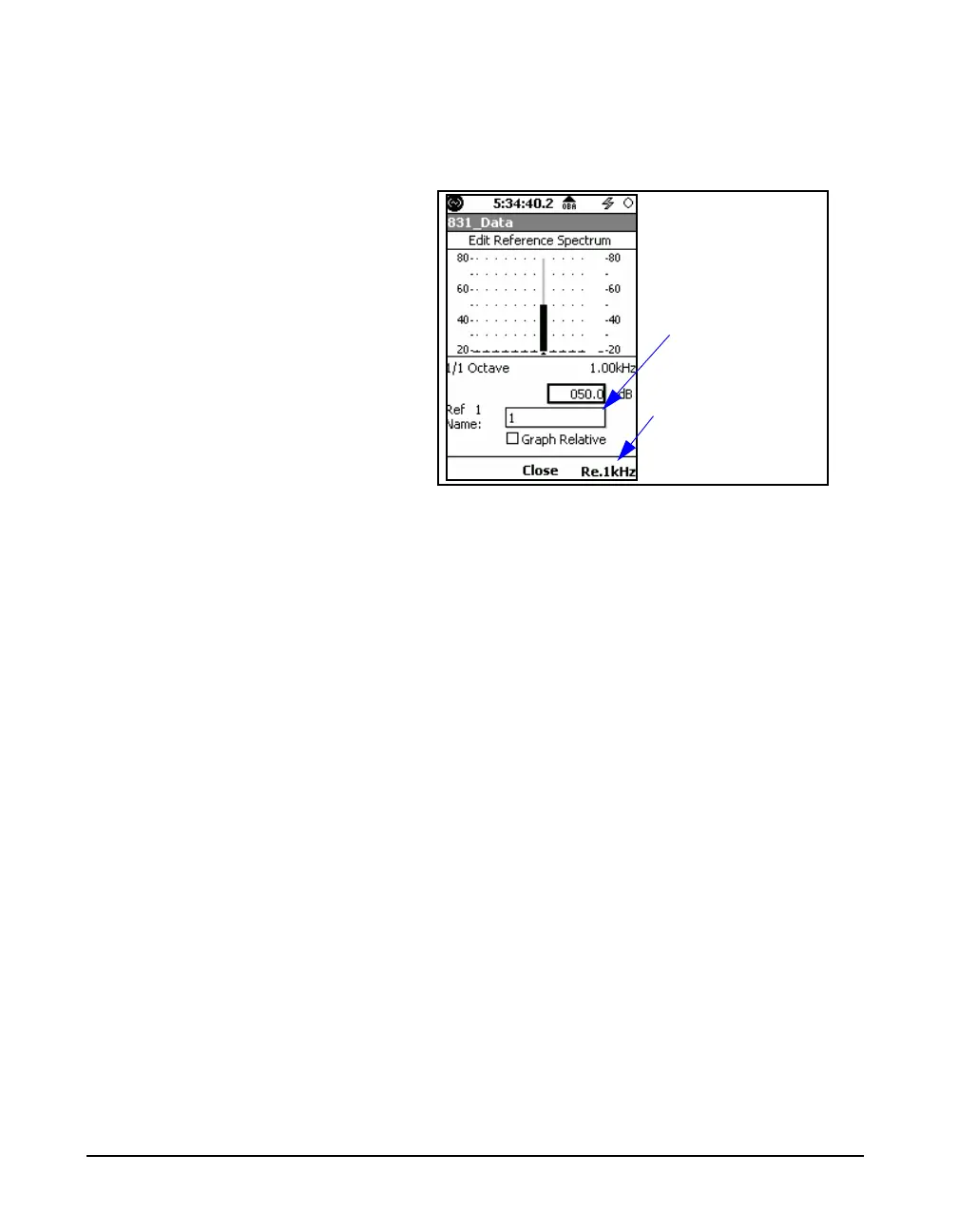
5 to complete the process. In this example the cursor is on
the 1 kHz frequency band, so if the amplitude were entered
to be 50 dB, the result would be as shown in FIGURE 5-42
FIGURE 5-42 Example User-Defined Reference
Spectrum; 50 dB @ 1 kHz
Continue this procedure band-by-band until the desired
reference spectrum has been defined.
Saving a User-Defined Reference Spectrum
When the desired spectrum has been defined, highlight the
Name Reference Spectrum field as shown in FIGURE 5-
42, press
5, use the 4, 6, 8 and 2 keys to input a
name and press
5 again to save this as a user-defined
spectrum under this name.
Offset Reference Spectrum to 1kHz band level
Pressing the Re.1kHz softkey, as shown in FIGURE 5-42,
will change all of the band levels to be offset relative to the
level at 1 kHz (the level at 1 kHz will be subtracted from all
band level values in the reference spectrum and the level in
the 1 kHz band will be 0.0 dB).
Name Reference
Spectrum
Reference Spectrum
Levels to the 1kHz
level



 To Next Page