Group 7 Data/Programming Page 126
Release R1.03e LEIBINGER JET3
7.5.5.3 Drawing tools
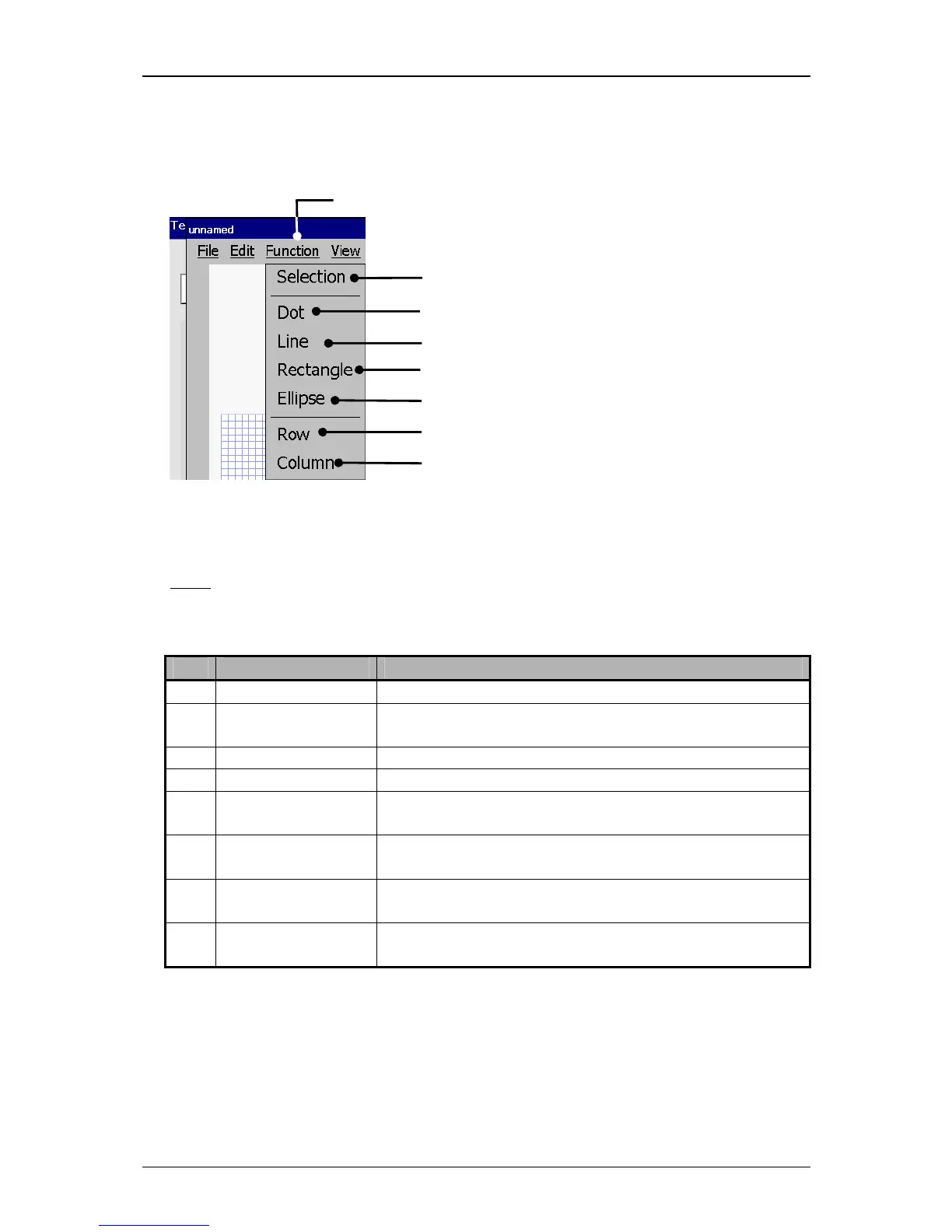
Fugure 70
1 – Button <Function>
2 – Drawing tool <Selection>
5 – Drawing tool <Rectangle>
6 – Drawing tool <Ellipse>
8 – Drawing tool <Column>
Graphic editor (Drawing tools)
With the button <Function> you can select the tools to create graphic elements
and you can select (mark) the graphic segments.
Note:
The function of the tools refers to the Windows™-drawing tools.
Irrespectively of the set raster size, points are always created with a raster
size 1x1 and lines- and circle elements are created with a raster width 1.
Pos. Drawing tool Function
2. Selection
Provides the marking of a created graphic segment for
editing.
3. Dot Provides the creation of a point.
4. Line Provides the creation of a line in the requested length.
5. Rectangle Provides the creation of a rectangle or quad in the
requested size.
6. Ellipse Provides the creation of a circle or an ellipse in the
requested size.
7. Row Generates a (horizontal) line with the total length of the
selected row.
8. Column (Gap) Generates a (vertical) line with the total length of the
selected gap.



 To Next Page