Group 7 Data/Programming Page 143
Release R1.03e LEIBINGER JET3
7.5.7.4 Delete jobs
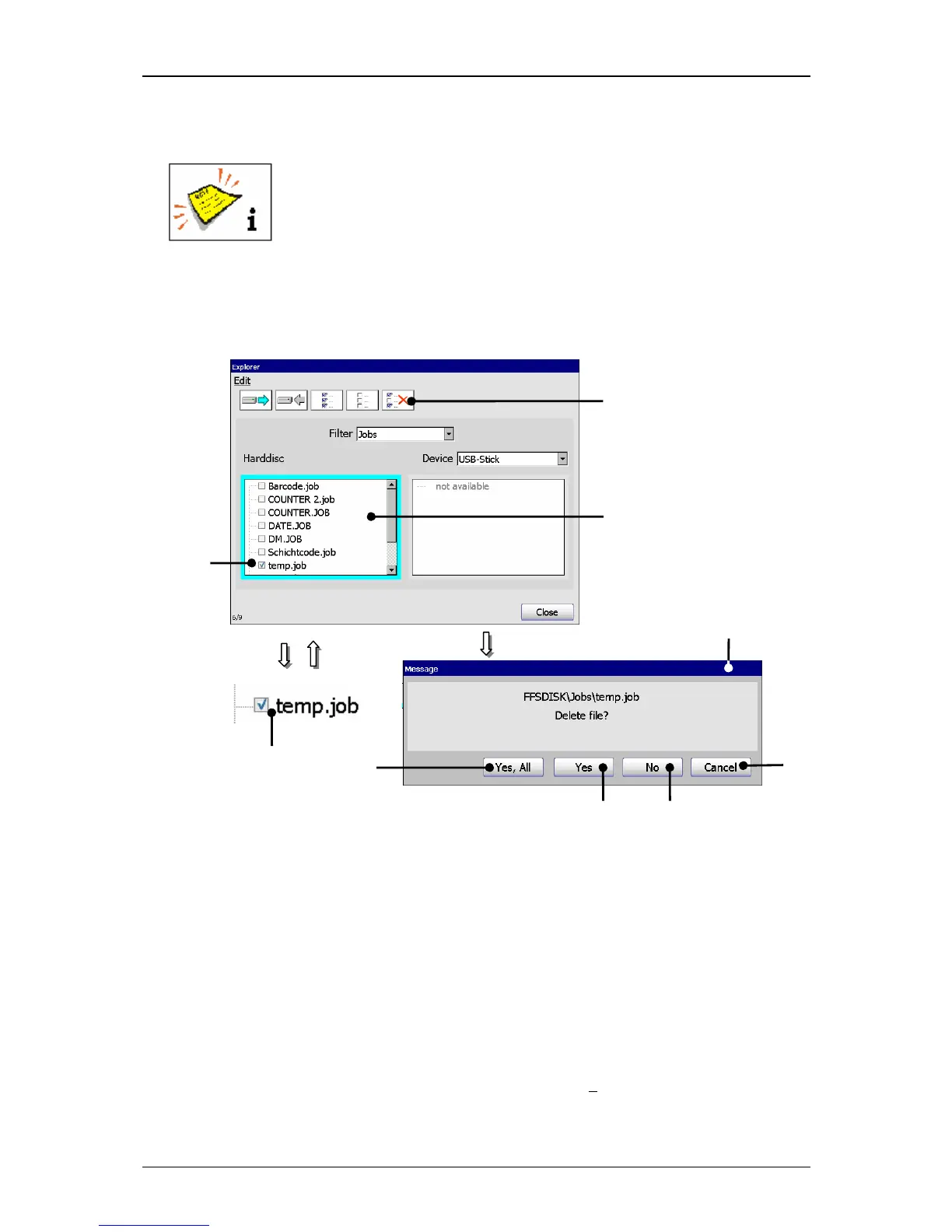
A job can only be deleted in the explorer!
(Example: The job „temp“ should be deleted in the internal memory.)
Figure 81
Explorer (Delete job)
1 – Selection window <Harddisc> 5 – Button <Cancel>
2 – Marked job 6 – Button <No>
3 – Tool <delete> 7 – Button <Yes>
4 – Message <Delete file> 8 – Button <Yes, All>
Proceeding:
Click on the display area of the selection window <Harddisc> (1) to activate it.
The border of the window is now displayed turquoise.
Select the job with the designation“temp.job“ (2) by clicking on the control box
or the designation. The selection is displayed with a √
in the control box.



 To Next Page