Group 6 Operation – Elements and procedures Page 46
Release R1.03e LEIBINGER JET3
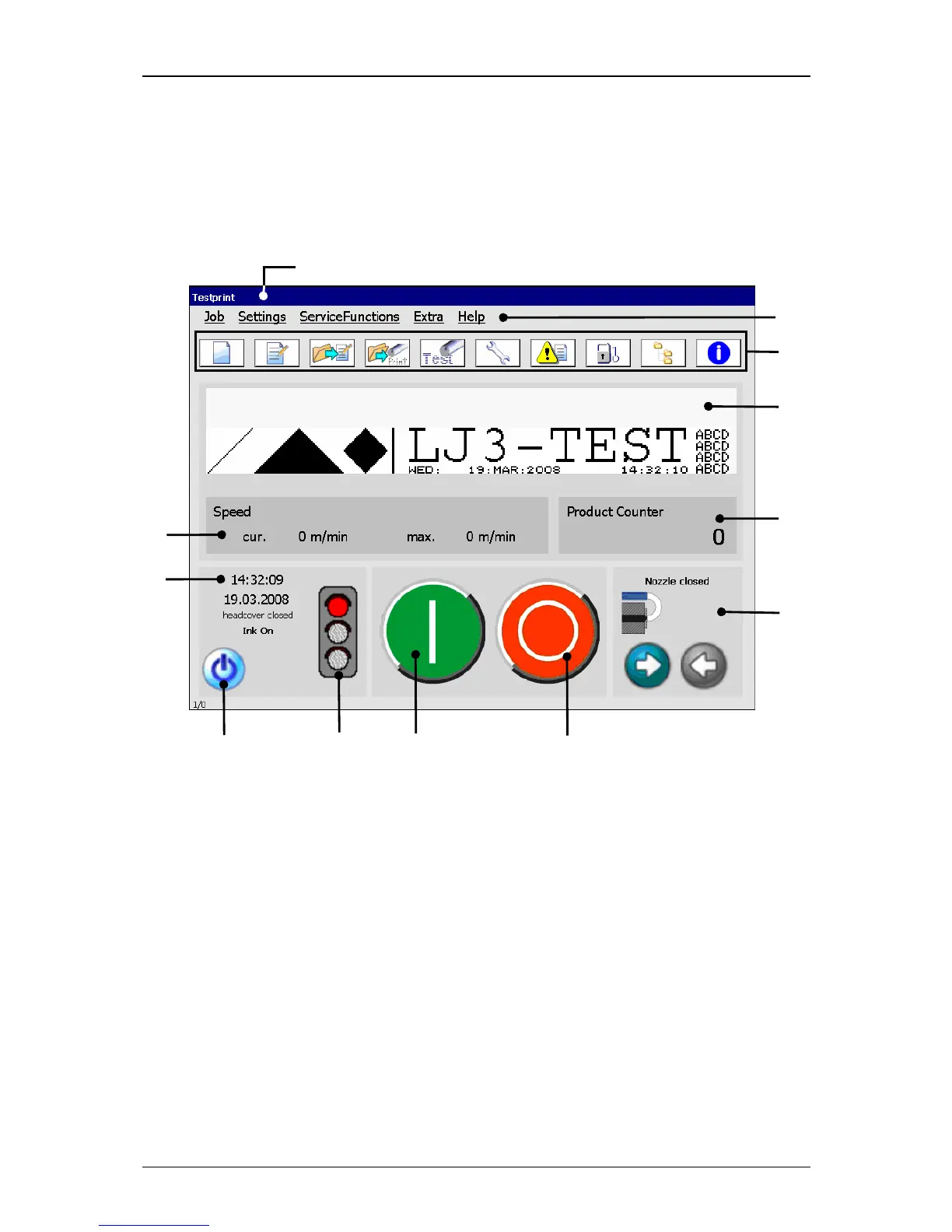
6.3 Essential operating- and information elements
This chapter describes the essential operating- and information elements of the
LEIBINGER JET3 main menu.
Figure 12
Main menu (construction)
1 – Title bar 7 – Status field <General>
2 – Main menu bar 8 – Status field <Nozzle>
3 – Direct buttons 9 – Device status (traffic light)
4 – Display range 10 – Button <Off/Shut down>
5 – Status field <Printing speed> 11 – Button <Printstart>
6 – Status field <Product counter> 12 – Button <Printstop>
Title bar (1): The title bar is displayed at the top of the main menu and contains the
name of the active printing job.
Main menu bar (2): The corresponding menus of the JET3 can be called with the
buttons in the main menu bar. The following menus are available:
Job Servicefunctions Help
Settings Extra



 To Next Page