Group 7 Data/Programming Page 95
Release R1.03e LEIBINGER JET3
7.4.3.2 Ink on/off
With the two buttons <Ink on > (2) and <Ink off >
(3) the ink delivery to the
nozzle is turned on or off.
The status of the ink delivery is designated by a on the accordant button.
This function can be generated also „remote-controlled“ by an electronical contact
(see also the informations in the following chapter).
7.4.3.3 Extern Ink on/off
During cleaning works at the print head it can be helpful (e.g. in case of a long
umbilical) that the ink delivery can be turned on/off externally. The JET3 requires
impulses for the control.
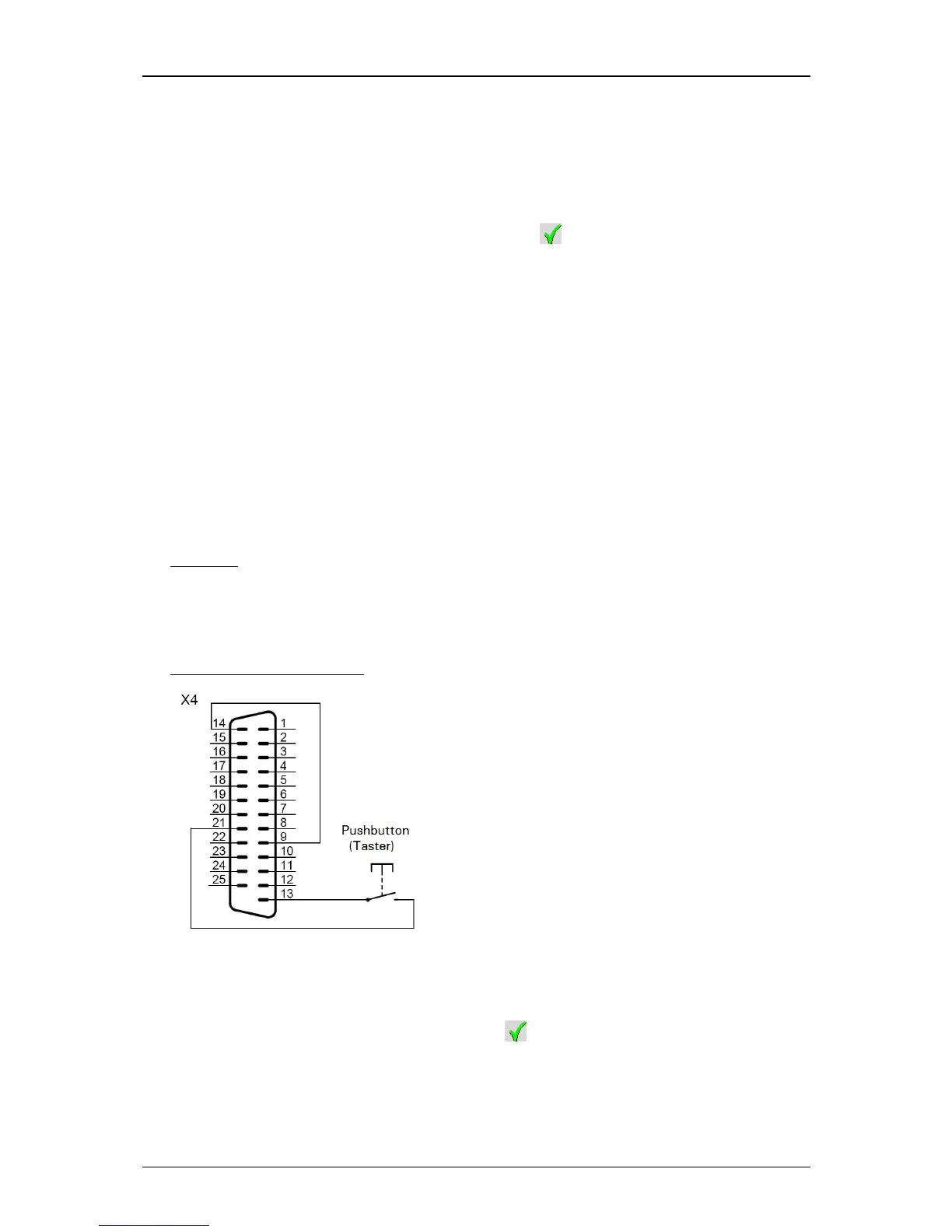
This can be reached with a bridge between pin 9 and 14 and a switch contact
(pushbotton) at the pins 21 and 13 of the I/O interface X4.
Example:
First impulse = switches off the ink delivery
Second impulse = switches on again the ink delivery
Diagram/Plug assignment:
The signal which is pending at the interface is only analyzed by the JET3 if the
function <Extern Ink on/off active> (4) is turned on.
If the function is activated, it is shown by a on the display.



 To Next Page