Group 6 Operation – Elements and procedures Page 59
Release R1.03e LEIBINGER JET3
6.4.4 Reset product counter
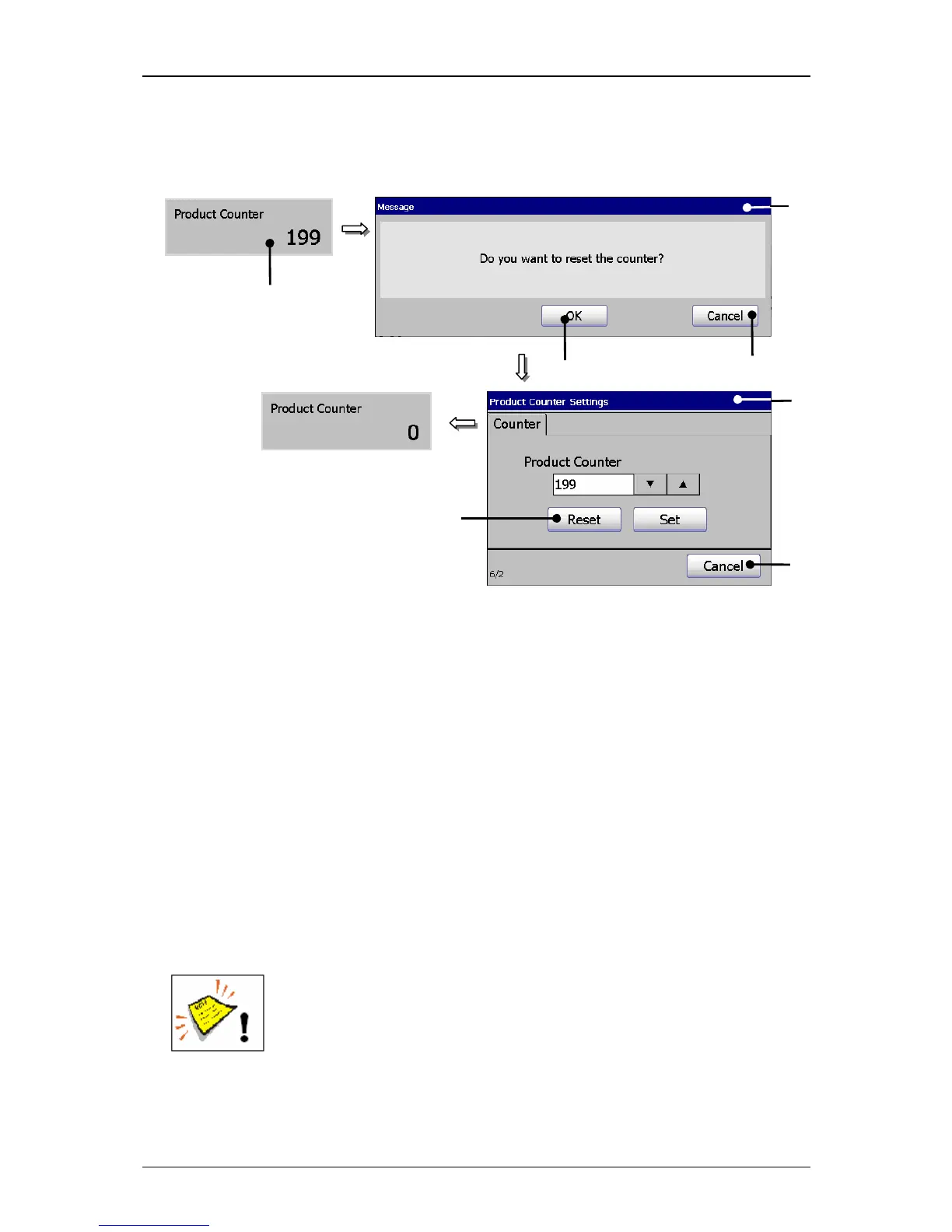
Figure 21
Reset product counter
1 – Status field <Product Counter> 5 – Window <Product counter settings>
2 – Message <Safety query> 6 – Button <Reset>
3 – Button <OK> 7 – Button <Cancel>
4 – Button <Cancel>
Proceeding:
Press on the status field <Product counter> (1).
A safety query (2), if the counter should be really reset is faded in.
Confirm the reset by pressing on the button <OK>
(3) or cancel the process
with the button <Cancel> (4).
The window <Product Counter Settings> (5) is faded in.
Confirm the reset of the counter again by pressing on the button <Reset>
(6)
or cancel the process with the button<Cancel> (7).
Attention! If job counters (object counters) whose existing settings
<Counter Reset>
have been applied with the attribute „Product
Counter“ are available in the current job, they will be also reset.
You will find further information also in the chapter Change product
counter as well as in the chapter Product counter!
1
3



 To Next Page