Group 8 Job editor Page 160
Release R1.03e LEIBINGER JET3
8.3.2 Load job to print
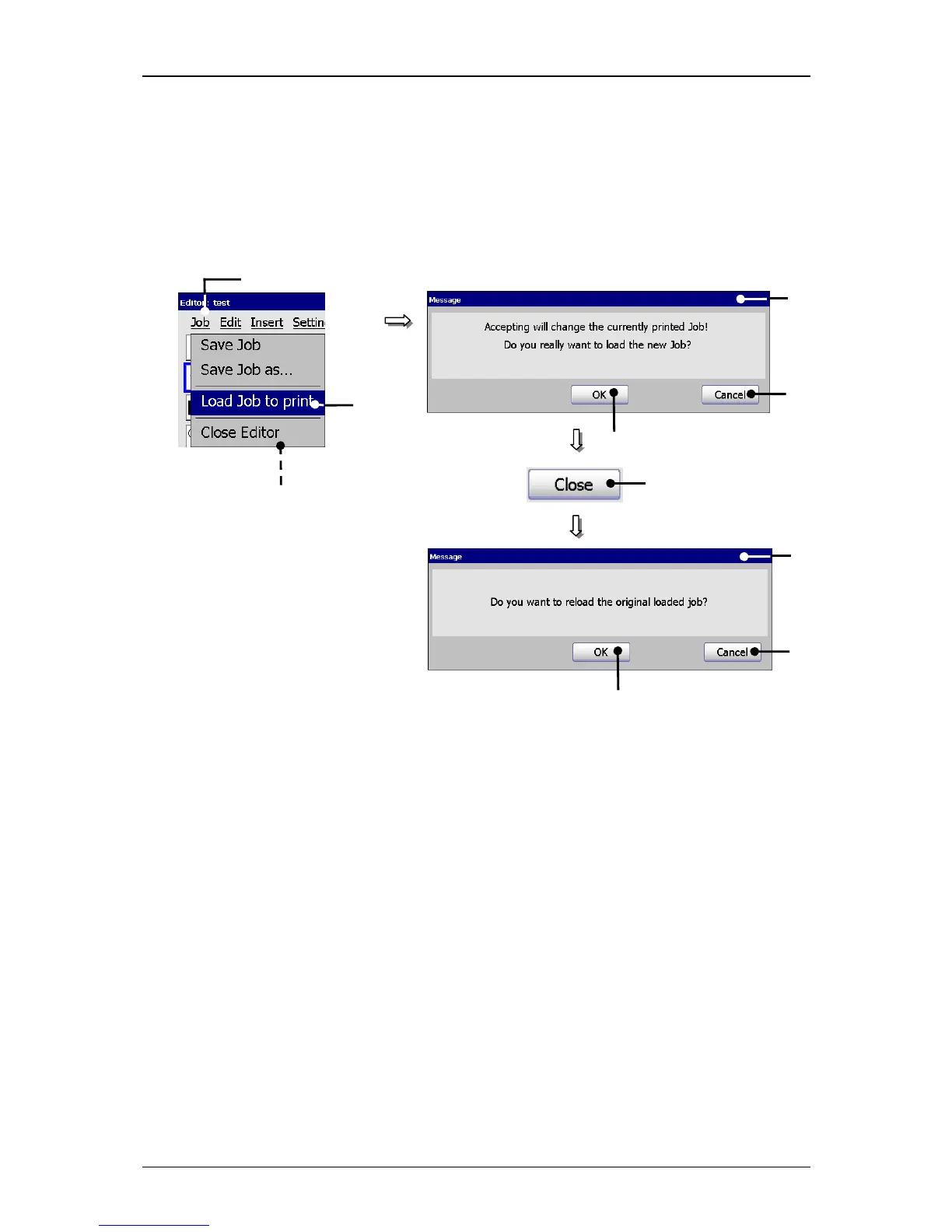
With the option <Load Job to print>
the job which is currently opened in the job
editor can be loaded directly for printing.
Figure 93
Job editor (Load job to print)
1 – Button <Job> 6 – Button <Close>
2 – Option <Load Job to print > 7 – Option <Close Editor>
3 – Message <Print job change> 8 – Message <Reload original job>
4 – Button <OK> 9 – Button <OK>
5 – Button <Cancel> 10 – Button <Cancel>
Proceeding:
Press the button <Job> (1) and the option <Load job to print> (2).
A safety query (3), if the print job should be really changed is faded in.
Confirm the change by pressing on the button <OK>
(4) or cancel the process
with the button <Cancel> (5).
The job in the job editor is now loaded for printing. Attention! If a print start
release has already happened for the original job, the JET3 starts immediately
with the printing process.
1



 To Next Page