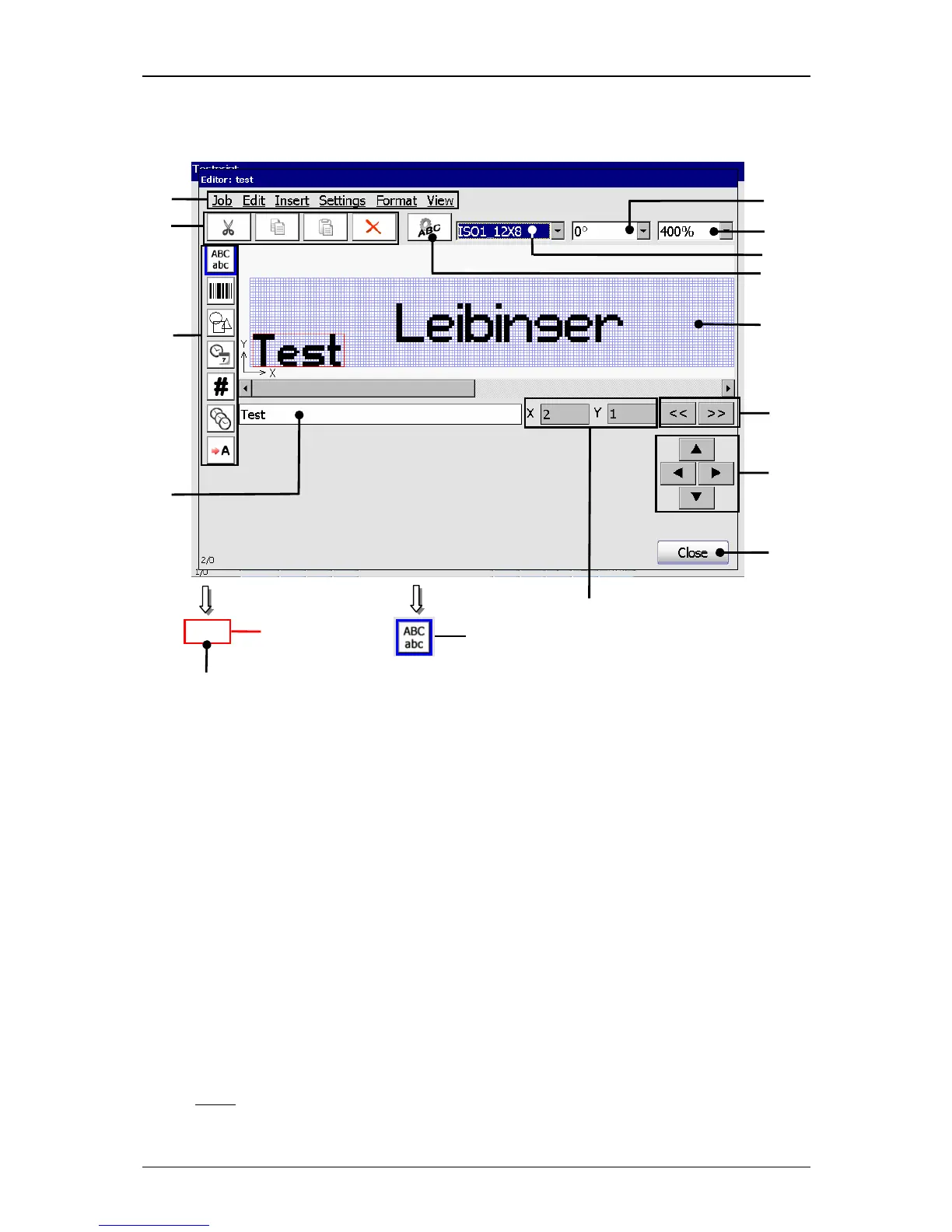
1 – Menu bar 8 – Display area <Print image>
2 – Direct buttons <Creation tools> 9 – Input field <Text>
3 – Direct buttons <Editierwerkzeuge> 10 – Display <Coordinates>
4 – Direct button <Object settings> 11 – Object framen
5 – Pop-up window <Font selection> 12 – Skip buttons
6 – Pop-up window <Orientation> 13 – Directional buttons
7 – Pop-up window <Zoom> 14 – Button <Close>
Input field <Text> (9): In the field the text of the selected text print element is
displayed. By clicking in the field a keyboard field opens to change the input.
If the creation tool <Text> is activated a keyboard field also opens and you can
see the inputs directly in the input field (9).
On the display <Coordinates>
(10) the start position (bottom left corner) of the
selected printing element is dispalyed.
Note:
For the displayed position not the actual printing element but the position



 To Next Page