Home
Leibinger
Industrial Equipment
JET3
Page 186
Leibinger JET3 - Page 186
233 pages
Manual
Save Page as PDF
To Next Page
To Next Page
To Previous Page
To Previous Page
Loading...
Group 8
Job editor
Page 186
Release R1.03e
LEIBINGER JET3
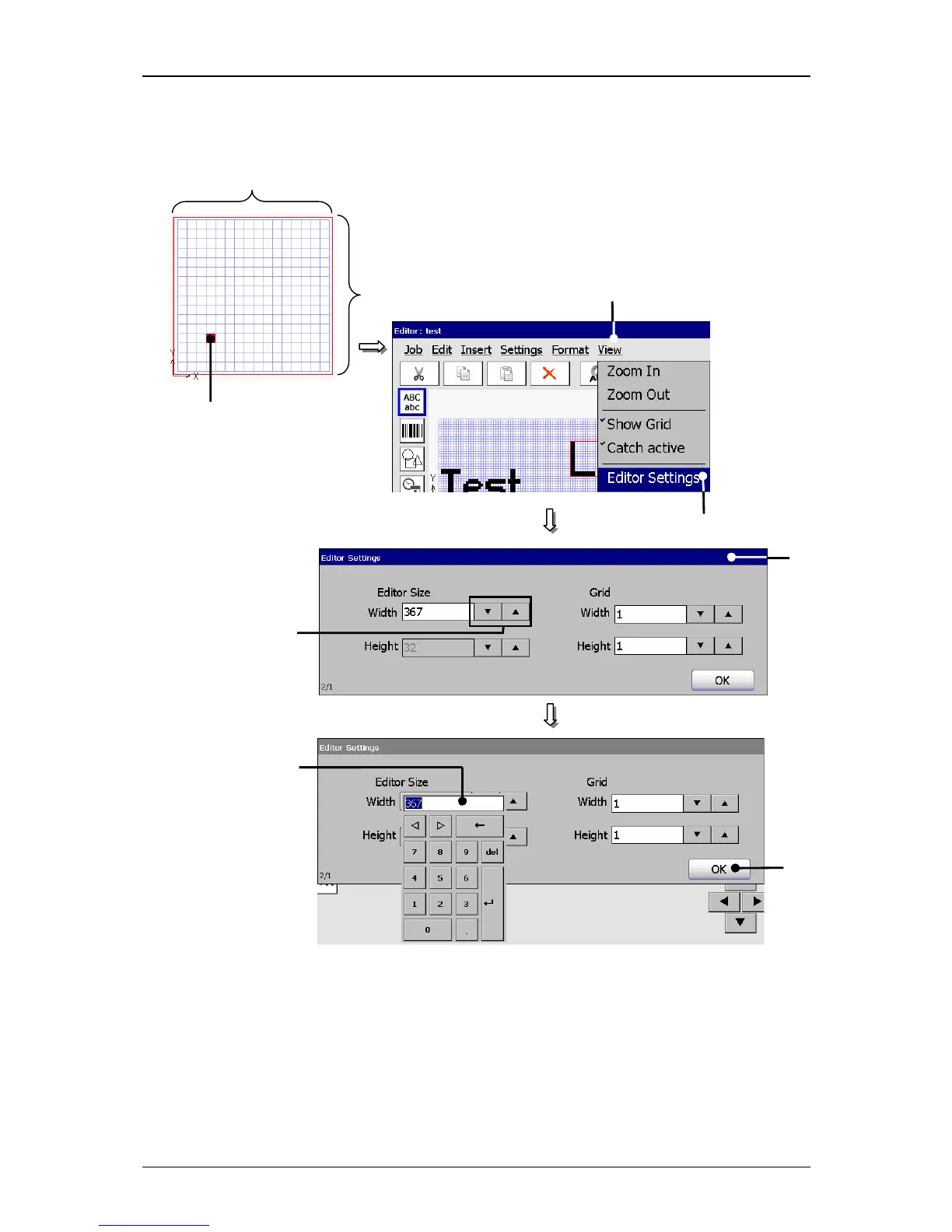
Figure 117
Job editor (Carry out editor settings)
1 – Button <View>
4 – Arrow buttons
2 – Option <Editor Settings>
5 – Display field
3 – Window <Editor Settings>
6 – Button <OK>
Grid size
2
5
6
4
3
Editor size (width)
1
Editor
size (hei
g
ht)
185
187
Table of Contents
Main Page
Default Chapter
1
Table of Contents
1
Group Directory
8
Publisher
9
Introduction
11
Document Information
12
Guarantee
12
2 Safety
13
Scope of Risks
13
Safety Instructions and Recommendations
13
Intended Use
15
Safety Sticker
16
Operating Staff
17
Dangers Due to Electric Energy
17
Personal Protective Equipment
17
Protective Devices
17
Safety Measures at the Place of Installation
18
Dangers through Consumables
18
3 Accident Prevention
20
Storage and Handling (Normal Use)
20
First Aid Measures
21
Fire Fighting Measures
21
Measures in the Event of Accidental Release (Spillage)
22
4 Technical Data
23
Dimensions, Weights, Connections
23
Electrical Connection Values
23
Ambient Conditions
24
Interfaces, Inputs, Outputs
24
Performance Parameter
24
Fonts
25
Types of Writing
25
Font Combinations
25
Function
25
Software
26
5 Transport/Start up
27
Transport, Storage, Shipping
27
Mounting
27
Installation
29
Mains Supply
29
Grounding (Potential Equalization)
30
Print Head
32
Interfaces
34
Ethernet-Connection
34
Interface X5 (Printgo)
35
Interface X1 (Encoder)
36
Description and Configuration
36
Mechanical Installation
37
Interface X4 (Inputs)
37
Interface X3 (Outputs)
39
Interface X2 (Serial Interface)
40
USB-Connection
40
6 Operation
41
Construction/Structure of the Device
41
Functional Principle
42
Method of Working
42
Drop Creation
42
Drop Charging
43
Drop Deflection
43
Creation of a Character
43
Summary of the Individual Procedures
44
Example of Use
45
Essential Operating- and Information Elements
46
Number Blocks
52
Keyboard Fields
53
Basic Operating Processes
54
General
54
First Initialization of the Device
55
Switch on Device
55
Switching on Without Password Protection
55
Switching on with Password Protetction
57
Reset Product Counter
59
Change Product Counter
60
Switch off Device
62
Menu Layout
63
Other Settings and Functions
64
Carry out Hardware Reset
64
Interval Operation (Integrated Clock Timer)
65
7 Data Entry/Programming
66
General
66
Job Administration
67
Create a New Job
68
Open Job to Edit
69
Edit Current Job
71
Load Job to Print
72
Settings
73
Basic Settings
74
Language and Units
75
Date and Time
77
Interval Operation (Set Interval Time)
79
Encoder Interface
81
Factory Settings
82
Password Settings and User Authorizations
84
Menu Password Settings
84
Definition of Password
86
Selection of User Level
86
Definition of User Rights
87
Lost Password
87
Password Protection (Password Query)
88
Service Functions
89
I/O Test
90
Hydraulic-/Printhead - and Special Functions
92
Printhead Functions
94
Jet Monitoring
94
Extern Ink On/Off
95
Ink On/Off
95
Piezo Test and Charge Test
96
Special Functions and Tools
102
MIX Only Ink/Sovent
104
Ignore All Error Messages and Alarm Messages
105
Data Logging (Log File)
106
Select (Call Up) Log File
107
Save Log File
108
Service Interval
109
Save Counter States
110
Test Print
111
Product Counter
113
Product Counter Settings
114
Stop after X Products (Pre-Defined Print Stop)
116
Reset All Job Counters
118
Login
119
Login User or Carry out User Change
121
Logout User
122
Graphic Editor
123
Edit Tools
124
Organization Tools
125
Drawing Tools
126
Display Tools
127
Load Existing Graphic
128
Save Graphic/Save Graphic as
130
Carry out Editor Settings
132
Create and Process Graphic Elements
133
Font Editor
137
Explorer
139
8 Job Editor
140
Structure
140
Explorer Tools
141
Delete Jobs
143
Touch-Calibration
144
Help
146
Save Info File
148
Job Editor Tools
151
Organization Tools
152
Formatting Tool
154
Parameter Setting Tools
155
Display Tools
157
Job(Editor)Management
158
Load Job to Print
160
Close Job Editor
162
Object Settings
163
Font Selection
164
Contrast Value
165
Position Settings
166
ICG-Value
167
Display Settings
168
Parameter Settings
169
Printgo-Distance
170
Printgo-Repetitions
171
Printgo-Holdoff Distance
172
Printgo-Source
173
Printgo-Gate
174
Monitoring Functions
175
Drop Flighttime
176
Encoder Source
177
Internal Speed
178
Return Stop
179
Font Width (Stroke Distance)
180
Printing Mode
181
Date Changing Parameter
183
Carry out Settings of Job Editor
185
Barcode
188
Integration of Counters
189
Carry out Replacements
190
Date/Time and Expiry Time
191
Carry out Replacements
195
Counter Parameter
196
Number of Digits
197
End Value
198
Counting Direction
199
Carry out Replacements
200
Counter Increment (Methods)
200
Shift Code
201
Replacements
203
Carry out Replacements
204
Job Editor
149
9 Disturbances/Trouble Shooting
206
General
206
Display of Device Messages
206
Error Messages
207
10 Equipping/Maintenance
209
Equipping
209
Refilling of Ink and Solvent
209
Service/Maintenance
211
Daily Servicing Work
211
Weekly Servicing Work
212
Anual Servicing Work
212
Cleaning
213
Cleaning the Print Head
213
11 Taking out of Operation/Dismantling
214
Taking out of Operation
214
Dismantling/Disposal
214
12 Appendix
215
Circuit Diagrams of the Interfaces
215
Connection Examples of the Interfaces
218
Interface X3 (Outputs)
218
Interface X4 (Inputs)
219
Increment Counter Signal (PIN 2)
219
Reset Counter Signal
219
Jobselect Input
220
Inputs
221
ON Input
221
Technical Drawings
222
Print Head SK 4
222
Cabinet LJ3
223
List of Keywords/Index
224
List of Illustrations
230
Other manuals for Leibinger JET3
Service Manual
6 pages
Service Documentation
5 pages
Related product manuals
Leibinger JET3 up
214 pages
Leibinger JET3 Series
406 pages
Leibinger Jet 2
178 pages
Leibinger Jet 3
378 pages
Leibinger JET2neo
294 pages
Leibinger JET2 neo
64 pages



 To Next Page